

Start and stop scenarios
When your scenario is ready, start it to begin streaming customers through your flow. Learn what the confirmation window shows, how changes affect a running scenario, and how to stop a scenario.
Start a scenario
When your scenario flow contains all the nodes it needs, click Start in the top-right corner of the scenario screen.
Confirm scenario execution
When you click Start, the Confirm Scenario Execution window opens. It shows the total number of interactions the scenario will process.
This number isn't always the number of unique customers. It counts every interaction, including repeated actions for the same customer. For example, if a scenario sends 3 emails to 1 customer, the window shows 3. That's 3 emails to the same customer, not 1 email to each of 3 customers. The number reflects the total volume of interactions, so use it to plan your scenario accurately and anticipate the load and impact on your resources. This helps you make more informed decisions about your scenario executions.
ImportantIn some cases, the Confirm Scenario Execution window shows a performance warning. Learn what each warning means and how to fix it in Save and clone scenarios.
Multiple triggers and action nodes
In complex scenarios with multiple triggers or action nodes, the number in the confirmation window can be much higher than the number of customers who enter the scenario. This happens because:
- Multiple triggers count each customer multiple times, even though both triggers won't fire at the same time for the same customer.
- Multiple action nodes multiply the count.
Example: A scenario with 2 triggers and 2 action nodes per customer shows 16 in the confirmation window, even though only 4 customers enter the scenario.
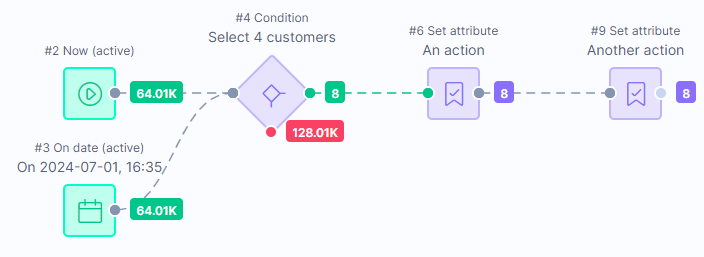
A scenario with 2 triggers and 2 action nodes shows 16 affected customers.
Edit running scenarios
When you change a running scenario, customers already on a node finish the scenario with the old version. This is usually a small number, except in wait nodes. All new customers who arrive at that node, from anywhere in the flow, follow the latest version.
To learn how changing a wait time affects customers already waiting, see Wait node.
If you made changes by accident or for testing, you can restore deleted versions and continue working on them. Learn more about scenario version history.
Stop scenarios
To stop a running scenario, click Stop in the top-right corner of the scenario screen. A window opens with 3 options:
- Cancel: Don't stop the scenario. It keeps running.
- Finish and stop: The scenario waits for all customers to finish their flow, especially customers in wait nodes. The scenario's status shows as Finishing until everyone completes their path. Learn more about scenario statuses.
- Stop immediately: The most common choice. All customers in wait nodes or moving between nodes are aborted immediately.
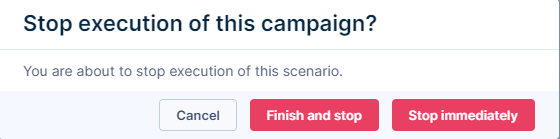
Stopping a scenario immediately drops all customers in wait nodes. To avoid losing customers during long waits, see Troubleshoot scenarios.
Updated about 1 month ago