

Pricing and usage
This documentation applies to Marketing customers on profile-based pricing.
Marketing pricing is based on 2 primary metrics: billable profiles and monthly unique visitors (MUV). These determine the tier (size) of your platform license, which is a flat annual subscription fee, and drive your usage allowances—the amounts of events, messages, and API calls included in your plan.
Why we moved to this model
Bloomreach’s profile-based pricing ties cost to the scale of your audience—using billable profiles and MUV—rather than to every event your systems generate. That makes costs more predictable, easier to explain internally, and more directly connected to the value you get from the platform.
NoteIf you contracted with Bloomreach on profiles and MUV before May 15, 2026, the usage limits and tier limits stated in the contract aren't affected by this documentation update.
The model is built to be:
- Fair: Pricing reflects your business size and the value you receive, not arbitrary thresholds.
- Predictable: Allowances are defined at contract time. Monitor usage against known limits and plan ahead as usage changes.
- Simple: Two core metrics—billable profiles and MUV—drive everything, rather than a complex web of individual counters.
Not sure which model you're on?Read Which pricing model am I on? for more information. Your sales order and contract define your exact pricing, allowances, and limits. This documentation is for general guidance. Your contract takes precedence. Contact your Account Manager or review your sales order if you have questions about your specific terms.
How it all fits together
Your contract sets your contracted billable profiles and MUV. Your selected apps and channels, add-ons, and contracted communications determine which usage allowances apply, and your sales order defines the exact allowance amounts.
The allowance is fixed for the duration of the contract. It doesn't automatically change if the number of active profiles in your workspace goes up or down during the year.
The relationship looks like this.
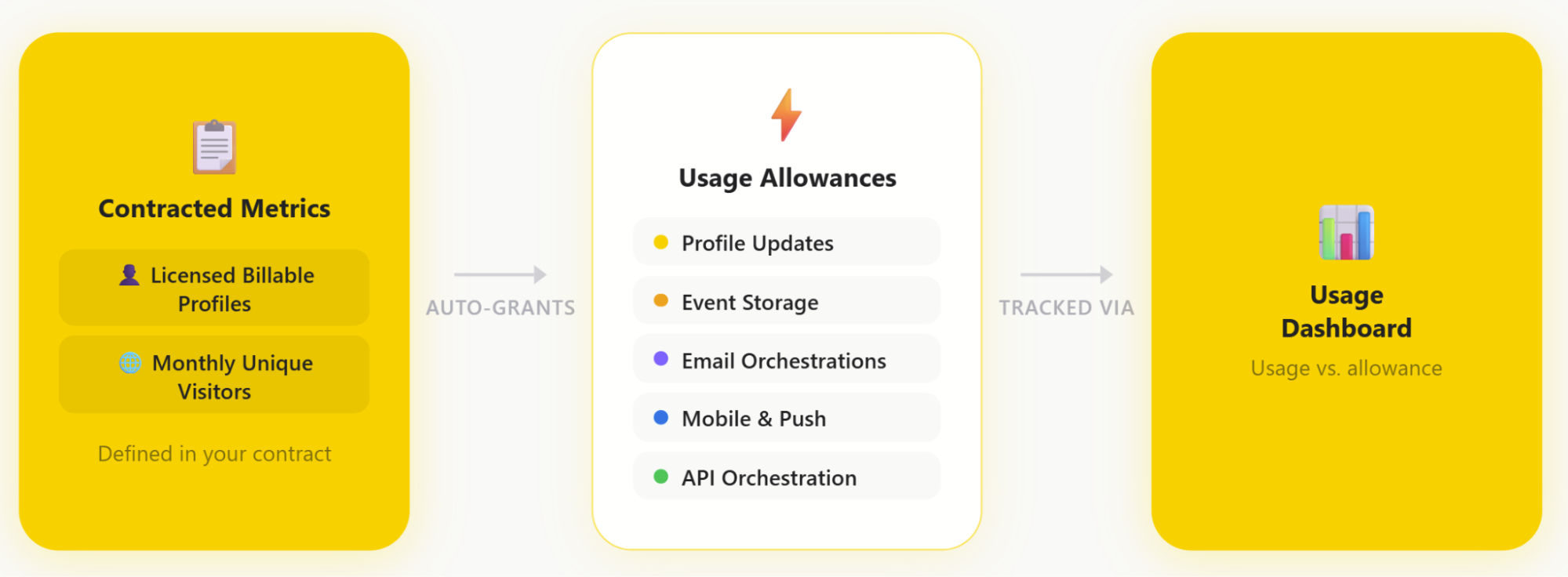
Contracted metrics—licensed billable profiles and MUV—auto-grant your usage allowances, which are tracked via the usage dashboard.
How tiers and multipliers work together
Your contracted MUV and billable profile amounts determine the pricing tier for your subscription. That tier determines the scale of platform capacity and usage allowances included in your contract. Your sales order is the source of truth for the exact contracted amounts and allowances that apply to your account.
What Bloomreach measures
What you see on the usage dashboard falls into 2 groups.
Pricing meters
-
Billable profiles and MUV define the tier (size) of your contract.
-
Each usage allowance (for example, event storage, profile updates, orchestrations, API calls, Loomi BigQuery) is derived from these entitlements and written into your sales order.
Actual usage
-
How much of each allowance you've used in a given period. For example, this month or this contract year.
-
The usage dashboard shows usage as it accrues. See how much of your included volume you've consumed.
-
Limits on specific platform features, such as weblayer serves, in-app messages, and ad sends.
Your usage dashboard shows where you stand against each limit so you can plan ahead.
Contracted vs. measured allowance values
Your contracted values are fixed in your agreement: your contracted billable profiles, your contracted MUV, and the platform allowances defined from them. Your usage dashboard shows how much of those allowances you've actually used so far. For example, emails sent this year, profile updates this month, and current event storage. This lets you see where you stand and plan ahead.
Quick links
- Not sure which pricing model you're on? See Which pricing model am I on?
- To prepare for migration to profile-based pricing, see Migrate to profile-based pricing.
- To understand how billable profiles and MUV are defined and measured, see Pricing meters.
- To understand how your allowances are calculated, see Platform allowances.
- To monitor your usage, visit the Usage dashboard.
- To keep your usage efficient on profile-based pricing, see Efficient profile-based platform usage.
- For answers to common questions, see the Pricing FAQ.
- To compare plans and what they include, see 2026 Marketing Packaging.
Updated 19 days ago