

Selected facet pill reference for Loomi for Shopify
Experience customization lets you personalize selected facet pills in your storefront. Selected facet pills are the active filter chips that appear above the product grid when a shopper applies a filter. Use the data attribute and EJS variables on this page to customize how each pill displays its label and remove control.
For page layout requirements, see HTML and EJS reference for Loomi for Shopify.
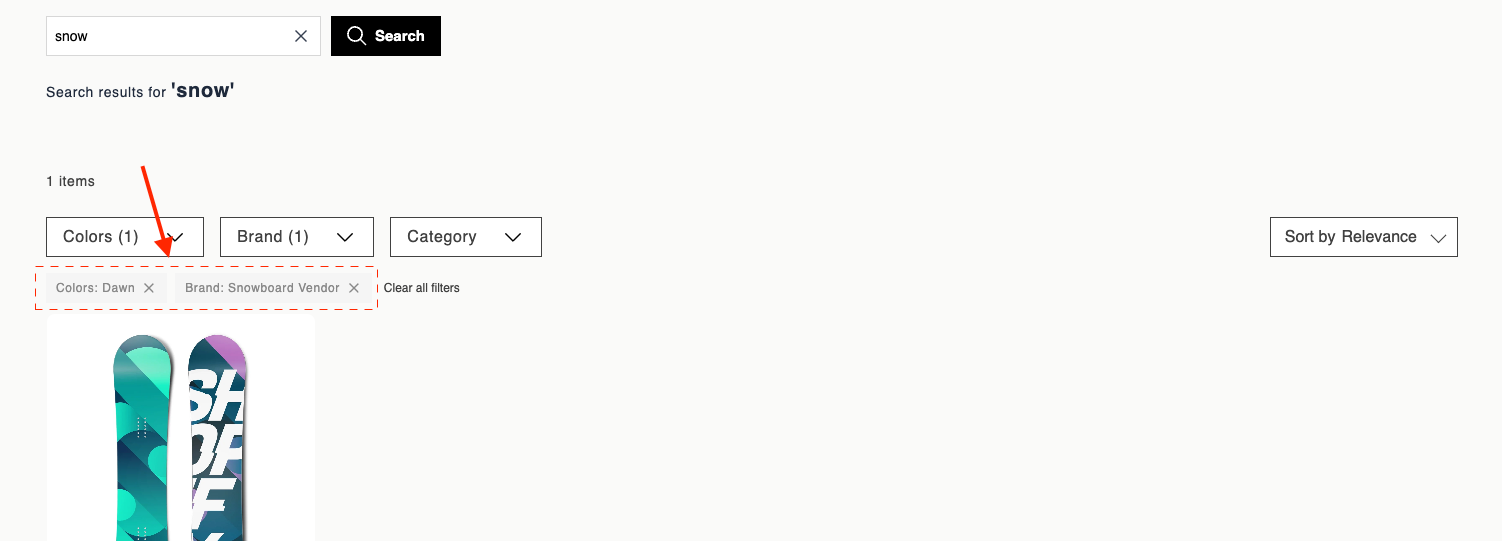
Data attributes
| Attribute | Element | Value | Behavior |
|---|---|---|---|
data-br-action | Remove control | facet-chip-remove | Click removes the chip from the active-filters row and clears the filter value from the facet selection. Fires br-facet-change. The parent unchecks the matching facet option, updates other chips, and refreshes the product grid. The chip disappears on the next render. |
EJS variables
The facetChip object exposes these fields:
| Field | Description | Data type |
|---|---|---|
facetName | Facet group name. | string |
optionName | Human-readable option label. | string |
filterValue | Value removed when the chip is cleared. | string |
displayText | Default label: facetName: optionName. | string |
allSelectedOptions | Full selection for this facet after removal. | string[] |
actions | Data attribute constants for event delegation: { remove }. | object |
Example
<div>
  <span><%= facetChip.displayText %></span>
  <button
    type="button"
    data-br-action="<%= facetChip.actions.remove %>"
    aria-label="Remove <%= facetChip.displayText %>"
  >
    X
  </button>
</div>
Updated 3 months ago
Did this page help you?