

Item types
Data hub rolloutData hub provides new unified API integration methods for sending data to multiple Bloomreach products. Access is being rolled out in phases. For new implementations, we recommend using Data hub where available. Existing product-specific integrations remain fully supported for Marketing, Search, and Conversational agent.
This guide introduces item types and explains how they organize data in an item collection.
What are item types
An item type is an independently managed dataset in an item collection. It has its own records, identifier settings, schema, imports, items, and destinations. A change to one item type doesn't affect the others in the collection.
- Workspace: The Data hub access-control boundary. Contains several item collections and controls access to your Data hub resources. Each collection groups its own item types. You and your API keys need permission for the workspace you access.
- Item collection: Groups related item types for a business context, such as one Shopify store. Think of it as a group of related tables. Choose the grouping that fits your business.
- Item type: Holds one dataset, much like a table. A collection can contain several product item types, several custom item types, or both.
Key relationships
-
An item type belongs to one item collection.
-
Each item type is either product or custom.
-
Grouping item types doesn't link their records or combine their data.
-
Each Records update, Items update, and Destination items update job processes one item type. Data hub lists jobs in the workspace, and each job shows its item type.
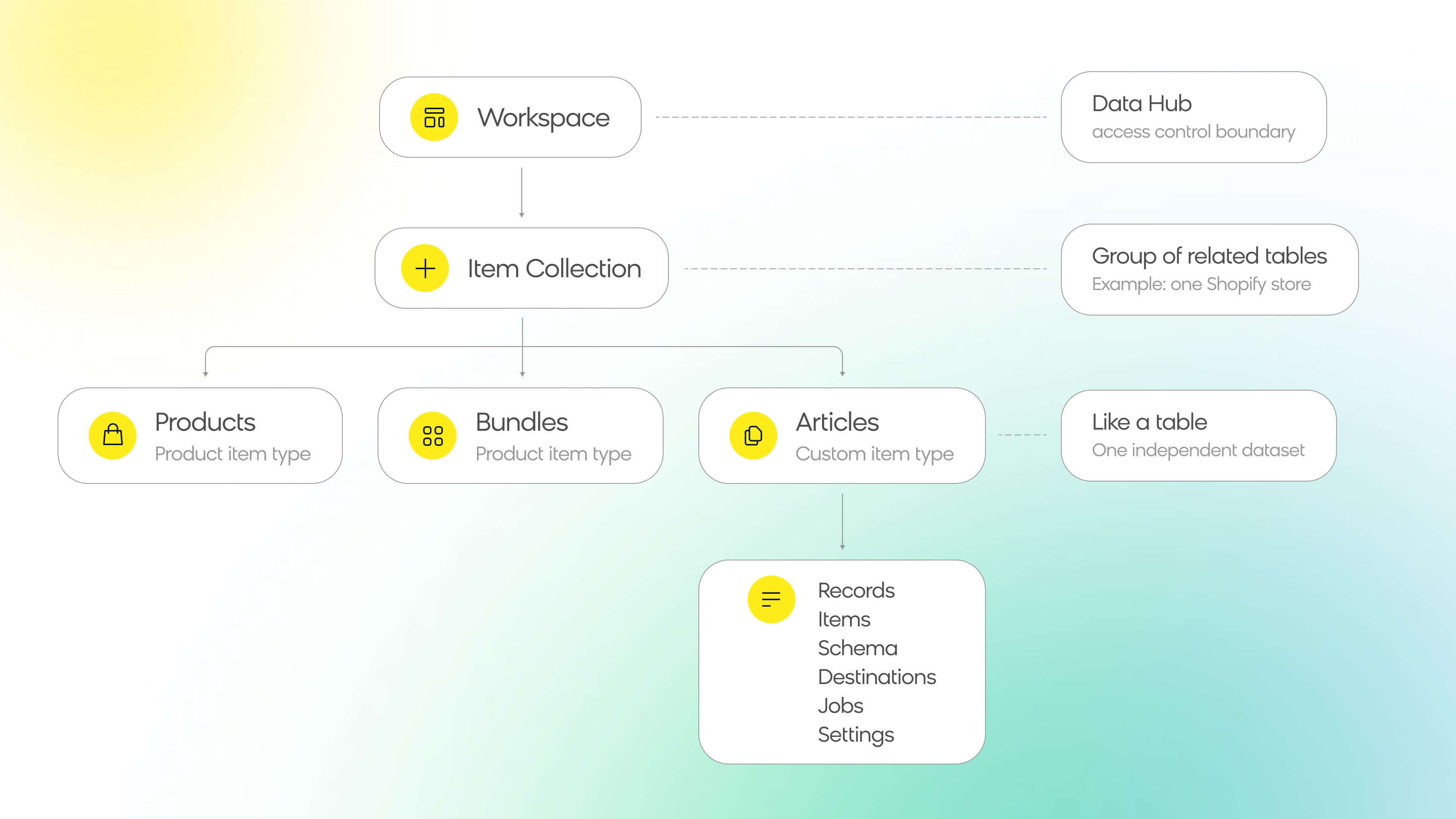
Key item type relationships.
Product and custom item types
When you add an item type, you choose Product or Custom. This choice sets the item type's features, and you can't change it later. The item type's name doesn't affect its features.
- Product: Product data with optional variants, such as sizes or colors of the same product.
- Custom: Other business data, such as articles, store locations, or hotel properties.
| Feature | Product item type | Custom item type |
|---|---|---|
| Variants | Optional | Not supported |
| System attributes and category path mapping | Supported | Not supported |
| Custom attributes | Supported | Supported |
| Marketing destination | Product catalogs | One general catalog |
| Search destination | Supported | Not supported |
For example, one collection can hold these item types, added when you create the collection or later:
| Collection | Item type name | Selected behavior | Example Marketing catalogs |
|---|---|---|---|
| Store data | Products | Product, with variants | products and variants |
| Store data | Bundles | Product, without variants | bundles |
| Store data | Articles | Custom | articles |
Plan item types
If your store or business operates in several countries or languages, you can keep that data in one collection. Create a separate product item type for each dataset that needs its own content, prices, availability, imports, or destinations. For example, a Store data collection can contain these item types:
| Item type | Type | Market | Language | Why it's a separate item type |
|---|---|---|---|---|
| Products UK English | Product | United Kingdom | English | Own prices and availability |
| Products US English | Product | United States | English | Own prices and availability |
| Products France French | Product | France | French | Own language, so it needs its own Search catalog |
| Articles English | Custom | United Kingdom, United States | English | Non-product data, published to Marketing as a general catalog |
The same product ID can appear in several of these item types with different information. A different country alone doesn't require a separate item type. One dataset can serve several markets if it meets the destination's requirements.
NoteSearch requires a separate catalog for each language. Use a separate product item type for each language, each connected to its own Search catalog. See Multi-language site integration.
Record IDs and item IDs
A record ID identifies the source record. The schema sets the item ID, which can be the record ID or another field. Both IDs are scoped to the item type, so the same ID in two item types refers to different records or items.
For example, the record article-42 has a field business_id with the value NEWS-42. The item ID depends on the item identifier you set in the schema:
| Item identifier | Item ID |
|---|---|
| Record ID (default) | article-42 |
Record field business_id | NEWS-42 |
Destinations by item type
Each item type sends only its own items to its destinations.
- Marketing: Each item type can have one Marketing destination.
- A product item type creates a product catalog and, if it has variants, a variant catalog.
- A custom item type creates one general catalog.
- Item types can share a Marketing project, but each needs its own catalogs.
- Search: Each product item type can have one Search destination. In the same account and environment, each product item type needs its own catalog.
To set up a destination, see Create destinations.
Things to know
- A full update affects one item type. A Full Records update replaces records only in the item type.
- Schema settings don't carry over. Mapping a field in one item type doesn't create an attribute in another. When you import a configuration from another collection, you also choose the item type to copy from.
- System names are fixed. You can't change an item type's system name after creation.
- Existing general catalogs don't convert. To manage that data in Data hub, import it or send it through the API to a custom item type and connect the item type to a Marketing destination. Data hub creates a new catalog. The existing catalog stays as it is, so update any campaigns and catalog triggers that use it.
Next steps
- Create an item collection and add item types.
- Configure the schema for each item type.
- Create destinations to deliver items.
- Monitor jobs for each item type.
Updated about 1 hour ago