

Slider facet reference for Loomi for Shopify
Experience customization lets you personalize slider facets in your storefront. Slider facets render a numeric range filter with draggable minimum and maximum handles — commonly used for price ranges. Use the data attributes and EJS variables on this page to customize the slider markup and value display.
For page layout requirements, see HTML and EJS reference for Loomi for Shopify.
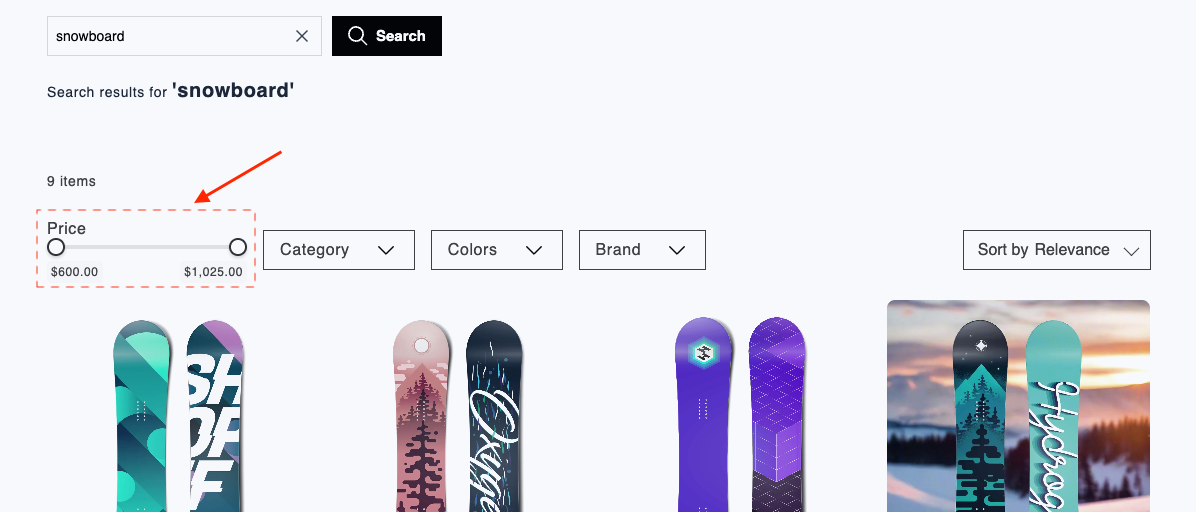
Data attributes
| Attribute | Element | Value | Behavior |
|---|---|---|---|
data-br-action | Lower range input (type="range") | slider-facet-min-input | Dragging the lower thumb updates formattedMinValue and, after a short debounce, fires br-facet-change with a range filter. The product grid and counts refresh. If the user drags above the upper thumb, the input snaps back. |
data-br-action | Upper range input (type="range") | slider-facet-max-input | Dragging the upper thumb updates formattedMaxValue and, after debounce, fires br-facet-change. Same grid refresh as the min input. Dragging below the lower thumb snaps back. |
Both inputs must be real HTMLInputElement instances (not divs). The component listens to the input event and reads input.value.
Set min, max, and step from sliderFacet.start and sliderFacet.end. Bind current values from sliderFacet.minValue and sliderFacet.maxValue.
EJS variables
The sliderFacet object exposes these fields:
| Field | Description | Data type |
|---|---|---|
name | Facet title. | string |
minValue | Current lower handle value. | number |
maxValue | Current upper handle value. | number |
start | Facet minimum bound from the API. | number |
end | Facet maximum bound from the API. | number |
count | Result count in range, from the API. | number |
formattedMinValue | Display string for minValue. | string |
formattedMaxValue | Display string for maxValue. | string |
formattedStart | Display string for start. | string |
formattedEnd | Display string for end. | string |
selectedRange | Pre-selected range from the parent, if any: { start: number, end: number } | object or undefined |
actions | Data attribute constants for event delegation: { minInput: “slider-facet-min-input”, maxInput: “slider-facet-max-input” } | object |
Example
<div><%= sliderFacet.name %></div>
<div>
  <input
    type="range"
    value="<%= sliderFacet.minValue %>"
    min="<%= sliderFacet.start %>"
    max="<%= sliderFacet.end %>"
    step="1"
    data-br-action="<%= sliderFacet.actions.minInput %>"
  />
  <span aria-hidden="true"></span>
  <input
    type="range"
    value="<%= sliderFacet.maxValue %>"
    min="<%= sliderFacet.start %>"
    max="<%= sliderFacet.end %>"
    step="1"
    data-br-action="<%= sliderFacet.actions.maxInput %>"
  />
</div>
<div>
  <span><%= sliderFacet.formattedMinValue %></span>
  <span><%= sliderFacet.formattedMaxValue %></span>
</div>
<p aria-hidden="true">
  <%= sliderFacet.formattedStart %> – <%= sliderFacet.formattedEnd %>
  <% if (sliderFacet.count != null) { %>
    (<%= sliderFacet.count %>)
  <% } %>
</p>
Updated about 2 months ago
Did this page help you?