

Data hub integration quick start
Data hub rolloutData hub provides new unified API integration methods for sending data to multiple Bloomreach products. Access is being rolled out in phases. For new implementations, we recommend using Data hub where available. Existing product-specific integrations remain fully supported for Marketing, Search, and Conversational agent.
This guide walks you through integrating Data hub into your setup. Learn how to ingest and configure your items data, then set up tracking to send event data to Marketing or Search.
How to get Data hub access
-
Contact your CSM to get Data hub access.
-
When you’re given access, Data hub appears in the upper left dropdown.
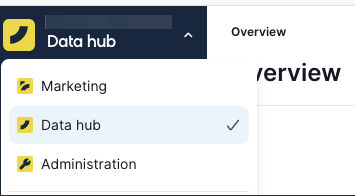
If you still don’t see Data hub, request your Cloud Organization Admin, Workspace Admin, or Workspace IAM Admin to go to the Administration section to grant you access based on application, scope, and permissions.
-
When you open Data hub, you can create new:
- Item collections: Item collection is a container for your product catalog data.
- Event streams: Event streams track your website/server events.
Understand integration workflow
Data hub integration follows two parallel tracks that work together:
-
Items implementation: Ingest your items product data, map data fields to attributes, and route data to Bloomreach applications.
-
Tracking implementation: Set up Event streams to capture user behavior data (views, clicks, purchases, and so on) and connect them to your Bloomreach applications.
Items implementation
For detailed guidance, review the How to set up item collections guide.
Tracking implementation
When implementing both Marketing and Search, combine the tracking requirements from each platform by adding Search's tracking parameters to Marketing's existing implementation.
To prepare for and implement event tracking, refer to the How to set up event streams guide.
Updated 23 days ago