

Event stream security and permissions
Event stream permissions give you security controls to manage what data enters Data hub through each event stream. You can set different permission rules for public sources, such as websites and mobile apps, versus private server-side sources. For public streams that require additional security, you can optionally enable JWT validation to require cryptographically signed customer identities for sensitive operations.
What are event stream permissions?
Event stream permissions are access controls that determine which customer identifiers, properties, and event types can flow through each event stream into Data hub. Think of them as gatekeepers that filter incoming tracking data based on rules you define.
The permission system recognizes two trust levels for data sources:
-
Public sources (web browsers, mobile apps): Less secure because anyone can inspect client-side code.
-
Private sources (backend systems): More trustworthy because they operate in environments you control directly.
Event stream permissions address this difference through two distinct stream types:
-
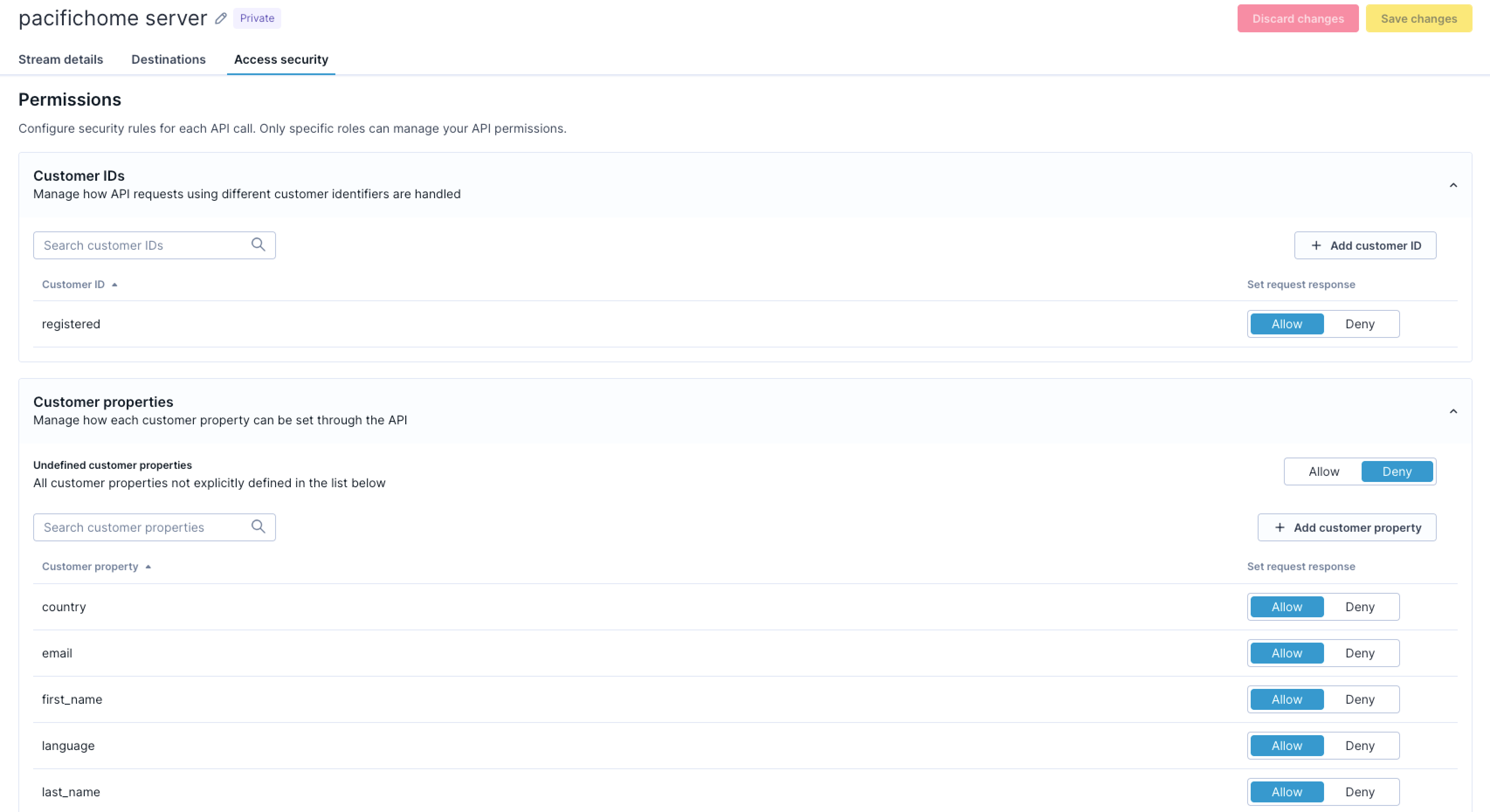
Public event streams: Authenticate with a public stream ID token and should have restrictive permissions. Optionally, you can enable JWT validation to require signed customer identities for sensitive operations.
-
Private event streams: Require both a stream ID and a shared secret key. These streams are suited for sensitive data because authentication verifies that requests originate from trusted systems.
Event stream permissions benefits
Configuring permissions delivers four practical security and quality benefits for your tracking implementation.
Prevent data pollution
Event stream permissions protect your data quality by controlling which customer IDs, event types, and customer properties can flow through each stream. Without permissions, anyone who discovers your tracking endpoint could send arbitrary events and properties, causing your schema to grow uncontrollably with meaningless or malicious data.
Separate trusted and untrusted data
The separation between public and private streams gives you architectural flexibility. You can configure public streams to accept only the minimal set of events needed for front-end tracking, while reserving sensitive operations such as consent management and purchase confirmation for authenticated server-side streams. This means you don't have to choose between enabling client-side tracking and maintaining data security.
Maintain schema consistency
Denying undefined event types and customer properties on public streams ensures that any new tracking must be properly defined in your data model first. This prevents schema drift caused by ad-hoc tracking implementations.
Prevent identity forgery
If your implementation requires stronger identity verification, you can optionally enable JWT validation on public streams. JWT validation stops malicious actors from sending events with forged customer IDs that could take over or corrupt customer profiles. See JWT authentication for Web SDK for implementation details.
Event stream security and permissions use cases
These examples show how typical configurations look across web tracking, server-side tracking, and JWT-protected setups.
Least-privilege public web tracking
A retail company configures their public web stream to allow only cookie-based and registered customer identifiers. The stream accepts a limited set of event types: session_start, page_visit, view_item, and product interactions. All customer properties except basic behavioral data are denied, and consent events must come only from the private server-side stream. This lets the website track customer behavior while preventing profile manipulation from untrusted sources.
Trusted private server-side tracking
For server-side tracking, the same company uses a private stream authenticated with a shared secret key. The stream allows both registered customer IDs and loyalty card IDs for linking customer records. The stream accepts customer properties such as email address, phone number, and membership status because the shared secret verifies that updates originate from authenticated backend systems. Sensitive events, including purchase transactions and consent updates, flow through this stream. Even with these broader permissions, the private stream still denies undefined schema objects to maintain data quality.
Public stream with JWT validation (optional)
For implementations that require stronger identity verification, a financial services company enables JWT validation on their public stream. They mark the registered customer ID and sensitive events such as purchase and consent as signed-only, requiring JWT tokens issued by their backend after user login. Anonymous visitors can still browse with cookie-based tracking, but any account-specific data requires a valid JWT.
How event stream security and permissions work
Event stream permissions operate through a combination of permission rules, authentication models, and enforcement mechanisms that work together to secure your tracking data.
Permissions model
Each event stream lets you configure three types of permission rules that control different aspects of incoming data:
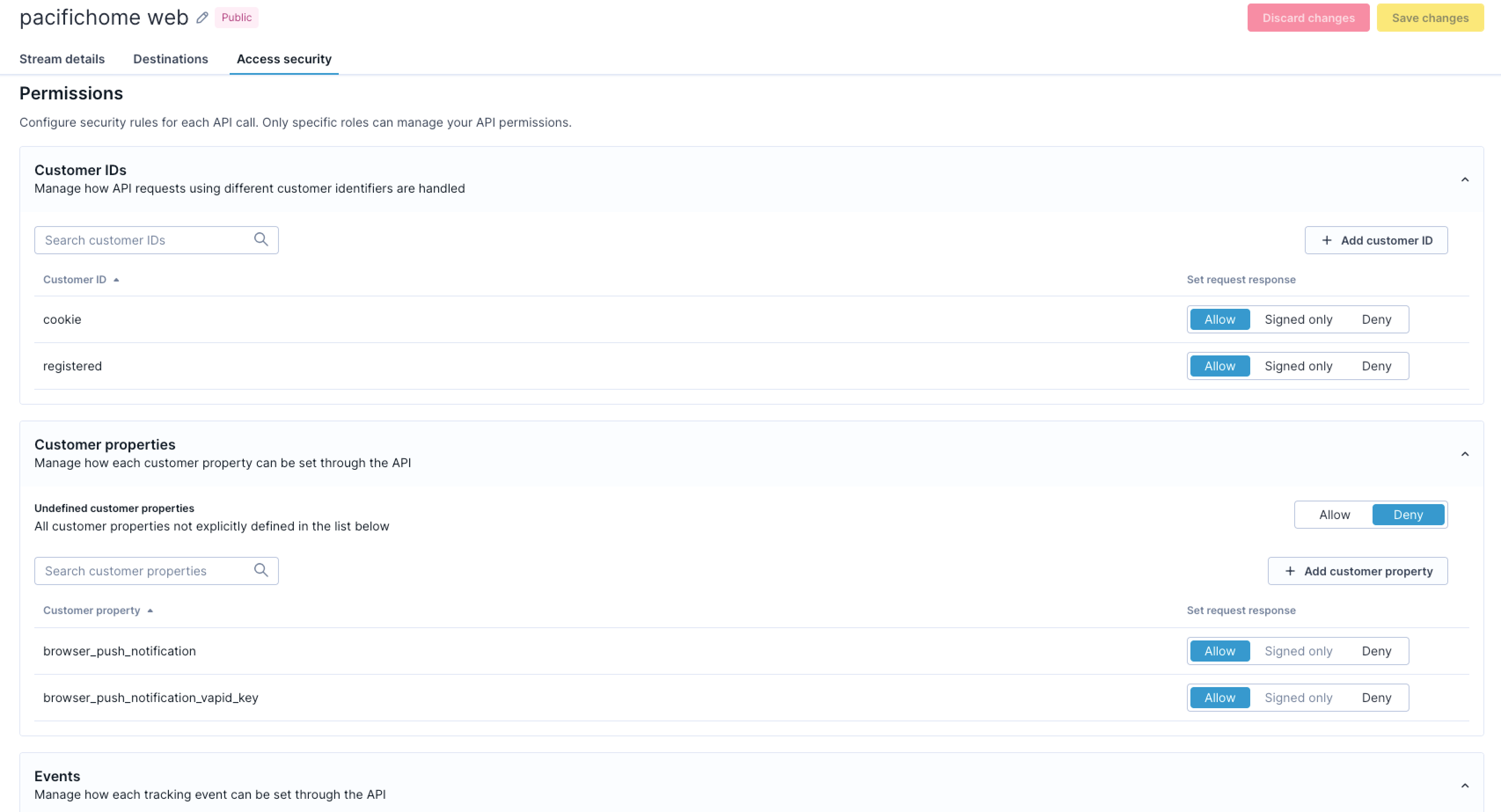
Customer ID permissions
These rules control which identifiers link events to customer profiles. You can configure each identifier as:
-
Allow: Accepted without a signature.
-
Signed-only: Only accepted when the request includes a valid JWT containing this signed ID. Applies to public streams only.
-
Deny: Rejected from this stream.
Example: Allow cookie IDs without a signature on public streams; require JWT signature for registered IDs; restrict loyalty card IDs to private streams only.
Customer property permissions
These rules determine which profile attributes can be updated. You can configure each property as:
-
Allow: Accepted from this stream, subject to customer ID validation.
-
Signed-only: Only accepted when the request includes a valid JWT with a signed-only customer ID. Applies to public streams only.
-
Deny: Always rejected from this stream.
Deny undefined properties to prevent data pollution. On public streams, mark sensitive properties such as email and phone numbers as signed-only if JWT validation is enabled.
Event type permissions
These rules specify which events the stream accepts. You can configure each event type as:
-
Allow: Accepted from this stream.
-
Signed-only: Only accepted when the request includes a valid JWT with a signed-only customer ID. Applies to public streams only.
-
Deny: Always rejected from this stream.
Deny undefined event types to prevent schema drift. On public streams with JWT enabled, mark sensitive events such as purchase and consent as signed-only.
NoteSigned-only permissions apply only when JWT validation is enabled on the stream. If JWT isn't configured, Signed-only behaves the same as Allow.
Authentication models
Stream ID authentication
All public event streams authenticate with a stream ID token. This is the standard authentication method for client-side tracking. You can find your stream ID in your Data hub dashboard under Events > your stream > Access security. The stream ID is visible in your front-end code, so it should always be paired with restrictive permissions.
Shared secret authentication
Private streams require both a stream ID and a shared secret key. You generate the secret in Data hub and include it in every request from your backend. The shared secret proves requests originate from your trusted infrastructure. Unlike JWT tokens, shared secrets don't expire and don't sign individual customer identities.
JWT validation (optional)
For public streams that require cryptographic verification of customer identities, you can enable JWT validation. Your backend issues JWT tokens after user authentication and passes them to the SDK. The SDK attaches the token to tracking requests, and the event stream validates the signature, expiry, and consistency with the request data. This lets you mark specific customer IDs, event types, and properties as signed-only, restricting them to authenticated users only.
For full implementation details, see JWT authentication for Web SDK and Set up event stream security and permissions.
Enforcement behavior
Permission validation behavior
The system enforces permissions by evaluating each incoming request against the configured rules:
-
When a request contains a denied event type or property, the entire write operation is rejected and the data doesn't enter Data hub.
-
The system strips any disallowed identifiers from the request before processing. You can see when an ID has been stripped in the API response.
-
If at least one allowed identifier remains after stripping, the request proceeds with the permitted identifiers.
-
If stripping removes all identifiers, the request is rejected. Events need at least one identifier to link to a customer profile.
Permission changes propagate across the system within five seconds, so you can respond to security concerns without lengthy deployment cycles.
JWT validation behavior
When JWT validation is enabled, the system checks the following for any request containing signed-only data:
-
The JWT signature matches a configured workspace signing key.
-
The JWT hasn't expired based on the
expclaim. -
The customer IDs in the JWT match the IDs sent in the request.
If any of these checks fail for a signed-only customer ID, event type, or property, the request is rejected.
Shared secret validation
For private streams, the system validates the shared secret key on every request. Requests without the correct secret are rejected. The secret must match exactly. For setup instructions, see Configure authentication.
Updated 3 months ago