

Data hub overview
Data hub rolloutData hub provides new unified API integration methods for sending data to multiple Bloomreach products. Access is being rolled out in phases. For new implementations, we recommend using Data hub where available. Existing product-specific integrations remain fully supported for Marketing, Search, and Conversational agent.
Data hub is your central platform for managing business data across the Bloomreach ecosystem. All your product data flows into Data hub, gets cleaned and standardized, and becomes instantly available to every Bloomreach application you use.
You connect your data sources once to Data hub instead of building separate integrations for each Bloomreach product. This single integration:
- Reduces your time to value.
- Eliminates duplicate work.
- Ensures consistency across your platforms.
Why Data hub
Data hub is designed to handle the complexities of managing data at scale across multiple Bloomreach products:
- Single integration point: Connect your data sources once to Data hub instead of building separate integrations for each product or use case.
- Accelerates time-to-use: Your data is available to all Bloomreach products as soon as it enters Data hub. No waiting, no repeated work, no delays.
- Unified data source: All applications work from the same validated data, ensuring consistency across personalized search, targeted marketing campaigns, and analytics.
- Scalable architecture: Add new sources or destinations without major rework as your business grows.
Real-world impact
Imagine launching a new product line. With Data hub, you set the product/events data integration once. It's immediately available for search results, product recommendations, and marketing campaigns.
When you spot a data quality issue, you fix it in one place. Every application benefits instantly. No duplicate uploads, no version control headaches, and no delays in going live.
What kind of data does Data hub handle?
Data hub manages 2 critical types of business data.
Customer behavior data
This includes customer properties and events that power marketing automation, search, conversational commerce, and advertising. Examples include:
- Product views
- Cart additions
- Purchases
- Email opens
- Website interactions
- Customer information (email address, name, location)
Product data
This covers your complete product or item catalogs—everything you sell and want customers to discover. Examples include:
- Item attributes
- Availability status
- Pricing information
- Images
- Category hierarchies
For detailed information on catalog management, see Item collections documentation.
How Data hub works
Data hub operates through 4 key stages:
- Data ingestion: Your data flows in from multiple sources. These include your website, CRM systems, product feeds, mobile apps, and third-party platforms.
- Data cleaning and transformation: Data hub standardizes and validates your product data automatically. It catches errors, normalizes formats, and ensures everything meets quality standards.
- Data unification: The platform merges and connects related data. It combines customer events with product details and links purchases to customer profiles. Every application works from a complete, unified view.
- Data activation: Your clean, unified data becomes instantly available to all Bloomreach products. It powers personalized marketing, intelligent search, accurate recommendations, and detailed analytics.
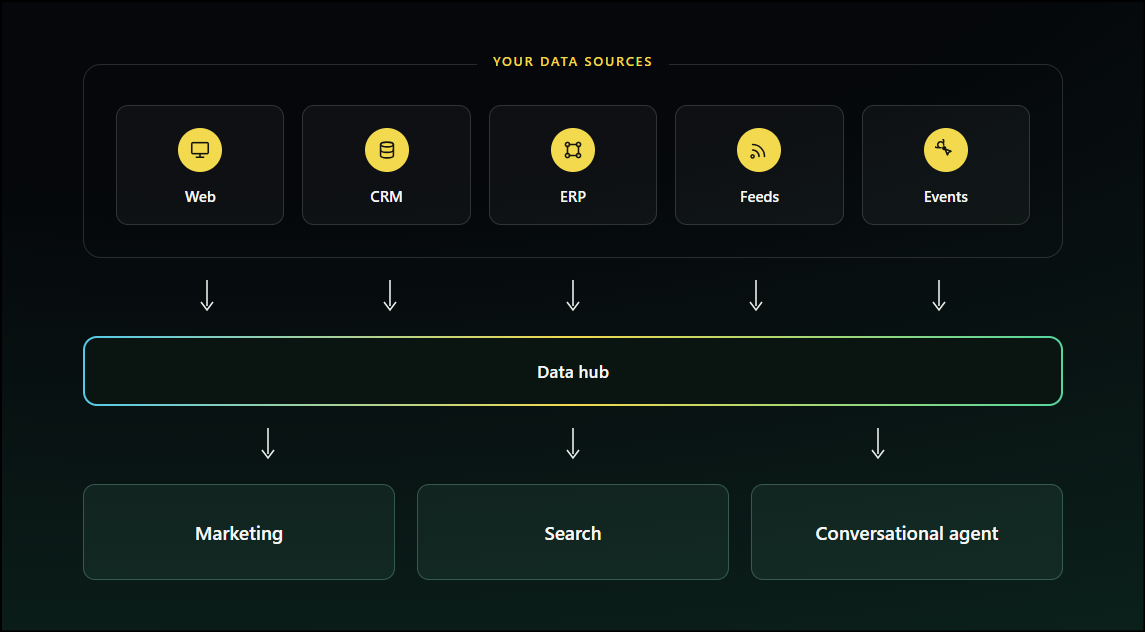
As your business grows, Data hub's scalable architecture lets you add new sources or destinations without major rework. You're always building on a solid foundation rather than patching together disconnected systems.
When you interact with Data hub
You'll work with Data hub at several key moments:
- During initial setup: When you first integrate your data sources and configure how data flows into the platform.
- Adding new data sources: When you expand to new channels, brands, countries, acquire new customer touchpoints, or introduce new product lines.
- Troubleshooting and validation: When you need to verify data quality, investigate issues, or confirm that data flows correctly.
- Configuring activation: When you decide which Bloomreach products use which data sets, or when you're optimizing how data powers specific use cases.
Related articles
Updated about 2 months ago