

Unified user management overview
Managing users across separate systems creates fragmented visibility, duplicate work, and compliance challenges. Unified user management consolidates all user administration into a single interface—giving you complete control over who has access to what across all Bloomreach products and regions.
This system serves as the single source of truth for user lifecycle management and role assignments. You can manage users individually or in bulk, while user information remains region-specific for legal compliance.
Terminology
Understanding these terms helps you navigate the unified administration structure and make informed decisions about user access.
Organizational structure
Administration
The user interface for managing administration roles and permissions across all products.
Auth0
The external authentication provider used by Search. Auth0 remains involved during the upgrade transition and for existing users linked to Search organizations.
Cloud organization
Your top-level container for your entire Bloomreach relationship. One organization can contain multiple workspaces across different regions.
User management—including user exports, invites, and identity domains—is handled at this level. So are security settings: two-step verification, authentication, invitation restrictions, IP address restrictions, SSO settings, and passwords.
Workspace
A container within your cloud organization tied to a single geographic/regulatory region. Multiple Marketing projects and Search accounts can link to a single workspace.
Account (Search only)
A container used to segment business units. A Bloomreach customer can have multiple accounts under a single workspace.
- Admins can assign users, user groups, roles, and custom roles to accounts.
- Search admins can't create, edit, or delete accounts (only Bloomreach can).
Environment (Search only)
A container within accounts. Every Search account has at least one environment for staging and may have additional environments for production or development.
- Admins can't create, edit, or delete environments (only Bloomreach can).
- Admins can assign users, user groups, roles, and custom roles to environments.
Project (Marketing only)
A container within a workspace. Projects help differentiate between businesses. Each project has its own project token (ID) for event tracking. Projects are independent—each has different customers, events, analyses, and campaigns.
Site and site groups (Search only)
A site can be standalone or parented by a site group. Admins can assign users, user groups, roles, and custom roles to sites. A site contains one or more catalogs. A site group defines a group of sites under an account.
Access control
User
An individual identity within the unified platform. Users are linked to resources and are managed individually.
Roles and permissions
Roles define a set of permissions assignable to users with a defined scope. Managed by both Bloomreach and clients. Permissions are the specific actions users can perform—these are grouped within roles and can't be managed separately.
Custom roles consist of selected predefined roles, from which they inherit all permissions and scope. Cloud Organization Admin can create and edit custom roles. Custom roles only applies to Marketing, Data hub, and Administration.
Role assignment
The process of linking users to roles.
Scope
The level at which a role or permission applies: cloud organization, workspace, project, account, and environment, site.
Regional data storage
User information (email, name, phone number for multi-factor authentication) is stored regionally to comply with legal requirements, even though management is centralized.
Security and authentication
Single sign-on (SSO)
An authentication method that allows users to log in once to access multiple applications across the platform.
Multi-factor authentication (MFA)
An additional security measure that requires users to provide two or more verification factors to gain access.
Identity domain
Defines authentication options (SSO, passwords) for users, managed at the regional login service level.
Audit log
A system that tracks user management actions and other activities for compliance and security monitoring.
Hierarchy overview
Here's the example of how the organizational hierarchy works:
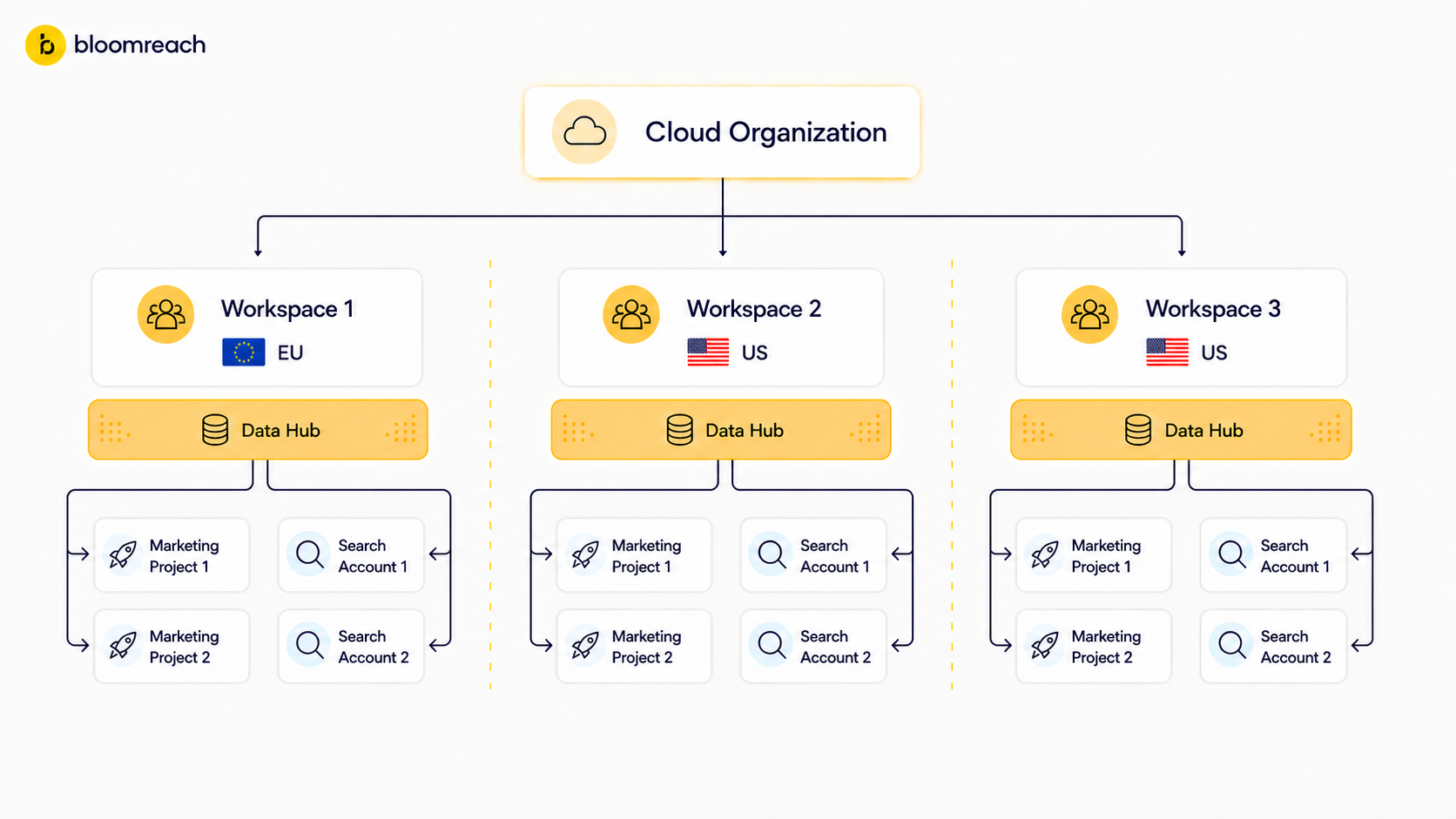
Bloomreach organizes products into workspaces under a single Cloud Organization. Each workspace has its own Data hub, Marketing projects, and Search accounts.
Understanding the hierarchy
Each level serves a specific purpose in organizing your Bloomreach relationship and controlling access.
Cloud organization level
Your entire Bloomreach relationship lives here. This is where you manage organization-wide settings like user exports, invitations, and user groups.
Workspace level
Workspaces separate your data by region (EU, US, UK, CA, AP) for compliance. Each workspace can contain Marketing projects and Search accounts.
Account level (Search only)
Within each product area, accounts help you organize by business unit, brand, or use case. This is where most day-to-day user access management happens.
Project/environment/site level
The most granular level where actual work happens—individual Marketing projects, Search environments and sites, or Data hub projects.
Next steps
Ready to start managing users? See Unified user management: Common tasks for instructions on:
- Adding new users
- Managing user access
- Exporting user lists
- Creating custom roles
Related articles
Updated about 2 months ago