

Event streams overview
Data hub rolloutData hub provides new unified API integration methods for sending data to multiple Bloomreach products. Access is being rolled out in phases. For new implementations, we recommend using Data hub where available. Existing product-specific integrations remain fully supported for Marketing, Search, and Conversational agent.
Event streams are the foundation of real-time customer data collection in Data hub. They act as a forwarding system that captures customer behavior using customer IDs, attributes, and events, and routes this data to your connected Bloomreach products for processing and activation.
What are event streams?
Event streams are Data hub's pipelines that connect your data sources to Bloomreach products. Each event stream receives customer data from your website or app and forwards it to your connected destinations (your Search accounts and Marketing projects).
Event streams work like data routers. Customer data flows from your sources into Data hub through an event stream, which then sends that data to your chosen destinations. Unlike batch imports for historical data, event streams handle live traffic as it happens, keeping your customer data current across all platforms.
ImportantEach event stream is a pass-through system with no data storage. Events sent without a connected destination are discarded immediately. This design ensures real-time processing and secure data flow from your sources to your Bloomreach destinations.
How event streams work
When a customer interacts with your configured channels, the event stream captures that interaction and forwards it to all connected destinations.
The data flow follows this sequence:
-
Events trigger when customers interact with your website or application.
-
Events flow from your tracking implementation (Tracking API, Web SDK, and Mobile SDKs) to the event stream.
-
Events get validated and forwarded to connected destinations:
-
Marketing stores customer profiles and events for analysis.
-
Search uses the data to optimize search and recommendations.
-
This unified approach means you implement tracking once while feeding data to all Bloomreach platforms. Each platform then processes the same events according to its specific requirements. Marketing builds comprehensive customer profiles while Search optimizes product discovery experiences.
Tracking methods
You have multiple options for implementing event tracking based on your platform.
Bloomreach Web SDK
Bloomreach Web SDK recommended for websites. Client-side JavaScript tracking captures events directly from user browsers on websites and mobile web applications. Add Data hub Web SDK snippet to your website's HTML to automatically capture and send customer interactions. This method works best for standard website implementations.
Tracking API
Tracking API recommended for server-side. Server-side integration provides maximum reliability and control. Your backend systems send events directly to Data hub endpoint using HTTP POST requests with proper authentication. Use this method when accuracy and completeness are critical, or when using a data source where we don't offer specific SDKs.
Mobile SDKs
Mobile SDKs for installed apps. Use dedicated Mobile SDKs for iOS and Android applications. These SDKs are optimized for mobile app environments and handle platform-specific requirements like offline event storage and network connectivity issues.
NoteWeb SDK tracking can be blocked by ad blockers and affected by browser restrictions, making it less reliable than server-side tracking for capturing all events. Choose your tracking method based on your technical requirements and platform constraints.
Common implementation patterns
Your Event stream architecture depends on your business structure:
Single brand in one locale: Create one event stream and connect it to your Marketing project and Search account. This straightforward approach works well when you operate a single website serving a single market and don't need to separate data for compliance, reporting, or organizational reasons. All customer data flows through this single pipeline to both platforms.

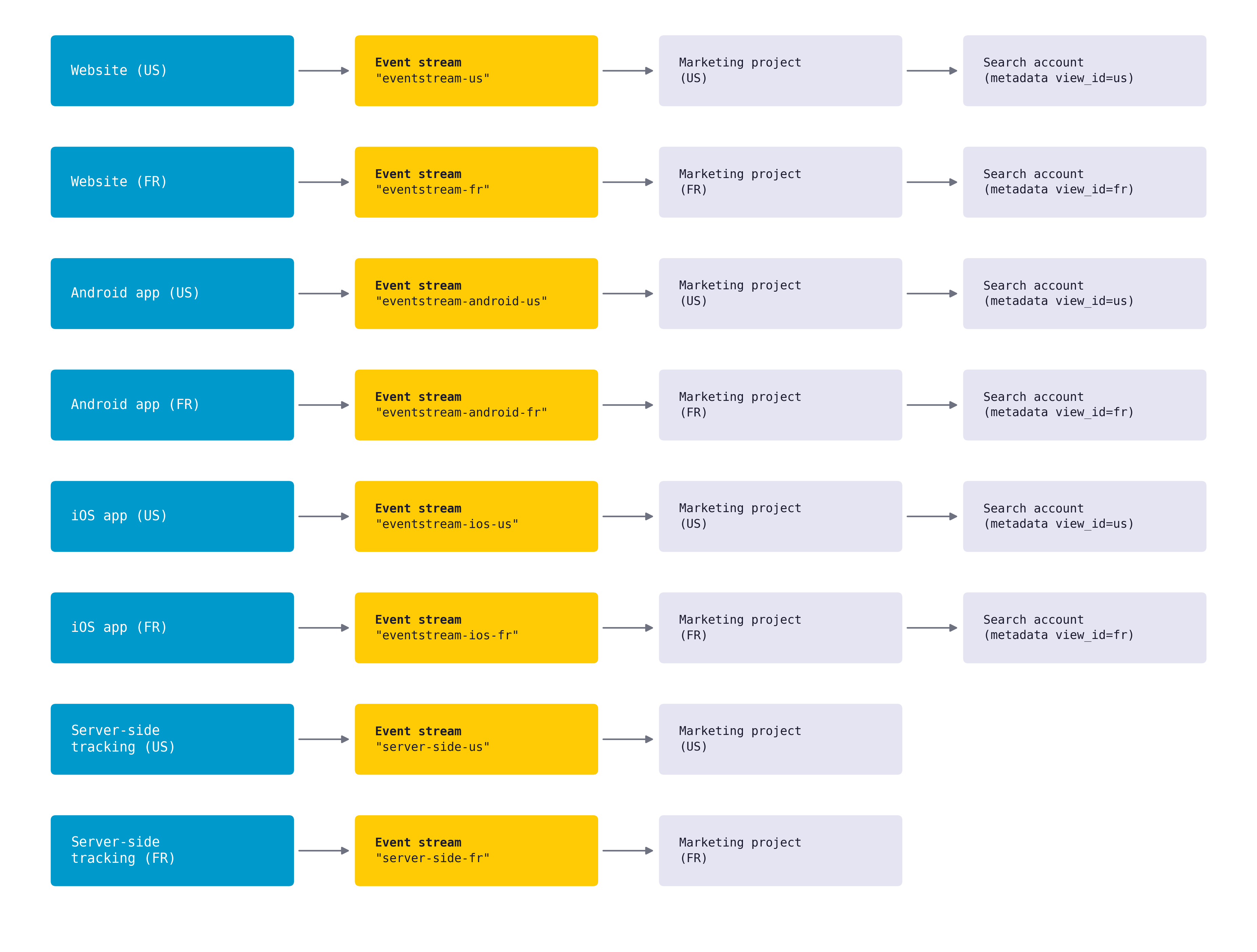
Multiple locales with separated data: Create one Event stream per locale, naming each to include the locale identifier (like "eventstream-us" or "eventstream-fr"). Connect each locale-specific Event stream to its corresponding Marketing project while connecting all Event streams to your single Search account. This pattern gives you:
-
Locale-specific customer profiles in separate Marketing projects.
-
Unified product discovery across all locales in Search.
-
Granular control over data processing and compliance per region.
The following illustration shows the data flow in an event stream setup for multiple channels with different locales:
Set up event streams
The setup process begins when Bloomreach creates your Data hub workspace along with your Marketing project or Search account. After logging in to Data hub, you'll create event streams—typically one per channel or locale. For example, you might create separate event streams for your website, mobile app, and each regional site if you need to keep data separated.
For detailed steps to create and implement tracking with event streams, read Set up event streams.
Implementation requirements
Before configuring event tracking, prepare the following for your implementation requirements:
-
Destination limits: Each event stream can connect to only one destination of each type (one Marketing project and one Search account maximum).
-
Item ID mapping: Product identifiers in your events must match the IDs in your Data hub catalog imports. Mismatched IDs will prevent Search from matching events to products, breaking recommendations and search analytics.
-
Event schema validation: Each event type (view, click, add to cart) must follow the defined schema with all required fields.
NoteUse historical imports for bulk data migration instead of streaming historical data through event streams.
Impact on usage metrics
When you connect event streams to Marketing, all forwarded data affects your contract allowances. Which allowances are affected depends on your pricing model.
See Marketing event-based usage for event-based pricing, or Pricing and usage for profile-based pricing.
Profile-based pricing
- Monthly unique visitors (MUV): Each unique customer identifier increases your MUV count.
- Profile updates: Events that create or update customer profiles count toward your profile update allowance.
Event-based pricing
Monthly processed events (MPE): Every event forwarded counts toward your MPE limit.
All pricing models
Event storage (ES): Stored events consume your event storage allowance. To optimize these metrics, implement selective event tracking.
Limitations
Event streams operate within specific constraints:
-
Real-time only: Designed for organic traffic, not bulk historical data uploads.
-
No data storage: Events without destinations are immediately discarded.
-
Single destination per type: Each event stream connects to a maximum of one Marketing project and one Search account.
Next steps
After understanding event streams concepts:
-
Set up your first Event stream with instructions.
-
Configure stream security and permissions (tracking trust controls).
-
Configure web tracking to capture customer behavior from your website.
-
Configure mobile tracking to capture customer behavior from your mobile apps.
Updated about 2 months ago