

Pagination reference for Loomi for Shopify
Experience customization lets you personalize the pagination component in your storefront. The pagination component renders page navigation controls below the product grid, including previous and next buttons, numbered page links, and ellipsis gaps. Use the data attributes and EJS variables on this page to customize the markup and disabled states. For page layout requirements, see the Loomi for Shopify HTML and EJS reference.
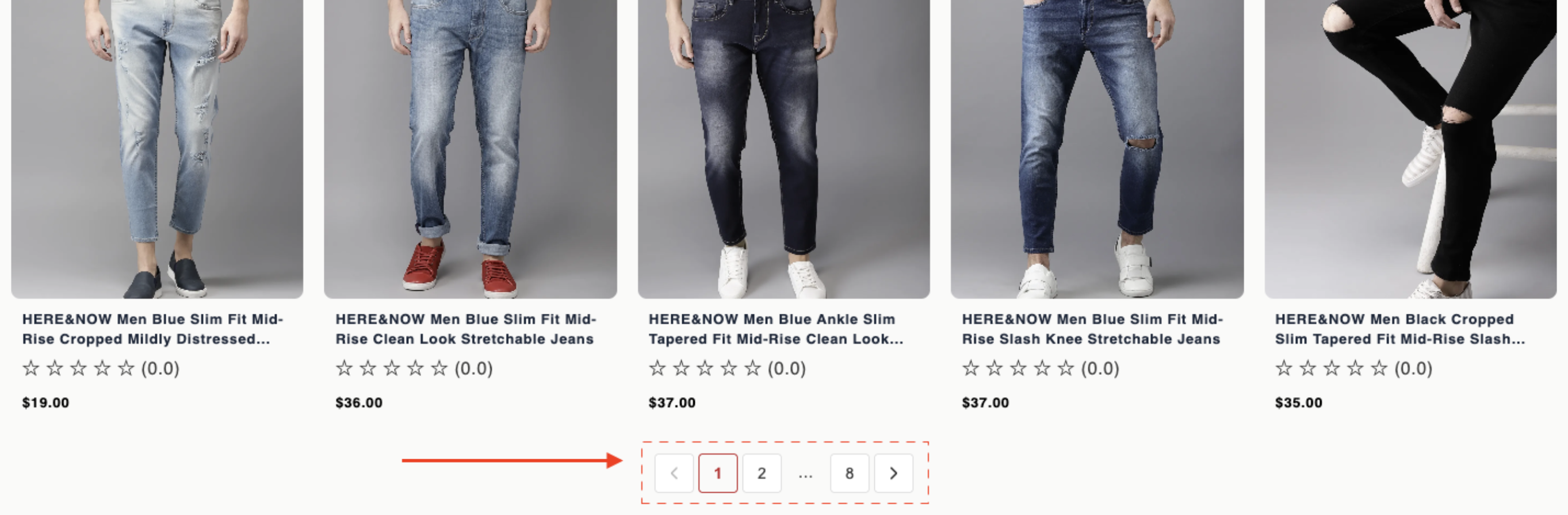
Data attributes
| Attribute | Element | Value | Behavior |
|---|---|---|---|
data-br-action | Previous button | pagination-prev | Click goes to the previous page when not on page 1. Fires br-page-change. The parent loads the prior result set, updates the active page styling, and refreshes the product grid. |
data-br-action | Next button | pagination-next | Click goes to the next page when not on the last page. Same refresh as prev. |
data-br-action | Page number button | pagination-page | Click jumps to that page number. Fires br-page-change and reloads results for the page. |
data-br-page | Page number button | Page number (for example, 1) | Supplies the target page index for pagination-page clicks. Wrong values navigate to the wrong page or no-op. |
EJS variables
The pagination object exposes these fields:
| Field | Description | Data type |
|---|---|---|
currentPage | Active page. | number |
totalPages | Total page count. | number |
pageNumbers | Sequence to render. Uses "ellipsis" for gaps. | (number | "ellipsis")[] |
isPrevDisabled | true on the first page. | boolean |
isNextDisabled | true on the last page. | boolean |
actions | Data attribute constants for event delegation: { prev: “pagination-prev”, next: “pagination-next”, page: “pagination-page” } | object |
Example
<button data-br-action="<%= pagination.actions.prev %>" <%= pagination.isPrevDisabled ? 'disabled' : '' %>>Prev</button>
<% pagination.pageNumbers.forEach(function(page) { %>
  <% if (page === 'ellipsis') { %>
    <span>…</span>
  <% } else { %>
    <button
      data-br-action="<%= pagination.actions.page %>"
      data-br-page="<%= page %>"
    ><%= page %></button>
  <% } %>
<% }); %>
<button data-br-action="<%= pagination.actions.next %>" <%= pagination.isNextDisabled ? 'disabled' : '' %>>Next</button>
Updated about 1 month ago
Did this page help you?