

Yotpo Loyalty
The Yotpo Loyalty integration brings your loyalty program data into a Marketing project from Data hub. Use it to segment customers on points, VIP tier, and expiry dates, and to trigger scenarios from loyalty events such as coupons, tier changes, and referrals.
Bloomreach imports each customer's current loyalty data once, then keeps it current in real time. To set it up, authorize the Bloomreach app once in Yotpo.
Prerequisites
Before you begin, ensure you have the following.
Yotpo
- An active Yotpo Loyalty program on any Yotpo plan.
- A Yotpo user with Integrations access (Owner, Admin, Manager, or Staff (Legacy)) who can authorize apps for the store in the Yotpo integrations center.
Data hub and Marketing
- Permission in Data hub to create and manage Yotpo integrations and to start imports.
- Permission in the Marketing project to create API groups, read API keys, and read project schemas. Setup creates a private API group, so projects without these permissions are disabled in the project list.
- A customer ID in the project for the Yotpo email address. Setup offers only IDs that already exist.
- Room under the project's customer property limit. The settings show the integration's usage.
Set up the integration
You can start from Data hub or from Yotpo.
NoteIf you start in the Yotpo marketplace or admin, Yotpo opens the Connect Yotpo with Bloomreach page. Select your login region (Asia Pacific, Canada, European Union, United Kingdom, or United States), log in to Bloomreach, and follow the steps below. Private and legacy instances aren't listed, so log in through your own instance URL instead.
- In Bloomreach, go to Data hub > Integrations.
- Click + Add new integration and select Yotpo.
- Enter a name for the integration and choose the Marketing project that receives the loyalty data.
- Click Connect Yotpo and authorize the Bloomreach app in Yotpo within 15 minutes. If the attempt expires, click Connect Yotpo again.
In Yotpo:
- Choose the store you want to connect and click Continue.
- Wait for Yotpo to return you to Data hub. Bloomreach creates the integration only after Yotpo confirms, and stores the access token encrypted.
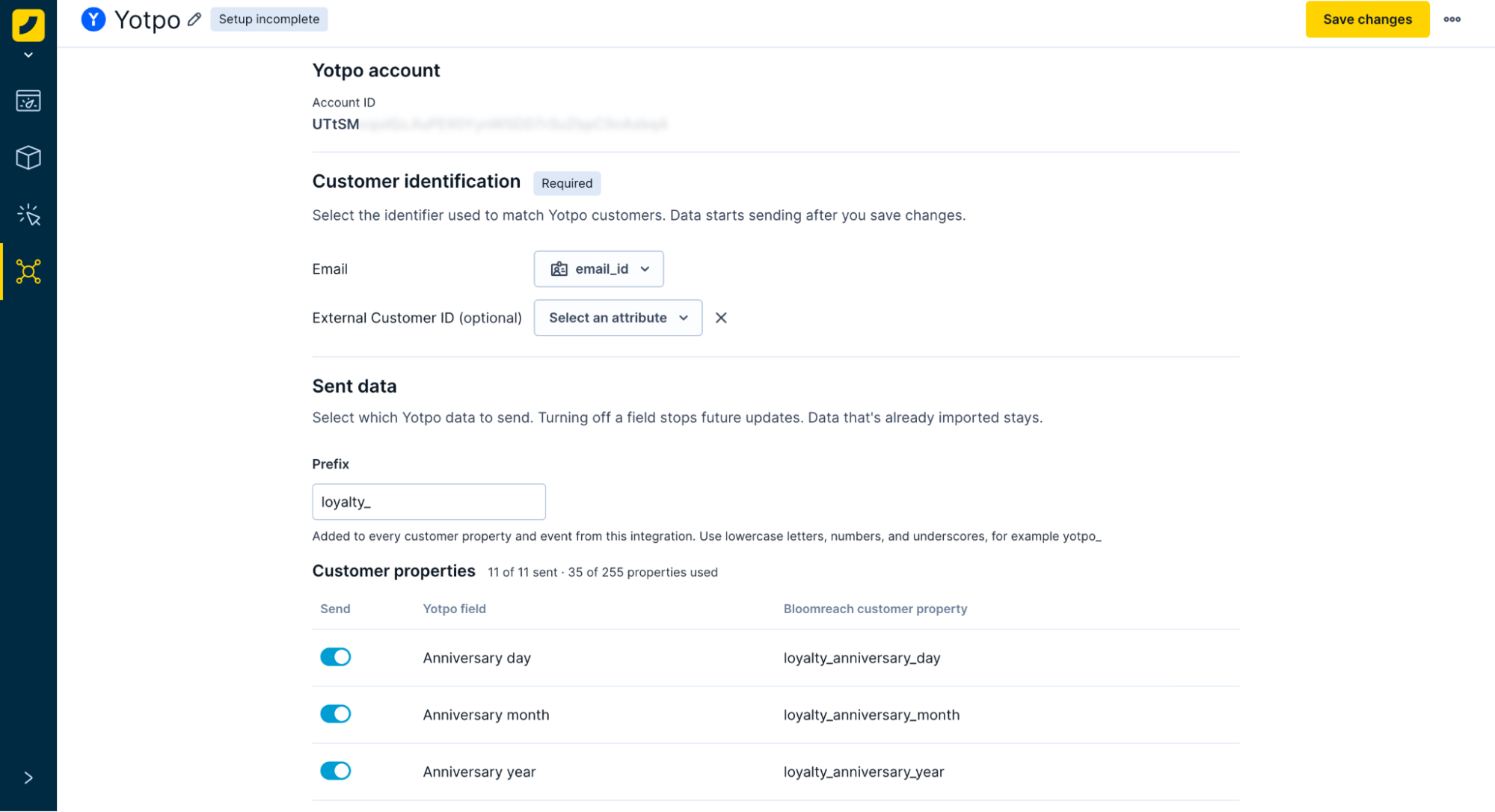
Once the setup is complete, the Data hub page shows your Yotpo account ID and you can configure the following:
| Section | Configuration |
|---|---|
| Customer identification | Map Email to a customer ID in the project. Optionally, map External Customer ID to a second customer ID. |
| Sent data | Change the default loyalty_ prefix added to every customer property and event, for example loyalty_points_balance. Use lowercase letters, numbers, and underscores, up to 32 characters. If you connect several stores to one project, use a different prefix for each. |
| Customer properties | Use the Send toggles to change which customer properties are sent. All are selected by default. |
| Events | Use the Send toggles to change which events are tracked. All are selected by default. |
| Consents | Choose a consent category to track loyalty opt-ins and opt-outs as consent events. The category is locked once the import starts. Consent events have no prefix. |
When you're done, click Save to start importing data.
NoteYou're responsible for flagging PII correctly, because Bloomreach can't decide which data is PII for you. We recommend flagging at least email addresses, names, and birthdays, such as the
external_customer_idevent properties and the birthday properties. For more information, see Managing PII.
Data import
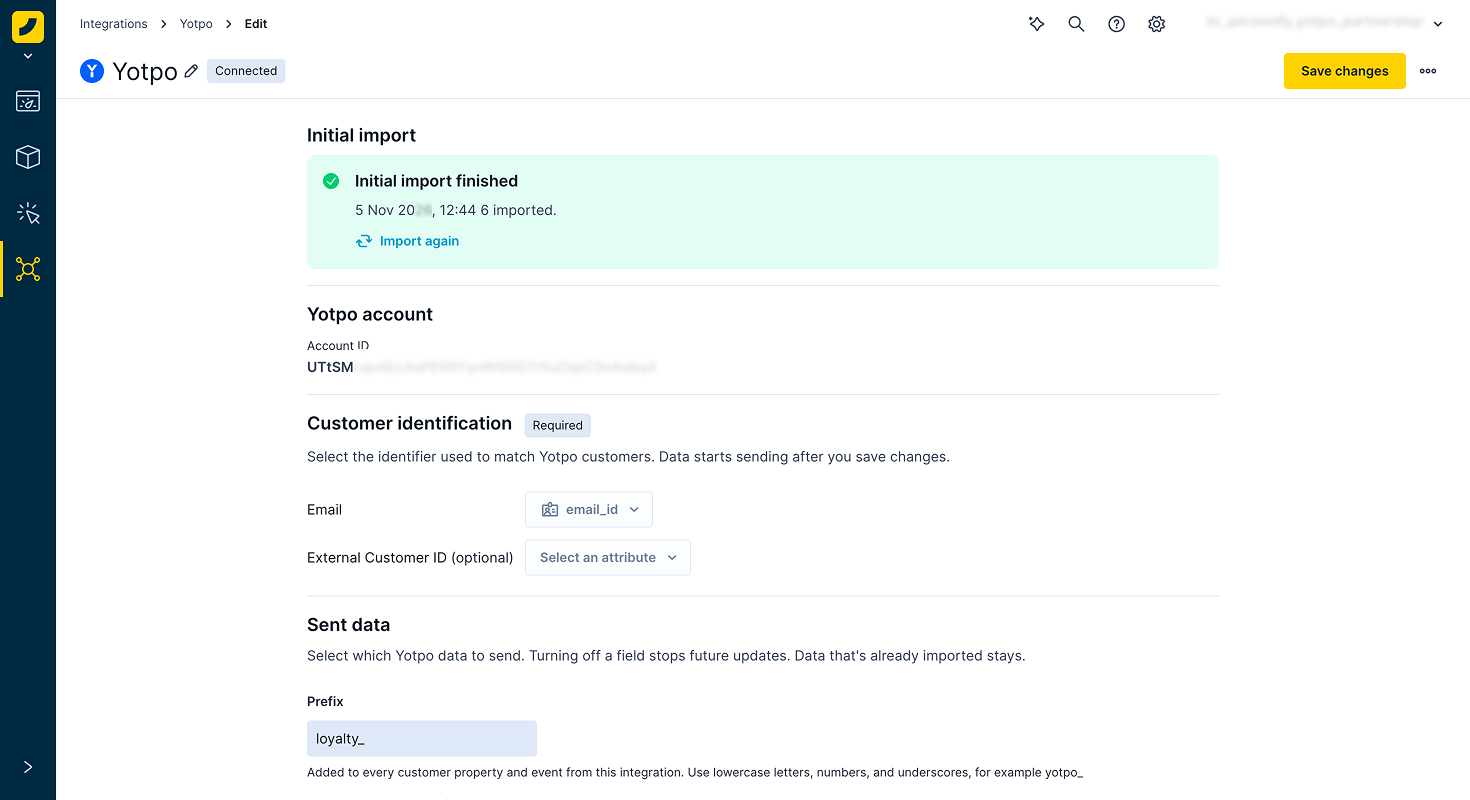
Saving starts the first import and the real-time sync of your Yotpo Loyalty data.
ImportantNothing is sent before you save. Settings are locked while an import runs, and the consent category stays locked once the import starts, unless the import fails.
When you save:
- Bloomreach creates a private event stream in the project.
- The import starts once the webhooks are registered.
- The page shows a running count of customers.
- Webhooks flow during the import, and newer webhook data always wins.
- After the import, each webhook that names a customer carries their full loyalty state, so any loyalty activity refreshes their properties.
- Bloomreach keeps the newest value of each property, based on Yotpo's publish time.
- Enabled topics are also tracked as events.
NoteThe import doesn't include birthday, anniversary, or the personal referral link, because Yotpo's customer API doesn't return them. To add them for existing customers, see Add birthday, anniversary, and referral link for existing customers.
Add birthday, anniversary, and referral link for existing customers
Yotpo's customer API doesn't return birthday, anniversary, or the personal referral link, so the import skips them. To add them for customers who were in Yotpo before you connected, import them from a Yotpo customer export. You can add any other Yotpo field the integration doesn't send the same way.
Export customers from Yotpo
- In Yotpo Loyalty, go to Customers.
- Click Export all. Yotpo emails you the file.
The export includes the following columns:
birth_month,birth_day, andbirth_year- Month, day, and year for the anniversary
referral_link
The year columns are empty when the customer didn't provide a year.
Prepare the file
Add these columns to the file before you import it:
| Column | What it holds | Notes |
|---|---|---|
birthday | The birthday as a date at noon UTC, stored as Unix seconds. It combines the month, day, and year. | When the year is missing, use 1904, the same year the integration uses for an unknown year. |
anniversary_date | The anniversary as a date, built the same way as birthday from the anniversary columns. | Leave the cell empty when the month or day is missing. |
update_timestamp | The date and time you exported the file. Use the same value on every row. | See the note below. |
In a spreadsheet, use this formula to build birthday:
=(DATE(IF(AND(ISNUMBER(birth_year), birth_year >= 1900), birth_year, 1904), birth_month, birth_day) - DATE(1970, 1, 1)) * 86400 + 43200For example:
- 12 June 1990 becomes
645192000. - 12 June without a year becomes
-2068718400.
NoteThe
update_timestampcolumn controls which data wins:
- With it: updates the integration receives after the export replace the imported values, whether you import before or after you connect.
- Without it: Bloomreach uses the import time, so the import overwrites any birthday or anniversary a customer changed in Yotpo after the export.
Import the file
- Import the file as a customer import. For more information, see Import customers.
- Tag the email column with the customer ID you mapped to Email in the integration.
- Map
update_timestampas the update timestamp. - Name the properties with your integration prefix, for example
loyalty_birthday,loyalty_anniversary_date, andloyalty_referral_link. - Set the type of the two date columns to date.
NoteYou don't need to import points, tier, or other properties the integration sends, because its first import fills them for every customer. If you include them anyway,
update_timestampmakes sure newer values from the integration win.
Manage the integration
The integration page in Data hub shows the connection and import status. Changes to your settings apply from the next webhook after you save.
- Import again: re-reads every customer after a finished import.
- Retry import: resumes a failed import where it stopped, or starts over if the settings changed.
- Remove: revokes Bloomreach access in Yotpo, which stops the webhooks. You can connect the store again afterward. Removing an integration doesn’t delete any data, it only disconnects your Yotpo account.
Limitations
Yotpo program and store
- Only Yotpo Loyalty is supported. Yotpo Reviews and actions that change Yotpo data, such as awarding points, aren't included.
- You can connect one integration per Yotpo store. If another integration holds the store, the connection fails with an already connected message.
- You can connect several Yotpo stores to the same Marketing project. We recommend a different prefix for each store.
- The new member reward event is tracked only when the New Member Reward earning rule is active in Yotpo.
Imported data
- Customers without an email address are skipped.
- Yotpo's customer API doesn't return birthday, anniversary, or the personal referral link, so the import doesn't include them. They fill in from webhooks as customers become active. To add them for existing customers, see Add birthday, anniversary, and referral link for existing customers.
- The next expiring batch of points is in neither the Yotpo customer API nor the customer export.
Settings
- Identifiers and the consent category can't change after the first import.
- The prefix is fixed once you save, unless the import failed.
- Turning a property or event off stops future updates. Data already sent stays.
- Events can be turned on or off, but not renamed or remapped.
- New fields stay off until you turn them on.
Consents and personal data
- With a consent category mapped, Yotpo loyalty program opt-ins and opt-outs are tracked as consent events in real time. The first import also records the current opt-in of existing members. Later imports don't repeat it.
- A Yotpo opt-in means the customer joined the loyalty program, not that they agreed to receive marketing email. Map loyalty opt-ins to a dedicated consent category, not to your email marketing category, so they don't count as marketing consent.
- The integration processes personal data, and events carry email addresses.
Events and delivery
- During a large import, real-time updates for that store can arrive late.
Changes from the existing Yotpo integration
This integration replaces the existing Yotpo Loyalty integration in Marketing. Before you switch, check these changes. For the existing setup, see Yotpo Loyalty.
- Event and property names change. Only the consent event keeps its name. For example,
yotpo_loyalty_points_balancebecomesloyalty_points_balance. - The
integration_typevalue changes fromyotpo_loyaltytoyotpo. - You need to choose the consent category again.
- A mapped External Customer ID becomes an identifier and can merge profiles that share it.
Troubleshooting
Connection to Yotpo failed
Bloomreach can't reach Yotpo. Click Connect Yotpo to authorize again. Your settings stay.
Disconnected
Disconnected means the app was removed in Yotpo, so nothing syncs. Remove the integration and create it again, or contact Bloomreach Support.
Already connected warning message
Another integration already holds the Yotpo store, and a store can have only one integration. A Yotpo store can have only one integration, which prevents duplicate data. If you see this message, the store is already connected to another integration.
Birthday, anniversary, or referral link is empty
These fields aren't part of the first import, because Yotpo's customer API doesn't return them. They fill in as customers become active. To add them for existing customers, see Add birthday, anniversary, and referral link for existing customers.
Next steps
Your Yotpo Loyalty data now flows into your Marketing project. From day one, you can segment on points balance, VIP tier, and points expiry date. Events add triggers for scenarios such as:
- Points expiry: remind customers how many points expire and when.
- Inactive customers: nudge customers who are close to a reward or can already claim one.
- Coupons: send the code the coupon event carries from a redemption, campaign, or VIP tier reward.
- VIP tiers: congratulate customers on a new tier, and warn them 30, 14, or 7 days before it expires.
- Referrals: send the referred friend an invite and a reminder, and thank the referrer after the friend's qualifying purchase.
- Birthdays and anniversaries: send reward messages when Yotpo issues the reward.
- Joining and leaving: welcome customers when they join the program and win them back when they leave.
Invite and reminder events are tracked on the referred friend, so you can email the friend. Completed referrals are tracked on the referrer.
Updated about 1 hour ago