

Made With Intent
Partner integration
This guide walks you through connecting Made With Intent with Bloomreach. You'll configure the integration in your Intent account, then verify that intent data is flowing correctly into your project.
How the integration works
Made With Intent is a predictive targeting platform that analyzes real-time user behavior to determine customer intent. Connecting it with Bloomreach lets you push intent metrics directly into your project, enhancing your targeting across experiments, weblayers, emails, and audience management.
The integration sends intent data from Made With Intent into Bloomreach in one of two ways:
- Customer properties: Updates a customer's properties directly within their Bloomreach profile.
- Events: Sends a named event to Bloomreach containing the intent data.
You configure how and when data is sent during the setup process in Intent.
Set up the integration
Set up the integration in Intent
Visit the Made With Intent documentation for details on configuring the integration in Intent.
- Go to your Intent account and navigate to the Integrations page.
- Select Bloomreach and click Configure.
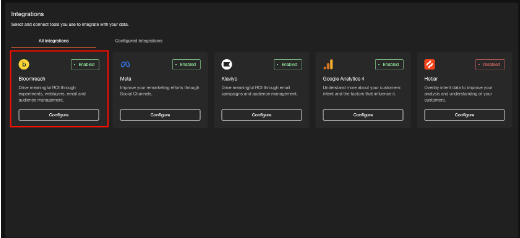
Select Bloomreach on the Integrations page and click Configure to start the setup.
- Click Add integration and follow the setup process. During this step, you decide how data is sent and when it's updated.
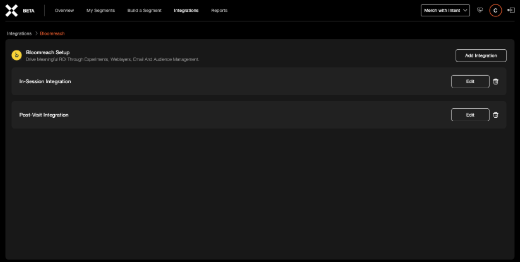
Bloomreach setup page in Intent with In-Session Integration and Post-Visit Integration options.
When choosing Event as your data sending method, select one of the following triggers:
- On event: Sends data with every inference response received in Intent.
- On change: Sends data when it changes between inference responses.
- On page view: Sends data on each page view only.
- Click Save to enable the integration.
Verify the data in Bloomreach
Confirm that data is arriving in your Bloomreach project.
- Go to your Bloomreach account.
- Navigate to Data & Assets > Data manager.
You can view the Intent data customer properties in the Data manager.
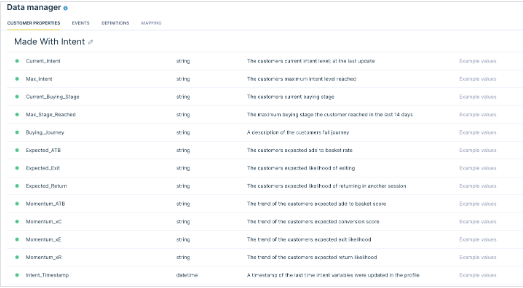
Data manager displaying Made With Intent customer properties and their descriptions.
You can also view the Intent data customer properties in individual customer profiles.
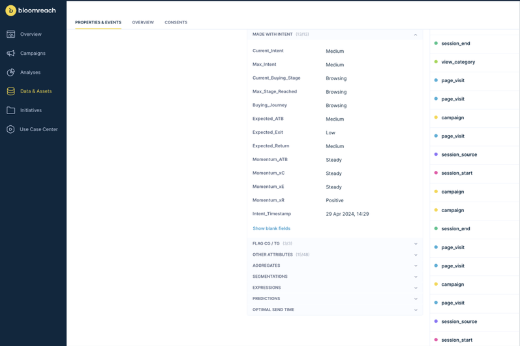
Individual customer profile displaying Made With Intent properties and their current values.
Use cases
Email capture
The Made With Intent integration lets you enhance your email capture strategy using real-time user behavior insights. Instead of relying on traditional triggers like time spent on site or mouse movement, you can use context-aware interactions to drive sign-ups.
For example, trigger a welcome email sign-up form when a user enters the "building intent" phase and is marked as "focused." This approach can increase engagement and improve response rates. You can also customize form content based on the user's phase and state to offer relevant incentives at the right moment.
Email campaigns
The integration enriches your email campaigns with contextual intent data, improving personalization and increasing engagement.
Instead of sending a generic cart abandonment reminder, tailor your campaign based on the user's intent and state when they leave your site. Use that context to decide whether to offer a discount, adjust its value, or serve alternative content.
Segment your campaigns by user phase — engage, build intent, maintain intent, or convert — to deliver content that matches where each customer is in their journey. This approach can drive user progression based on real behavior rather than assumptions.
Updated about 2 months ago