

AI Content Generator
The AI Content Generator by Loomi helps you create campaign copy. This guide covers how to use it, when it's useful, and what to watch out for.
This is a Premium tier feature powered by Loomi.
Generate content
The content generator is available in the following nodes and in email campaigns:
- SMS
- MMS
- Browser push notification
- Mobile push notification
To generate content:
- Click the robot icon in the bottom-right corner of your campaign editor.
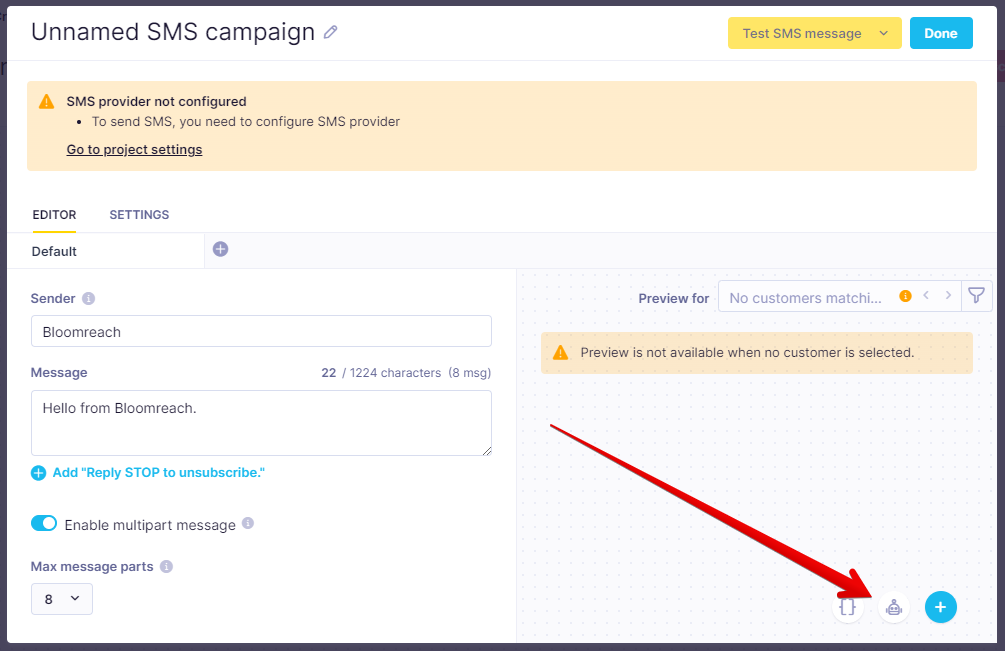
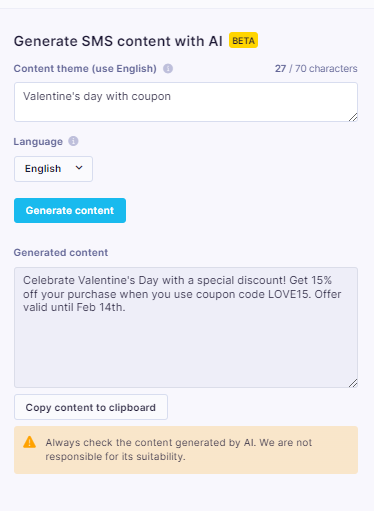
- When the sidebar opens, select a theme and language.
- Click Generate content.
- Copy the output to your clipboard and use it in your campaign.
If the output doesn't match your intent, click Generate content again to try a different result.
When to use content generator
Use the content generator to produce campaign copy on demand—no brief, no back-and-forth. For example, if Valentine's Day is coming up and you want to send an SMS to your "can't lose them" segment, generate a first draft in seconds and refine from there.
Limitations
- No PII filtering: The generator works with text you type in the prompt. It doesn't have access to stored customer data or attributes, so it can't expose customer PII. However, it also can't detect or filter out anything you manually type, so avoid including personal or sensitive information in your prompt. Anything you enter is passed to a third-party LLM.
- No brand guardrails: Always review generated content for brand fit and suitability. Bloomreach doesn't control model outputs and isn't responsible for incorrect, misleading, biased, or offensive content.
- Content policy: Every theme is checked against OpenAI's content policy.
- Rate limits: Maximum 10 requests per user per 60 seconds; maximum 200 requests per 24 hours.
Updated 2 months ago
Did this page help you?