

Yotpo Reviews
This guide shows you how to integrate Yotpo Reviews with Bloomreach. The integration enriches your marketing strategy with customer reviews and ratings, helping you target unsatisfied customers with special offers and win them back.
With this integration, you can analyze real-time customer sentiments, create dedicated campaigns for dissatisfied customers, and trigger follow-up messages based on review activity.
Prerequisites
Before you begin, make sure you have:
- Active Bloomreach account with integration permissions.
- Active Yotpo Reviews account with admin access.
- App Key and App Secret from your Yotpo Reviews account.
- Yotpo plan that includes webhooks.
How the integration works
Data sync overview
Yotpo Reviews sends data to Bloomreach in one direction. The integration syncs data in real time, and events appear in Bloomreach as review events.
The integration triggers review events when customers create or update product or website reviews in Yotpo.
Events tracked
When you sync data from Yotpo Reviews, Bloomreach tracks the following events:
| Event name in Bloomreach | Yotpo trigger |
|---|---|
review | Review created or updated |
Event attributes
Review events include the following attributes:
| Event attribute | Description |
|---|---|
status | Current review status (created or updated) |
sentiment_category | Review sentiment classification |
sentiment_value | Numerical sentiment score |
NoteSentiment attributes (
sentiment_category,sentiment_value) are populated when Yotpo includes sentiment analysis in the webhook. This typically occurs during review moderation, publishing, or verification (triggeringreview_updatedevents), but not when reviews are first created.
Use case
The Yotpo Reviews integration helps you configure many use cases:
- Monitor and analyze real-time customer sentiments to adapt campaigns and strategies.
- Create dedicated campaigns for unsatisfied customers to win them back.
- Segment customers based on review data such as number of reviews, average score, and average sentiment.
- Trigger follow-up messages and flows based on review activity.
- Announce to customers when their review is published on the website.
Set up the Yotpo Reviews integration
You will set up the Yotpo integration in Bloomreach only. The integration automatically connects once you provide your Yotpo credentials.
Add the integration
- Go to Data & Assets > Integrations.
- Click + Add new integration.
- Search for Yotpo Reviews and click + Add integration.
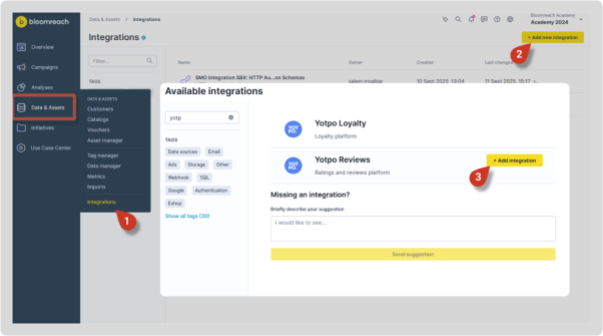
Configure the integration
On the integration setup screen, configure the following:
- Authenticate the integration by inserting your App Key and App Secret from your Yotpo Reviews account. You can find these credentials in General Settings inside your Yotpo Reviews account.
- In the Customer ID mapping section, decide which customer identifier Bloomreach should use to identify events from Yotpo:
- Email: Customer email address.
- Order ID (optional): Associated order identifier.
- Yotpo User ID (optional): Yotpo's internal user identifier.
- Click Save integration.
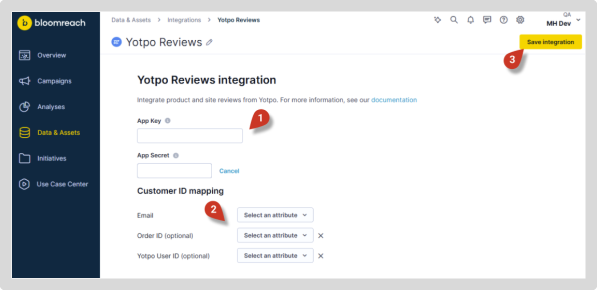
The Yotpo Reviews integration is now set up. Once a customer creates or updates a review in Yotpo, you'll automatically see the event in Bloomreach.
Remove the integration
To disconnect Yotpo Reviews from Bloomreach:
- Go to Data & Assets > Integrations.
- Open the Yotpo Reviews integration
- Click Remove integration.
- Confirm removal.
Limitations
Availability
The Yotpo Reviews integration is available in some instances only. Some single-tenant instances and new multi-tenant instances may need manual activation by the engineering team first. This is generally requested during a new instance setup or can be requested anytime later by contacting our live chat or your Customer Success Manager.
Additional limitations include:
- Review events don't include product information: Events produced by this integration don't contain product identifiers such as product ID, SKU, or product name. To associate reviews with specific products, correlate review data with purchase events or catalog data.
- Status updated events only: Sentiment attributes (
sentiment_category,sentiment_value) are retrieved only for review events withstatus = updated.
Updated 18 days ago