

Cookies
This guide introduces you to cookies and explains how Bloomreach uses them to identify and track customers across sessions and devices.
Bloomreach identifies users by tracking their cookie. A customer's cookie acts as their soft ID, and when a user is identified (for example, by email), it serves as a complement to their hard ID. Read more on the difference between hard and soft ID in the Customer identification article.
ImportantBefore customer's cookies can be tracked, you must receive explicit consent from them for doing so.
Cookie journey
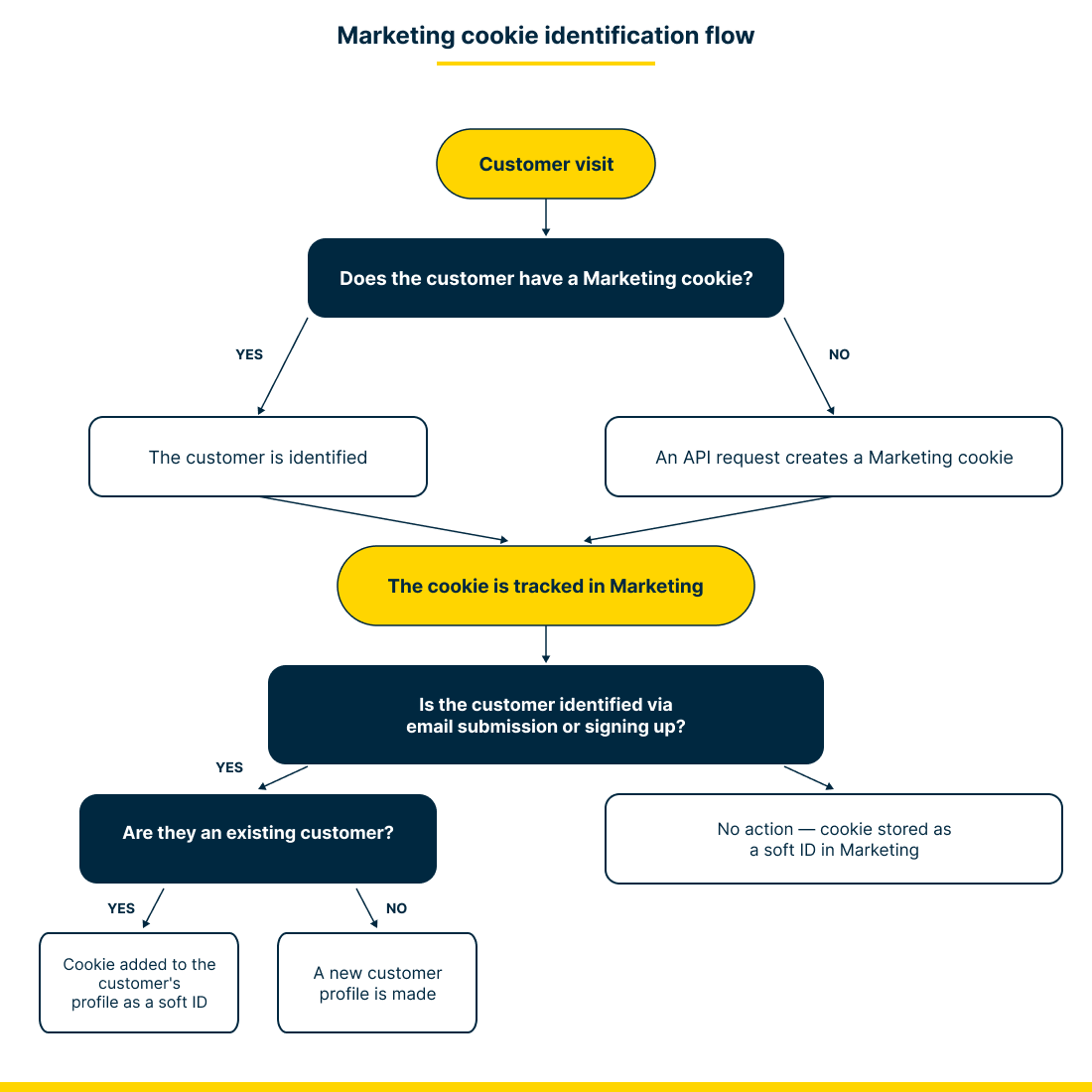
A customer's cookie goes through the following journey:
- When a customer visits your website, it is one of these two scenarios:
- Their Bloomreach cookie has already been tracked and stored in Bloomreach.
- No Bloomreach cookie can be found, and so a new cookie is created via an API request.
- Bloomreach then checks whether the customer is identified via an email or an account sign-up.
- If yes, then Bloomreach checks if they are an existing customer.
- If they are an existing customer, a cookie is added to the customer’s profile as a soft ID.
- If they aren't an existing user, a new customer profile is made with the cookie as a soft ID.
- If no, a Bloomreach cookie is stored as a soft ID without a hard ID.
- All the user’s following actions are tracked in the customer's profile with this particular cookie as their soft ID.
NoteA cookie is automatically recognized as PII and expires three years after the last time it was tracked (unless you configure a different expiration in the JS SDK).
Example
James has never visited your website. After agreeing to cookies and Bloomreach is launched, Bloomreach recognizes that James doesn't have a cookie. A new cookie is created to track his actions.
When James checks out of your store and creates an account, his cookie is attached to his email address. His hard ID is the email address, and his soft ID is the cookie.
To show how a customer can have multiple cookies: if James visits your site from a new device — an iPhone 11 — he gains another cookie as a soft ID in his customer profile.
Storage
To read about how and which cookies are stored in Bloomreach, go to Cookies & Storage article.
Anonymization
To read about how cookies can be anonymized, go to the Right to erasure section.
Bloomreach cookies and other platforms
Some of the integrations send IDs for mapping. For more information, see the Terms of Use for Third-Party Integrations.
Updated about 1 month ago