

Recommendations
Recommendations help you surface the right items to the right customers at the right moment. Bloomreach uses customer behavior and catalog data to power AI-driven suggestions across your channels boosting engagement, add-to-cart rates, and conversions.
Powered by Data hub and Web SDK, recommendations are intended for marketers and merchandisers through a single self-service UI.
Prerequisites
Recommendations are available to:
- Marketing customers
- Search customers require Data hub integration to support the unified setup
Before creating a recommendation, confirm your account has these in place:
Platform components
To use recommendations, make sure the following components are in place:
- Web SDK to collect the behavioral events recommendation engines learn from, such as views, cart updates, and purchases.
- Product catalog (item inventory) for recommendations to choose from.
Packages
- Loomi Platform: required to access recommendations.
- At least one channel package: web, email, mobile messaging, app, or Extension package—to deploy recommendations on that channel.
Catalog setup
Your catalog requires:
- Item identifier: set a unique ID that matches the ID used in your events. For Data hub integrations, configure this in the item collections schema.
- Searchable fields: mark any field you want to filter on as searchable.
- Field mapping: map image, URL, title, and price to display item details in single customer view and the Test tab.
- Other mandatory fields:
- New items template: requires a datetime column or a column with value representing when the item was added.
- Similar descriptions template: requires fields with string values. Blocks of texts are recommended over lists of properties and values.
Events
Set up event tracking through Web SDK and confirm the mappings in Data manager. Both are required: Web SDK sends the raw events, Data manager maps them to the action types recommendations relies on.
Track these events through Web SDK:
view_item: item detail page views.cart_update: cart additions, removals, or quantity changes.purchase_item: completed purchases.
Confirm these mappings in Data & Assets > Data manager > Mapping:
- Purchase item
- Add to cart
- View item
- View category
For setup details, see Data manager.
Module visibilityWhat you see in the UI depends on the packages your account has. If your account doesn't have Email, the Email channel won't appear when configuring deployment. Talk to your platform admin if a module you expect to see is missing.
Where to use recommendations
Place recommendations across multiple touchpoints in your customer experience:
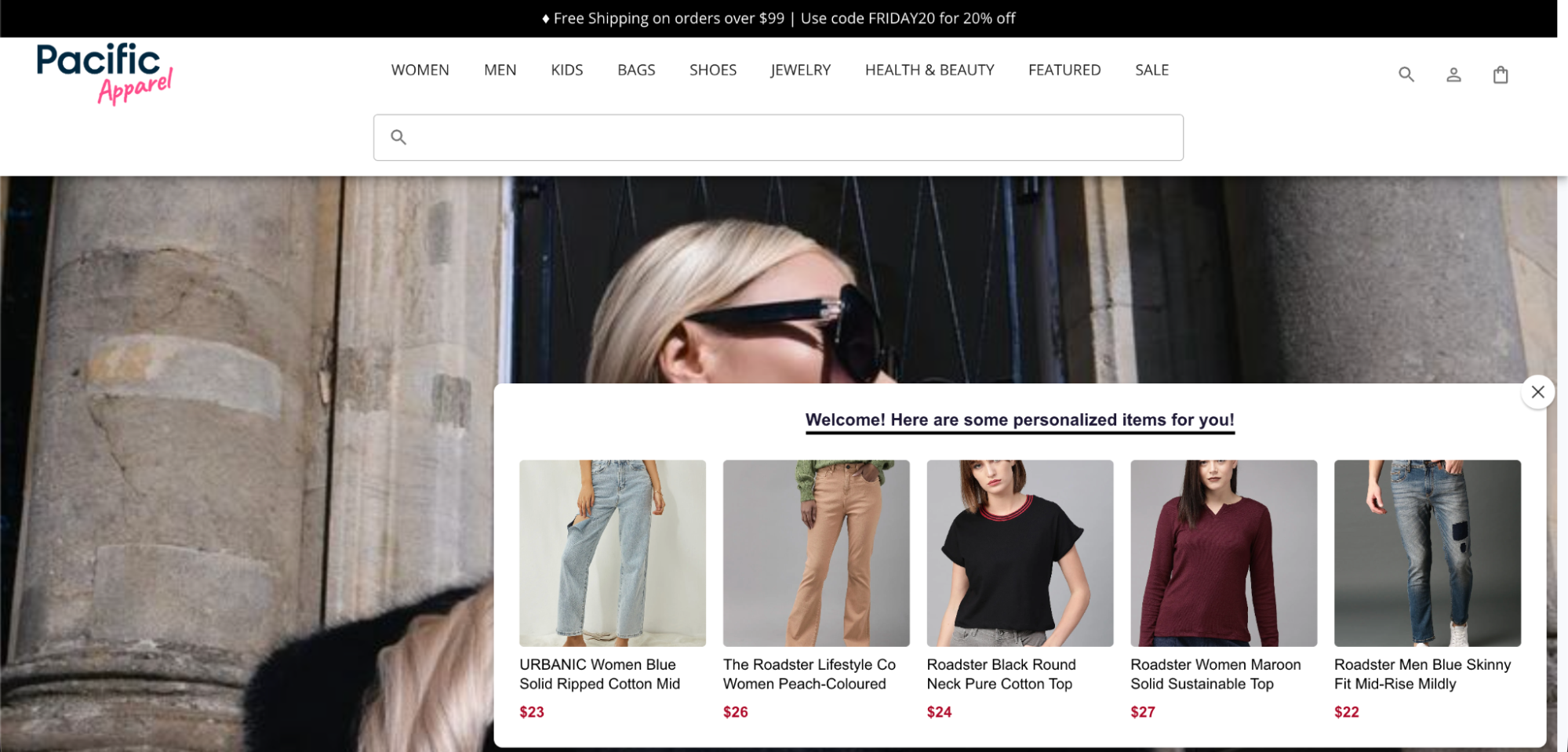
- Personalized homepage: showcase top products or personalize content to re-engage returning visitors.
- Category page: highlight the most popular items within the category a customer is viewing.
- Personalized product page: suggest alternatives or complementary items to the one being viewed.
- Search results: enriches results pages with personalized recommendations.
- Cart: recommend relevant items alongside what's already in the cart.
- Email campaigns: personalize email marketing or showcase your store's range.
- Push notifications: engage users with relevant suggestions in real time.
- SMS: send recommendations through SMS campaigns.
- WhatsApp: surface recommendations in WhatsApp messages.
- Weblayers: surface recommendations within in-page experiences.
How it works
A typical recommendation goes through 5 stages:
- Choose a template. Pick one of the ready to use or Loomi templates that fit your use case.
- Configure mandatory fields, such as catalog, events, learning window, and more.
- Add merchandising (optional) controls on top of the model. Refine with dynamic filters, pinning, block lists, or customer preferences.
- Test and preview the results against a customer or reference item before deploying.
- Deploy the recommendation by embedding it through the Web SDK snippet, or referencing it from email, push, SMS, and WhatsApp campaigns.
Template families
Recommendations offer two template families.
| Template family | Description |
|---|---|
| Ready to use templates | Based on fixed rules, ready to serve results immediately after you save them. Use them for transparent, rule-driven logic like popularity, similarity, or filter-based selection. |
| Loomi templates | Driven by machine learning models. Use them for recommendations based on advanced pattern recognition. Loomi templates can’t be used immediately as they need data and learning time to generate recommendations. |
Not sure which to choose?If you aren’t sure, start with a ready to use template. You can always switch to a Loomi template once your catalog has sufficient data
Related articles
Configure recommendation templates
Preview recommendations results
Deploy recommendations
Evaluate using recommendations dashboard
Manage recommendations
Updated about 1 month ago