

View catalog items
This guide covers how to view the processed items for Data hub catalogs that Bloomreach applications use.
How are items useful
Items are the processed and validated versions of the records. Items are available for your project applications, such as campaigns, scenarios, and recommendations. The items represent the data that your applications see and use.
View items
-
Go to the Items tab.
-
View all the items created based on the records and configured schema settings. By default, only the item IDs are shown.
-
Customize the attributes displayed by clicking the settings icon and adding more attributes to view.
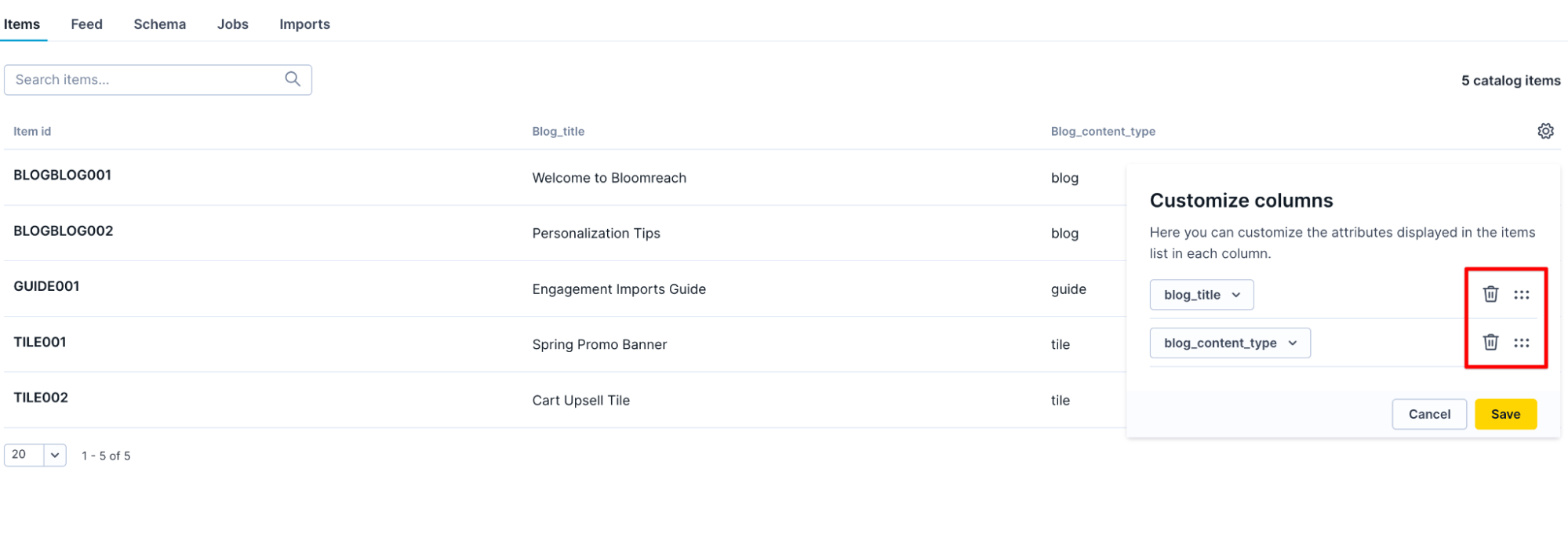
Customize the attributes columns
-
Click the View button adjacent to the specific item to view all of its attributes and values. You can also search items by attribute.
Troubleshoot item issues
If the items displayed in the Items tab don't appear as expected:
Check the catalog's schema
This is where you define how record fields are mapped to item attributes. Ensure that the attribute definitions are correctly set.
Verify current records contain expected data
The fields in your records are the source for the attributes in your items. If a record is missing a field or contains a value that doesn't conform to the configured attribute type, the item may not be generated or may contain unexpected values.
Updated 6 days ago