

Custom predictions
Custom predictions let you define your own target, eligible customers, and features to build a model tailored to your needs. Use this option when none of the standard templates fit your use case. To get started, go to Analyses > Predictions, click + New prediction, and select Custom prediction.
Configure custom prediction
Setting up a custom prediction consists of four steps:
- Target customer filter: Define the goal you want to predict — for example, a purchase.
- Eligible customer filter: Define the customers the model should predict for — for example, those who opened a particular email.
- Features: Define the data the model uses to make predictions.
- Algorithm settings: Define the algorithm's basic settings.
Target customer filter
The target is the event or customer property you want to predict — for example, a purchase or a subscription renewal. Use the target customer filter to define this goal and set the conditions the model should learn to identify.
Prediction type
Choose the prediction type — the data type the model should return:
| Prediction type | Output value | Description | Example usage |
|---|---|---|---|
| Binomial classification | Probability | Determines whether customers will achieve a prediction goal in the future or not. | What is the probability that customers will make a purchase within a week? |
| Regression | Absolute number | Predicts the numerical value of specific customer attributes in the future. | How much money will a customer spend this month? |
| Multinomial classification | Best segment | Determines which segment from a given set is best for each customer. | Which campaign channel is the best one for a customer? |
For a best channel prediction example, see Multinomial classification use case.
Define your target
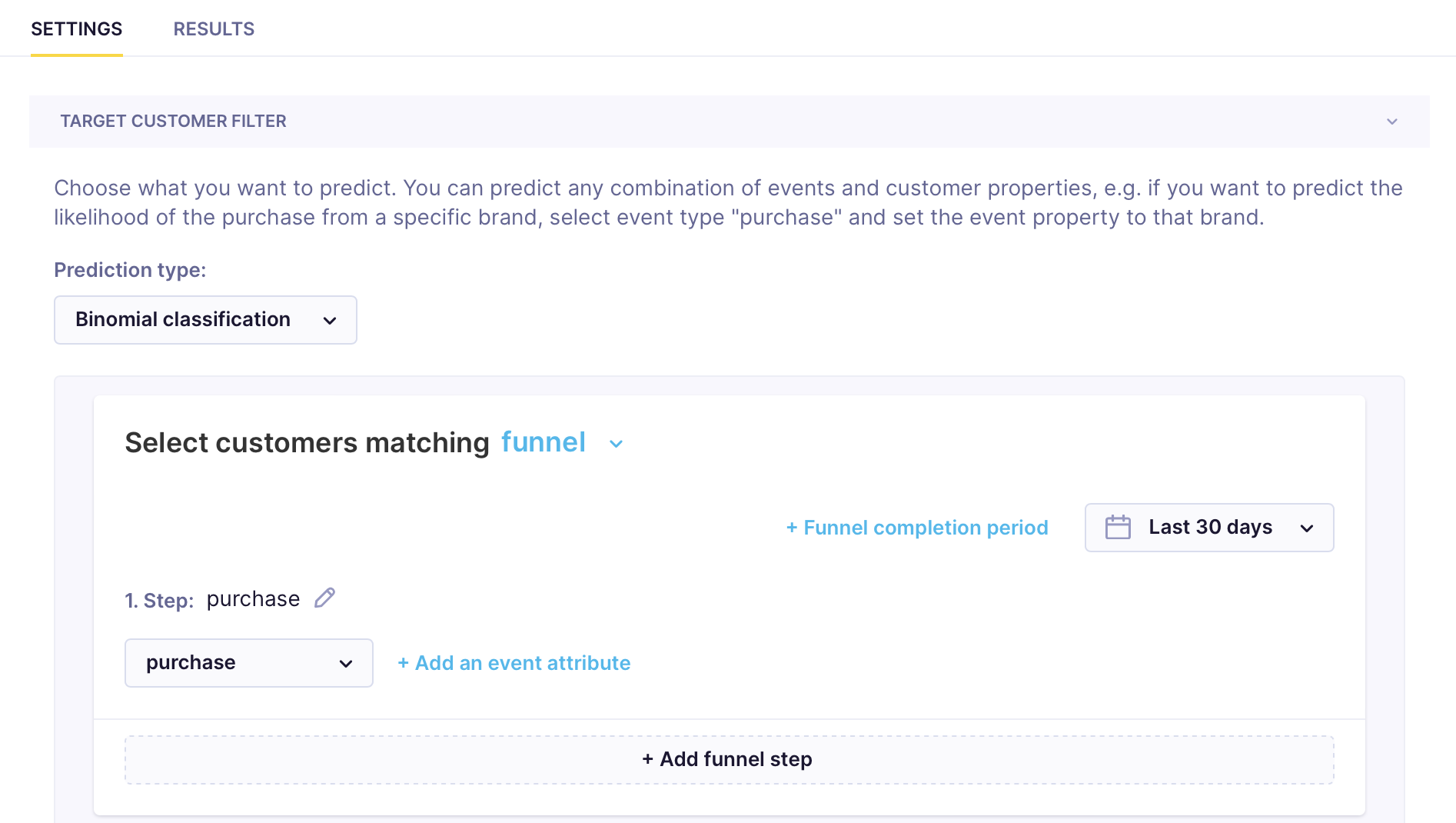
Define the specific target you want to predict. The target can be any combination of events or customer properties — limited only by the variety of data you've tracked. Add a target by clicking + Add filter condition. In the example below, purchase is the target event.
For reasonable accuracy, have at least 1,000 target customers. For multinomial classification, that means at least 1,000 per segment, ideally equally distributed
Eligible customer filter
Filter customers to include only those relevant to the prediction. Ideally, use customers for whom you've tracked target events in the past three months. If you don't have enough data, broaden the criteria by reducing the number of filters or extending any time-based conditions. The eligible customer filter works the same way as a standard customer filter.
The eligible customer dataset should contain at least a few thousand customers for the model to generate accurate predictions.
Features
In the Features tab, define:
- The time frame within which the events or properties are tracked. Set the time frame based on whether you want to predict the target now or in the future.
- Customer attributes and event filters that the model considers.
- Advanced feature settings.
Time frame
Features are the inputs the model learns from — the customer behaviors and attributes it uses to identify patterns that predict your target. In the Features tab, define the time frame, the events and properties to include or exclude, and any advanced settings.
The model works with two time frames:
- Feature window: The time frame from which the model extracts behavior patterns preceding the target.
- Target window: The time frame from which the model extracts whether a target was or wasn't reached.
How you configure the feature and target windows determines what the model predicts. Use now prediction when you want to score customers based on current behavior — for example, real-time purchase intent. Use window prediction when you want to forecast future behavior based on past patterns — for example, likelihood of purchase in the next 30 days.
Now prediction
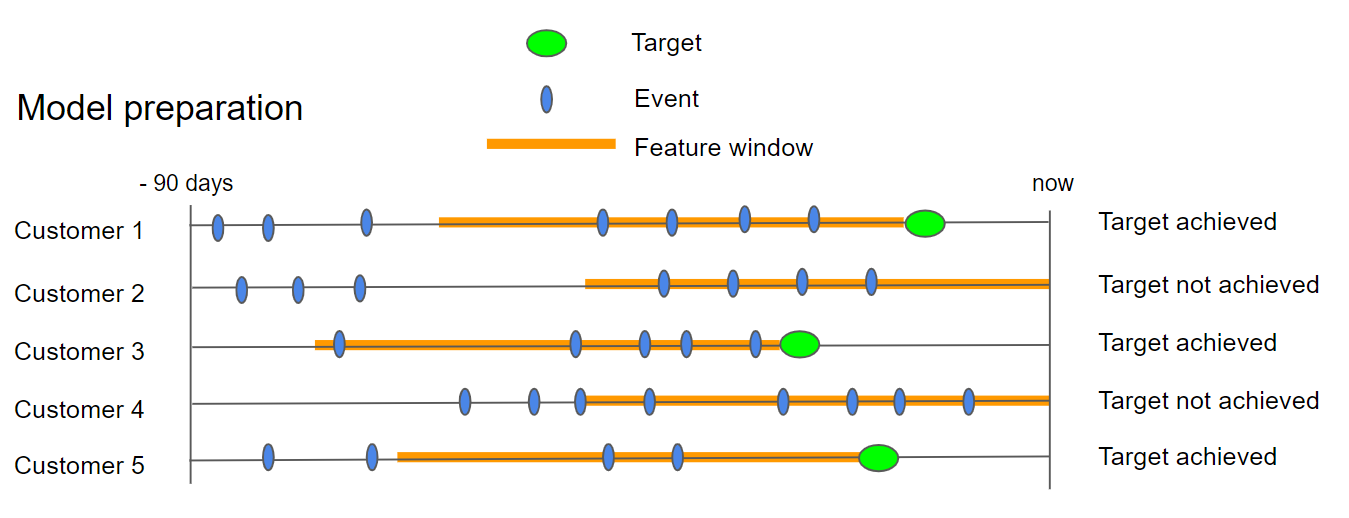
The feature window overlaps the target window. Unlike window prediction, the feature window is calculated per customer based on when the target event occurred, rather than a fixed past period. The model scores each customer using behavior from the same period as the target.
Example:
- Target customer filter:
Last 30 days - Features:
Last 60 days- Enable
Is floating window
- Enable
This allows the feature window to shift per customer based on when their target event occurred, rather than applying a fixed past period to everyone.
Window prediction
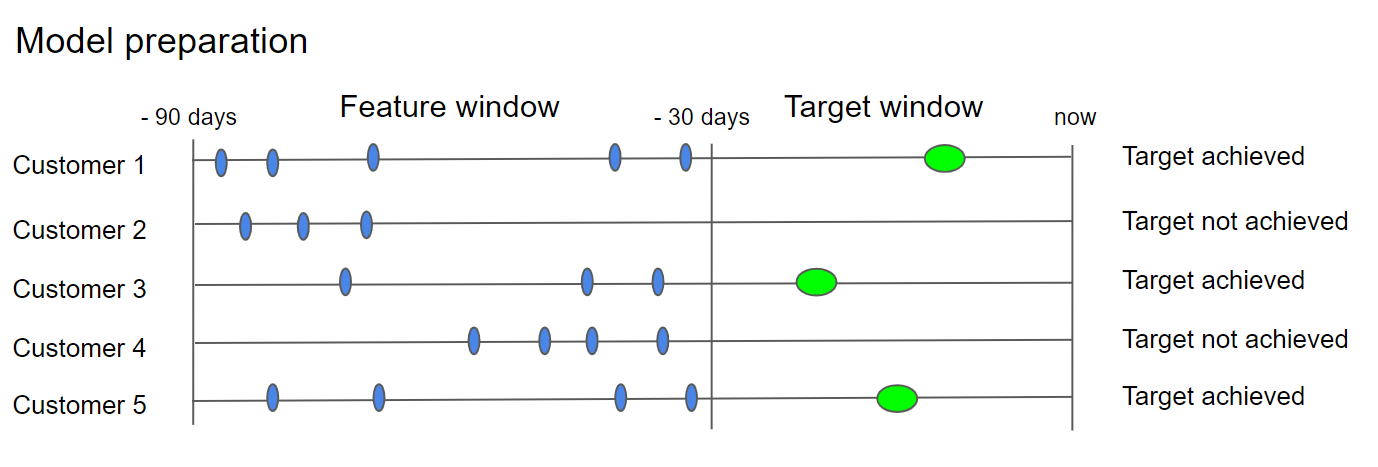
The feature window sits before the target window. The model studies customer behavior in the feature window, then checks whether the target was reached in the target window to learn which patterns predict success.
Example:
- Target customer filter:
Last 30 days - Eligible customer filter:
Last 60 days before 30 days - Features:
Last 60 days before 30 days
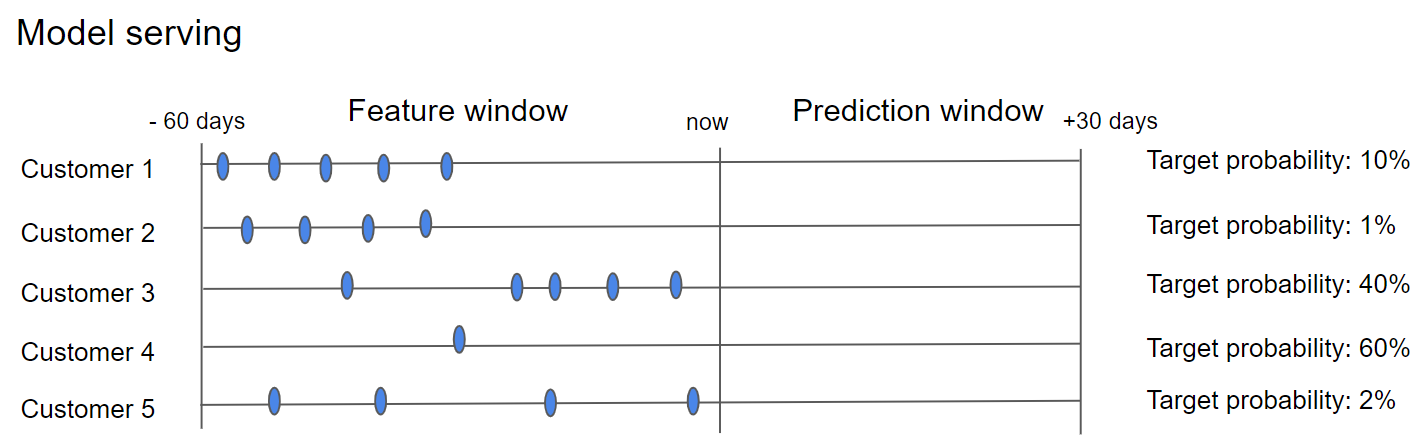
The model uses 60 days of behavior to predict purchases in the following 30 days.
When applied to new customers, the model analyzes their behavior over the past 60 days and assigns each a probability score for the next 30 days.
Events and customer properties
Select the events and customer properties the model should learn from:
- Include — specify exactly which events and properties the model uses. Choose this when you want full control over inputs or need to limit training to relevant data.
- Exclude — remove specific events or properties and let the model automatically select the best predictors from the rest. Choose this when you have a large dataset and want the model to determine what matters most.
Advanced feature settings
These settings are optional and intended for advanced use cases. Leave them at defaults unless you have a specific reason to adjust them — for example, heavily skewed data or a need to track probability changes over time rather than absolute scores.
| Setting | Description |
|---|---|
| Target offset | Defines when the model stops considering relevant events before the target event. Applies only to customers who fulfill the target. |
| Floating time window | Accounts for relevant events that occurred before the start of the feature window, if the target was tracked at the beginning of that window. |
| Dataset balancing | Activate when data is heavily skewed — for example, when the target rate is very high or very low. |
| Data validation | Sets the percentage split between training and testing datasets. |
Algorithm settings
By default, the algorithm uses standard settings that work well for most use cases. Only adjust these if you have a specific reason — for example, increasing minimum instances per node to reduce overfitting, or constraining tree depth to improve interpretability. Optionally, customize the following:
- Minimum instances per node: Sets the minimum number of data instances per decision node in the decision tree.
- Maximal depth: Constrains the depth of the decision tree.
- Algorithm type: Requests a specific algorithm.
Related articles
Multinomial classification use case: Learn how to create a custom prediction that identifies the best communication channel for your marketing campaigns.
Updated 7 months ago