

Profile usage dashboard
About this dashboardThis dashboard is for customers on profile-based pricing. Usage is calculated based on unique customer profiles and reflects the metrics used for billing on current plans.
If your account is on event-based pricing, refer to the Event usage dashboard.
Usage dashboard benefits
- Proactive limit management: View contractual limits directly on graphs to identify when you're approaching thresholds and take action before reaching them.
- Detailed breakdown analysis: Access monthly breakdowns to understand which activities drive your consumption and where to optimize.
- Multi-level monitoring: View usage data at account or project levels to monitor consumption across your organization or drill into specific implementations.
Access the usage dashboard
Go to Overview > Bloomreach usage. Switch between project and account views using the selector in the top right corner.

Permissions required
You need the following permissions to access the usage dashboard:
- Project-level dashboard: Project Admin or Project Usage Viewer role
- Account-level dashboard: Account Admin or Account Usage Viewer role
How usage dashboard works
The dashboard collects your usage data daily and shows you a historical view of what happened in your projects. Think of it as a snapshot album rather than a live camera—it captures what occurred and stores it permanently.
To keep your metrics stable and representative, the dashboard uses median values for monthly calculations. This means that if you have an unusual spike one day, it won't affect your entire monthly number.
ImportantThe dashboard captures data before any deletions happen. Even if you've set events to expire after a certain time, the dashboard will still show those events in its historical record because it took the snapshot before they were removed.
Dashboard structure
The dashboard organizes consumption data across two levels.
Account level
Aggregates usage across all projects within your account. Compares data against subscription plans configured in account settings. Use this view to monitor overall consumption and manage contractual limits.
Project level
Shows detailed metrics for individual projects. Identifies which specific implementations drive consumption and reveals opportunities for optimization.
General overview
The General overview tab displays three core metrics that reflect your audience reach and profile management:
- Unique visitors
- Stored profiles
- Profile updates
- Omniconnect monthly requests

Unique visitors
The number of distinct visitors identified in your account during a given period (also called Monthly Unique Visitors or MUV).
How counting works
- When someone visits your site or app for the first time, they're counted as a unique visitor.
- If they return later—even from a different device or after logging in—they won't be counted again if we can recognize them.
- If an anonymous visitor later gets identified and merges with an existing profile, the count doesn't change.
- Each visitor is counted once based on their first appearance, giving you a stable view of audience growth over time.
This approach ensures each visitor is counted once, based on their first appearance.
ImportantThe MUV count in usage dashboards will likely not match MUV counts from other analytics tools. This is because of subtle differences in methodology of counting and the method of tracking.
Calculation: Unique visitors are calculated daily. During the current month, the dashboard shows a rolling monthly value. For completed months, the final value is the median of daily counts, reducing the impact of short-term spikes.
- Project level: Unique visitors in the project.
- Account level: Summary across all projects in the account.
Stored profiles
The total number of customer profiles currently stored in your project. Tracked daily with monthly median calculations to provide stable metrics.
- Project level: Profiles with at least one hard ID, email, or phone number. If no profiles have any of these attributes, all customer profiles in the project are counted instead.
- Account level: Summary across all projects in the account.
Profile updates
The number of times customer profile attributes are modified through imports, campaign scenarios, JavaScript SDK calls, or Data API requests. Each property change counts as one update.
The dashboard shows monthly sums per project and can break down updates by source, helping you understand which integration methods generate the most modifications.
Omniconnect monthly requests
The number of inbound requests received by your Omniconnect integrations. The dashboard shows the last 3 completed months plus the current month, plotted against your workspace's monthly request allowance.
NoteOmniconnect inbound requests count toward your Monthly inbound requests allowance. The customer updates and events that result from those requests count toward your Profile updates allowance. See Omniconnect limits for the thresholds that apply to your plan.
Communication
The Communication tab shows average monthly volumes for outgoing messages across all channels:
- Emails enqueued
- SMS sent
- MMS sent
- RCS sent
- Notifications sent
- WhatsApp messages sent
- Webhooks sent
- Ad audiences events processed
- TCPA list validation

ImportantCommunication data reflects real actions performed in Bloomreach and doesn't account for campaign event mapping in project settings. Data is based on
campaign_actionsprocessed within the month and won't reflect event deletion or expiration.
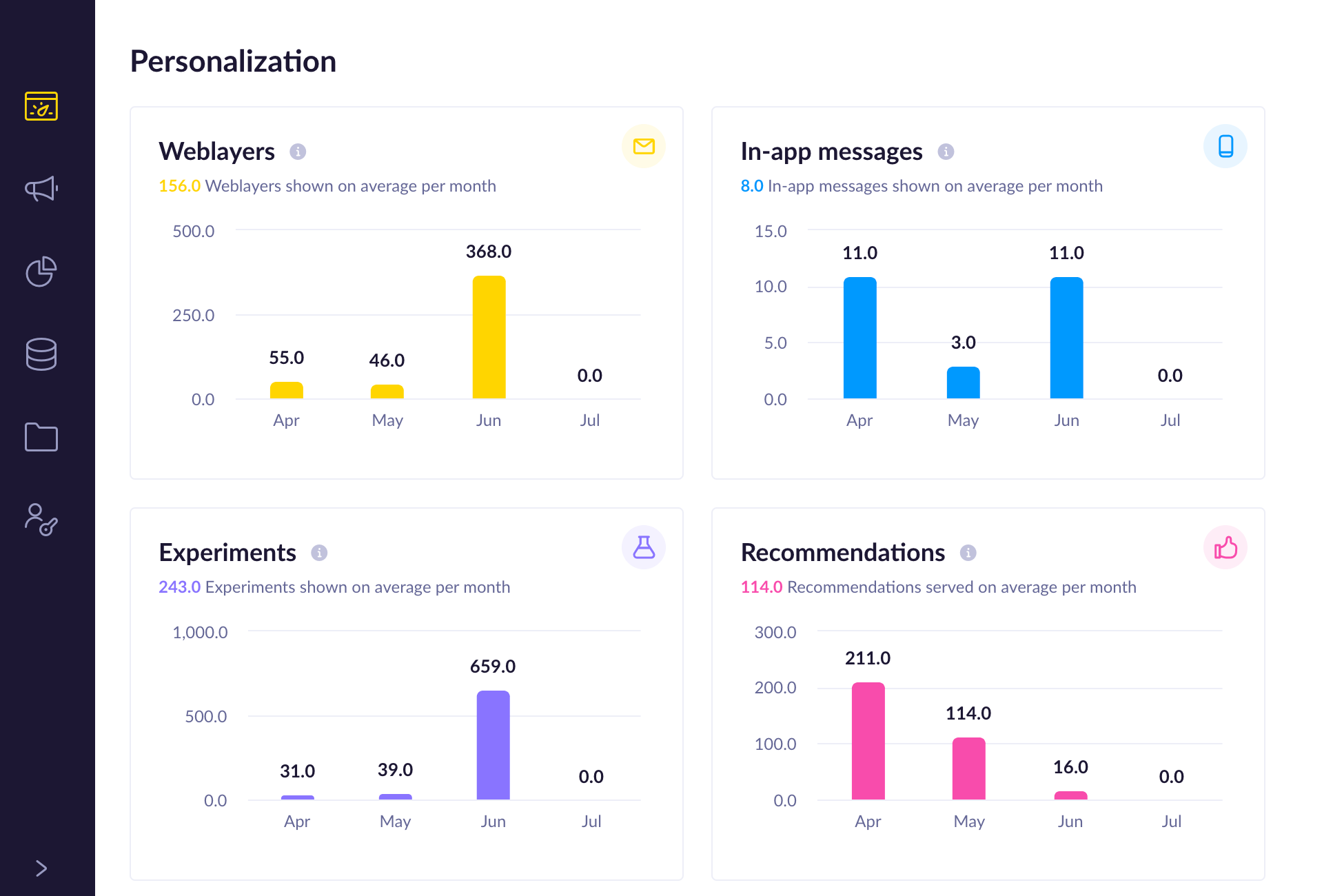
Personalization
The Personalization tab tracks average monthly volumes for interactive experiences:
- Weblayers shown
- In-app messages shown
- Experiments shown
- Recommendations served (including requests without tracking serve events, such as email previews)
Data breakdown
The Data breakdown tab shows the Outgoing communication metric: monthly processed campaign events with breakdown by action type and status. View up to 12 months of history.

Other allowances
The Other allowances tab displays average monthly usage for additional platform resources:
- BigQuery data processed (in terabytes)
- Catalog rows processed
- Rows exported
- Active prediction models
- Imported events
- Stored profiles
- Maximum event storage (MES)

Limitations
- Historical data availability: Metrics display from your account configuration date. Earlier historical data may not be available.
- Real-time updates: Metrics refresh on a schedule. Recent activity may take up to 24 hours (project level) or 48 hours (account level) to appear.
- Export limitations: CSV exports include data for the selected time range and view level only. Generate separate exports for multiple projects.
- Limit modifications: Only account administrators can modify contractual limits and governance settings. Project-level users can view but not change them.
- Expiration policy restrictions: Users can decrease event retention periods below the account default but can't extend beyond the configured maximum.
Updated 2 months ago