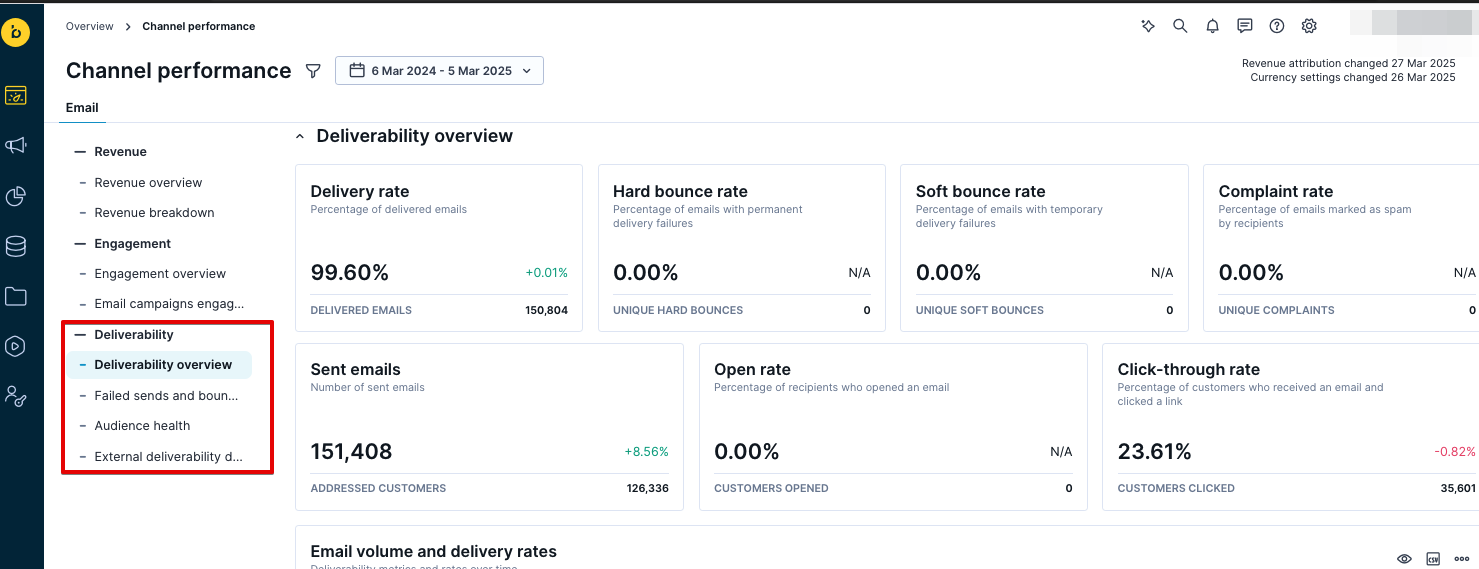
Email deliverability dashboard

Email deliverability dashboard is part of the Channel performance dashboards within Performance dashboards. It provides insights into your email delivery performance and the health of your email audience. It tracks metrics including:

  • Delivery rate
  • Hard bounce rate
  • Soft bounce rate
  • Complaint rate
  • Sent emails
  • Open rate
  • Click-through rate

These metrics help you identify and resolve delivery issues.

Access the dashboard

To access the dashboard, follow these steps:

  1. Click Overview > Channel Performance.
  2. Select Email.
  3. Click the Deliverability tab.

The dashboard displays automatically generated insights from Bloomreach Engagement.

To customize the dashboard to fit your needs, learn how to modify it. For a better understanding of the metrics on the dashboard, refer to the glossary.

Benchmark thresholds

The dashboard highlights metrics that fall below or above industry benchmarks. Use these thresholds to identify areas needing attention:

  • Delivery rate: Below 99%
  • Soft bounce rate: Above 0.5%
  • Hard bounce rate: Above 0.5%
  • Spam complaint rate: Above 0.05%
  • Click-through rate: Below 2%

Metrics outside these benchmarks are highlighted in the dashboard reports to help you quickly spot performance issues.

Email deliverability dashboard use cases

Identify provider-specific delivery issues

Your delivery rate drops suddenly. Check the Deliverability by top email domains report to see which mailbox provider is affected. Below-benchmark metrics are highlighted to help you quickly spot problem areas. If the issue affects all providers, check the Deliverability by sending IP and integration report to see if the problem is bound to a specific IP address or integration. Note that sending IP data is only available for Mailgun integrations. This helps you determine whether to contact your email service provider or adjust your sending strategy.

Compare campaign deliverability performance

You want to understand which campaigns have the best delivery and engagement rates. Use the Deliverability by email campaigns report to compare delivery rate, open rate, click-through rate, and bounce rates across your campaigns. This helps you identify campaigns with deliverability problems and learn from your best-performing campaigns to improve future sends.

Detect delivery slowdowns

Emails take longer than usual to arrive. Use the Emails by time to delivery by top domains report to identify which provider is slowing delivery. You can then reduce sending volume to that provider or spread your email sends over 1-3 hours instead of sending all at once.

Diagnose bounce patterns

Your bounce rate increases. Check the Soft bounced reasons and Hard bounced reasons reports to understand if you're dealing with temporary provider issues or invalid addresses. Hard bounced and repeated soft-bouncing addresses are automatically removed from your contact list. If you notice recurring typo domains (like "gmial.com" instead of "gmail.com") not present in the Global Suppression List, add them to your Custom Suppression List to prevent future sends.

Fix template and targeting errors

You see a higher rate of failed sends in your latest campaign. Check the Failed send reasons report to identify consent violations, frequency policy issues, or Jinja template errors that need correction.

Maintain audience engagement health

You want to protect the sender's reputation. Use the Customers by emails since last engagement report to find customers who received 100+ emails without engaging. Adjust your targeting to exclude these customers from regular campaigns. Instead, target them with a specific re-engagement campaign that differs from your usual newsletters. This prevents reputation damage from over-sending to disengaged contacts.

Understand list invalidation

You need to know why contacts are being removed. Check the Customers invalidated reasons report to see the most common causes (hard bounces, compliance issues) and improve your list collection or maintenance practices.