

Imports technical reference
Use this reference to understand how the platform handles imports under the hood—deduplication, timestamps, ID management, and system limits.
For guidance on setting up imports, see the Imports article.
Date and time formats
For supported date and time formats, see the Data manager article.
Event deduplication
Event deduplication applies to all events—whether imported or tracked in real time. An event is treated as a duplicate if it has the same event type, timestamp (to the last decimal place), and attribute values and types. Duplicate events are discarded.
Deduplication applies only at the customer level. The same events in different customer profiles aren't deduplicated.
Import events with explicit timestamps wherever possible. This lets you safely reimport or retry tracking if an import partially fails.
Scenario triggering happens before deduplication, so the platform doesn't yet know if an event is a duplicate at the point of triggering. This means deduplicated events can still trigger scenarios. If you reimport the same events with a different scenario trigger option, deduplication prevents the event from triggering that scenario.
Deduplication data is kept for 90 days from the date an event is processed. Events received within this window aren't reprocessed, but the 90-day window resets on receipt.
ImportantConsent events can't be deduplicated.
Event order with identical timestamps
When events share a timestamp but have different attributes, processing order isn't guaranteed. If order matters — for example, in funnel analytics—make sure timestamps differ by at least one decimal place. The platform supports precision up to 6 decimal places.
Automatic trimming and lowercasing of IDs
The platform can automatically trim and lowercase IDs when imported or tracked. Enable this in settings.
Duplicate identifiers in the import source
Import sources are processed top to bottom. For customers and catalogs, each row updates the record found by a given ID:
- Catalogs: Row order is respected. If a source contains duplicate item IDs with different columns, the last occurrence sets the final value.
- Customers: Row order is guaranteed only when rows have identical values in all ID columns. Rows using different IDs are processed in an arbitrary order, even if they belong to the same customer.
Delays in data visibility
The import system is optimized for throughput, not speed. A short delay between an import showing as finished in the UI and data becoming visible in the platform is expected.
All projects on an instance share the same import queue. Heavy import activity in one project can delay imports in others. File size doesn't affect how quickly an import starts—queue position does.
The 2-stage progress bar reflects this: the first stage shows data loading into the system, the second shows processing. Data is only available after both stages complete.
Timeouts for HTTP(S) sources
To prevent stalled imports from blocking processing workers, two timeout limits apply:
- Connect timeout: 30 seconds to open a connection to the server. If the server is unavailable, the import is dropped.
- Read timeout: 3,600 seconds to receive the first bytes of the HTTP response. If exceeded, the import is cancelled.
Working with CSV
CSV is the recommended format for importing historical data. Import each event type in a separate file. Each row must include a customer identifier and a UNIX timestamp.
Column names in your CSV don't need to match attribute names in the platform. You can map them during the import wizard. For example, a column called fn can be mapped to the first_name attribute.
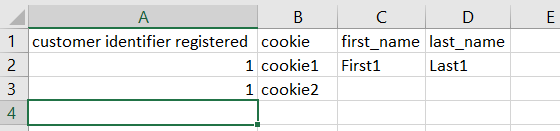
Import multiple cookies for one customer by using a separate identifier such as registered to pair the additional rows.
Each cell can only hold a single value. To import multiple cookies for one customer, use a separate identifier such as registered to pair the additional rows.
To update specific properties on existing profiles, include only the relevant columns in your import.
CSV requirements:
- Encoding: UTF-8 (also supported: UTF-16, cp1250–cp1258, latin1, iso-8859-2).
- Delimiters: space, tab, comma, period, semicolon, colon, hyphen, pipe, tilde.
- Escape character: double quote ".
- New line: CR LF (
\r\n). - Maximum file size: 1 GB.
- Maximum columns: 260.
- Recommended maximum rows per file: 1,000,000.
- HTTPS endpoint with SSL certificate signed by a trusted CA (trusted CA list).
- HTTP Basic Authentication per RFC 2617.
- CSV format per RFC 4180.
- Transfer speed must allow the full file to download within 1 hour.
Working with XML
XML is supported for all import types via copy-paste, file upload, URL, or file storage (SFTP, Google Cloud Storage, Amazon S3, Azure). It's commonly used for product catalogs in ecommerce.
XML stores data in a tree structure using nested elements. Because the platform supports only flat structures for imports, XML data is automatically flattened during import. For more on XML syntax, see the W3Schools XML guide.
Example XML structure:
<bookstore>
  <book category="cooking">
    <title lang="en">Everyday Italian</title>
    <author>Giada De Laurentiis</author>
    <year>2005</year>
    <price>30.00</price>
  </book>
</bookstore>
This is how XML code renders in the app.
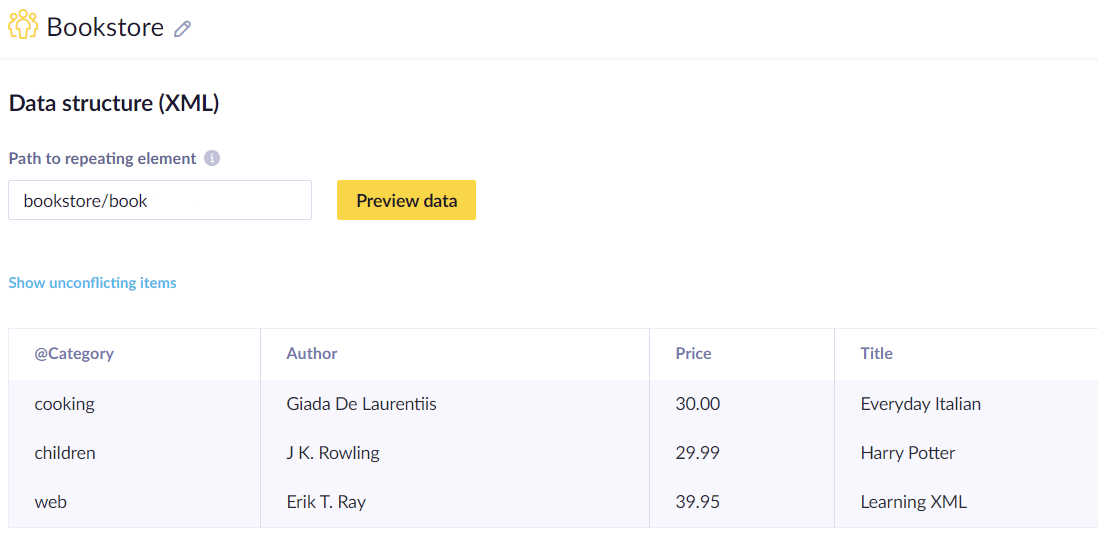
XML data is automatically flattened during import to match the platform's flat structure requirement.
Schema detection scans only the first 128 KB of an XML file, so elements that appear only later in the file won't be available in the mapping UI. For large files, ensure all elements you want to map appear near the beginning.
Updated 3 months ago