

Funnels: Technical reference
This page covers how funnel calculations work in Bloomreach, including step ordering, customer counting, time interval behavior, and filter logic.
For guidance on building and using funnels, see Create and customize a funnel analysis.
How funnels are calculated
Funnels take a sequence of steps—each defined as an event—and calculate how many customers completed each step in the defined order.
Loose order
Customers must complete funnel steps in the order you define, but they don't need to do so without interruption. They can perform other actions between steps, as long as they complete the required steps in sequence. This is called loose ordering.
Example
Consider a funnel with five steps in this order: A > B > C > D > E.
- A customer who does
A > B > C > D > Ein exact order is counted in every step. - A customer who does
A > B > F > C > D > Eis also counted in every step. The extra eventFbetweenBandCdoesn't affect the result under loose ordering. - A customer who does
A > B > C > Eis counted in the first three steps only. Because they skippedD, they don't qualify for stepDor stepE— a customer must complete each step before moving to the next. - A customer who does
A > B > C > E > D > Eis counted in every step. They completed stepEbefore stepDthe first time, but later completedDand thenEagain. Under loose ordering, the full sequence is satisfied.
Unique customers, not event totals
Funnels count customers, not events. The number shown for each step is the number of customers who completed that step—not the total number of times that event occurred. Even if a customer completes the funnel multiple times, they're counted only once per step.
Example: Consider a funnel with 3 steps: A > B > C. A customer who does A > B > C > A > B > C is counted once in each step.
How time intervals affect funnels
By default, the time interval filter is off and funnels are calculated across the full tracking history.
When you turn on the time interval filter, you limit the window within which a customer must complete all the steps. Only events that fall within the selected time interval are counted.
Example: Consider a funnel with two steps: A > B. With a 30-day time interval filter applied, only customers who completed both steps within the last 30 days are counted. If step A happened more than 30 days ago, the customer isn't counted — even if step B happened within the window.
Logical operators in funnel filters
Funnel filters use AND and OR logical operators. Understanding how they interact is important for building accurate filters.
AND requires both conditions to be true. OR requires at least one condition to be true. The truth table below shows all combinations:
| A | B | A OR B | A AND B |
|---|---|---|---|
| True | True | True | True |
| True | False | True | False |
| False | True | True | False |
| False | False | False | False |
AND always takes priority over OR. In the expression A OR B AND C, the B AND C part is evaluated first, making the full expression equivalent to a OR (b AND c). To give OR priority over AND, use parentheses: (A OR B) AND C.
Filtering logic is based on De Morgan's laws, where ≡ means "identical to":
NOT (A AND B) ≡ NOT A OR NOT BNOT (A OR B) ≡ NOT A AND NOT B
The diagram below illustrates a complex expression and the order of logical operations.
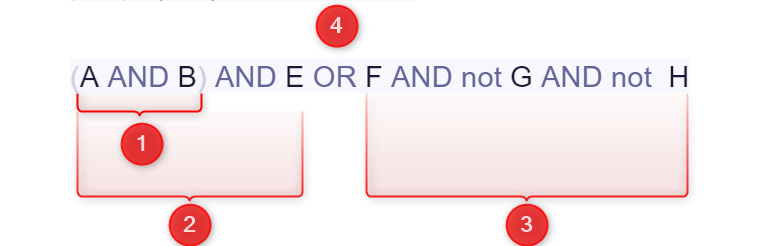
A complex logical expression showing the order in which AND and OR operators are evaluated.
Updated 3 months ago