

Scenario triggers
Triggers determine when a scenario streams customers. Each trigger serves a different purpose, so select the one that matches your campaign timing. Learn about the trigger types, the events that don't trigger scenarios, and how to reset and combine triggers.
Parallel triggersIf you use multiple triggers in one scenario, such as
On eventandOn date, they process in order. The second trigger waits for the first to finish completely. For parallel triggers, consider using separate scenarios.
| Trigger | Description |
|---|---|
| API trigger | Starts the scenario when an external system sends a signal about a real-world event, such as a sports team winning, a weather alert, or a back-in-stock product. Learn how to set up an API trigger. |
| Now | Streams all customers immediately after execution. Becomes inactive after use in a live scenario. To reactivate it, reset the trigger. |
| On date | Streams customers at a specific date and time. Uses the time zone from Settings > User settings > Time zone. |
| On date attribute | Launches campaigns based on customer or event dates, such as birthdays, purchase anniversaries, or subscription renewals. Controls timing, recurrence, and delivery down to specific hours and time zones. Learn how to set up an On date attribute trigger. |
| On event | Streams one customer every time a specific event is tracked. |
| Repeat | Streams customers repeatedly based on time conditions. Set daily, weekly, or monthly runs, and specify when the scenario stops repeating. |
Trigger guides
Some triggers have their own setup guides:
- API trigger: Send personalized communications to targeted groups of customers based on external events, such as a sports team winning, a weather event, or a back-in-stock product.
- On date attribute trigger: Automate date-based campaigns around key customer milestones, such as birthdays, purchase anniversaries, or subscription renewals.
Trigger limitations
- Some events and nodes don't trigger scenarios.
- Too many
On eventtriggers can also cause performance issues. Learn more in Troubleshoot scenarios.
Campaign event statuses
Certain campaign event statuses don't trigger scenarios when used in the On event node. Don't use them as triggers in your scenarios. Those statuses include:
enqueuedenqueue_failedsentfailedsuppressed
Importantly, campaign events that don't have a status attribute altogether, such as A/B tests, will also not trigger a scenario.
Other events and nodes
These events and nodes also don't trigger scenarios:
-
mergeevents -
consentevents generated by manual updates in the web UI. Such events haveCRMin the source attribute. -
Add eventnodes, unless you select Allow scenario triggering. -
Ad audiencenodes withadd_customersandremove_customersoperations -
Ad audience nodes with the
remove_customers_from_all_custom_audiencesoperation.
On event trigger limitations
- You can't use Jinja in an
On eventtrigger. - You can't define an
On eventtrigger with derived attributes, such as running aggregates, expressions, or event segmentations. To use an event segmentation, add aConditionnode right after theOn eventtrigger and apply the event segmentation there. - If you use "event attribute is
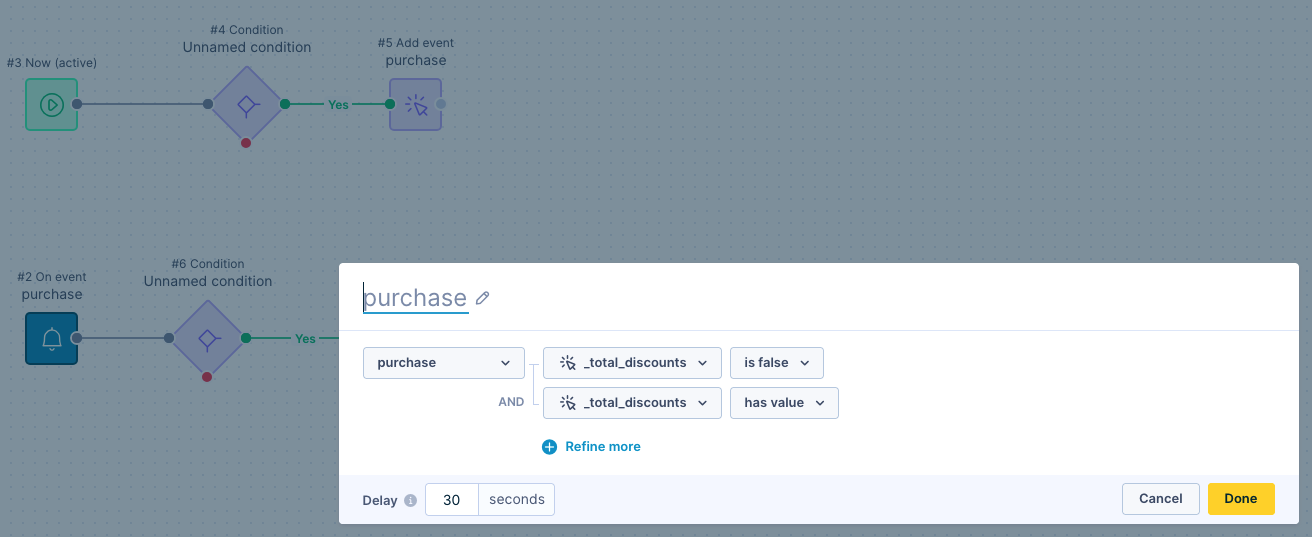
false," also add "event attributehas value". This makes the system check that the attribute exists before it evaluates it. Without the has value condition, the system treats attributes that don't exist as false.
Example: You set up 2 scenarios. The first scenario sells your product. The second scenario uses an On event trigger, and you want to exclude customers who bought your product with a discount. To exclude them, set the event attribute discount to false and add discount with has value.
You can't preview scenarios that start with an On event trigger. For a workaround, see Preview your scenario before launch.
Reset triggers
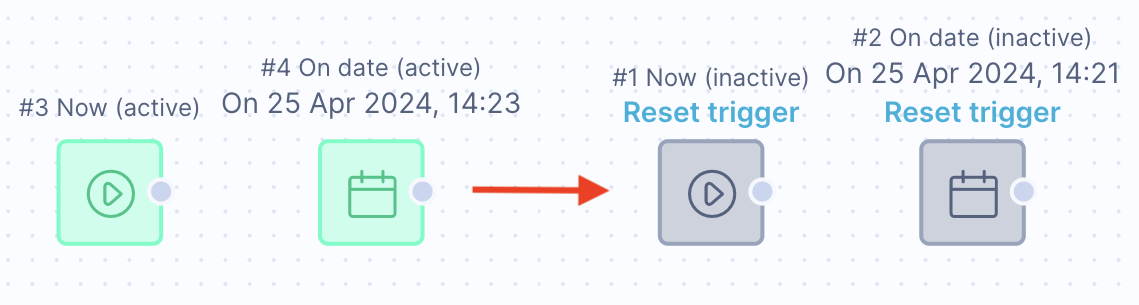
Now and On date triggers become inactive after use. To reactivate them, use Reset trigger.
Updated about 1 month ago