

Divisions
Divisions for region and brand access
Divisions let you split a single project into scoped slices — one per region, brand, or team — instead of managing a separate Bloomreach project for each. Each division sees only the customers, campaigns, and reports that belong to it, while your global team keeps full visibility across all of them.
What is a division?
A division is an access-scoped slice of a single project, defined by a customer filter. Instead of separate projects per region or brand, one project holds all your customer data, and divisions act as internal boundaries on top of it.
There are two scopes:
- Global: unrestricted access to all data and assets in the project. This is where you manage anything meant to apply across every division.
- Division: restricted to the subset of customers matched by that division's customer filter — for example, everyone whose
regionattribute equalsDE.
This solution governs who can access which audience and assets — it doesn't localize content or handle language variance. It's built for organizations that can keep all their data in one project. If your organization needs strict legal separation between regions or brands, keep using separate projects instead.
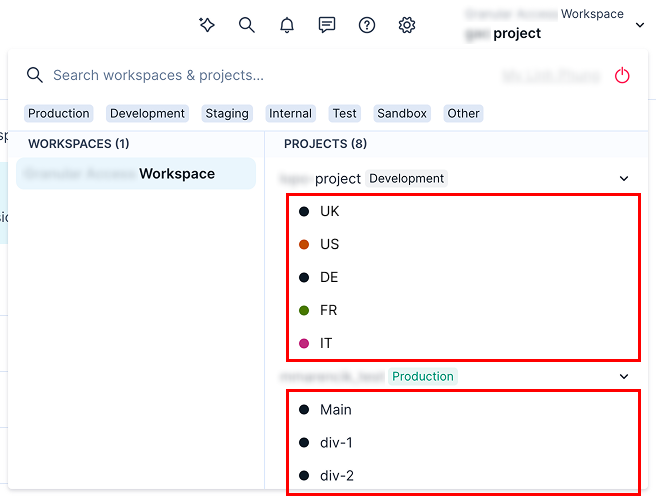
How divisions work
- An admin defines a customer attribute that determines which division a customer belongs to — for example, a
regionorbrandattribute set during import or by your own systems. - The admin creates a division and sets its customer filter based on that attribute (see Create a division and assign users).
- Users are assigned to the global scope or to one or more divisions, with a role that determines what they can do — divisions support campaign and analytics roles (see Create a division and assign users and Role-based access management for how roles work generally).
A user assigned to:
- A division sees and can edit only that division's own customers, campaigns, segments, and reports. Campaigns created at the global level appear in the division automatically, prefiltered to that division's audience, but remain read-only there.
- The global scope sees every division's entities, but can only edit the ones created at the global level — division-created entities stay read-only from the global scope.
Filtering is enforced at the data level, not just hidden in the interface — a division user's scenarios, reports, and customer lists only ever operate on their division's data.
Keep customer routing attributes accurate
Bloomreach routes each customer into a division based solely on the attribute you configure in its customer filter, and keeps using that attribute as the single source of truth over time.
For example, if a customer is filtered into a "Brand A" division based on a brand attribute, and that customer later interacts with Brand B, your Brand B team won't see that customer until the attribute is updated to reflect it. Set up your customer filter and your data pipeline with this in mind, and communicate it to anyone administering divisions.
Limitations
Access and security
- API keys operate at the global scope only. A key always has access to every division's data; there's no division-scoped API key.
- Transactional APIs aren't scoped by division. Direct transactional email/SMS API calls that target a specific customer aren't filtered by division — the caller is assumed to already know who they're messaging.
Campaigns and content
- Cross-division campaign execution isn't supported.
- Divisions apply within a project, not to every surface. Web personalization and in-app messages continue to serve based on your existing targeting; the customer filter that defines a division doesn't automatically restrict who can see a weblayer or banner.
- Initiatives aren't supported within divisions yet. An initiative and its contents stay at the project level.
Filtering and audience
- A customer can belong to only one region or brand value. Multi-region or multi-brand customers (an array-valued attribute) aren't supported.
- Mid-scenario removal is silent. If a customer's routing attribute changes while they're partway through a scenario, they're dropped from the scenario at the next evaluation point, with no separate exit path or notification.
Setup and management
- Division deletion and duplication aren't supported.
- Division-level data export isn't supported.
- No per-division consent pages — consent pages are configured at the global level only.
- Once you save the division, its customer filter can't be edited or removed.
Updated about 19 hours ago