

Ready to use recommendation templates
Ready to use templates produce recommendations through transparent, rule-driven logic. They're ready to serve as soon as you save them, with no training period.
PersonalizationRecently viewed is a ready to use template that generates personalized recommendations based on selected customer events.
Choose a ready to use template when you want predictable behavior based on item attributes, popularity, or specific filters—or when your catalog doesn't have enough data to train a machine learning model.
NoteEach template uses a single engine. To combine multiple engines to cover your business needs, use the Combined template.
Ready to use templates quick overview
The following templates are based on rules:
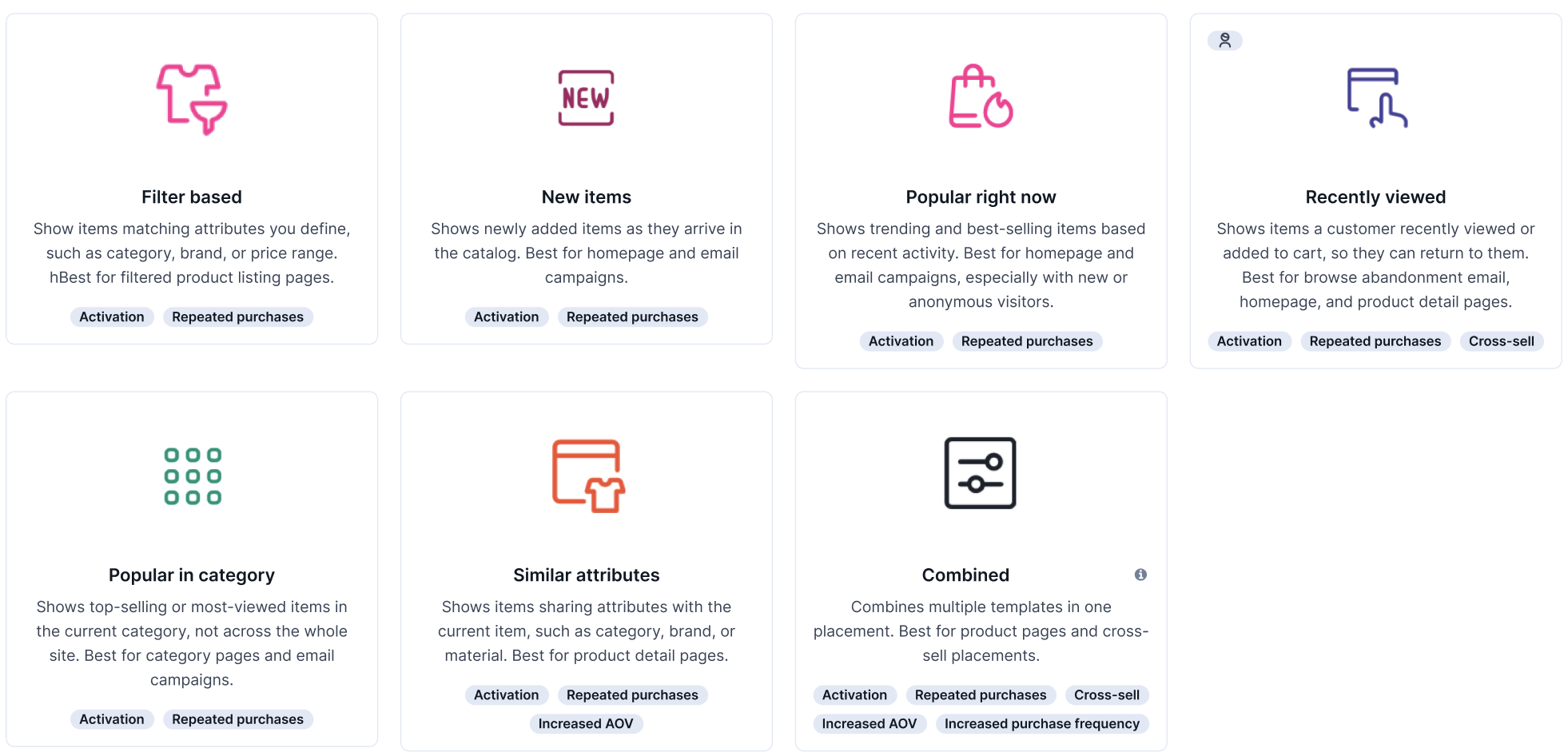
| Template | Use it for |
|---|---|
| Filter based | Curated collections where you control scope—seasonal edits, clearance, brand spotlights. |
| New items | Recommendations blocks with recently added items when freshness matters—new arrivals, seasonal launches, or weekly restocks. |
| Popular right now | Best-seller and trending blocks on homepage, category, or product detail pages. |
| Recently viewed (previously Customer recent interactions) | "Pick up where you left off" and recently viewed recommendations blocks. |
| Popular in category (previously Metric-based category) | Recommendation blocks with top performers within a specific category—for example, best-sellers in women's shoes. |
| Similar attributes (previously More like this) | Recommendations blocks with alternatives on a product detail page based on shared attributes like style, color, or brand. |
| Combined (previously Advanced) | Recommendations blocks that combine multiple signals—for example, a personalized top slot with a popularity fallback. |
Ready to use templates support the following merchandising operations:
- Block list: exclude items by event or item ID
- Pin items: reserve fixed positions for specific items or attribute matches
- Dynamic filters (support varies per template): narrow the item set based on the customer or the reference item
- Customer preferences: reorders results by per-customer attribute preferences
Filter based
Filter based is a non-personalized template that returns items matching your catalog filters. The items are randomly sampled and refreshed every 60 seconds to limit load on the underlying search index.
| Personalized | No |
|---|---|
| Recommended placement | Any |
Configuration
| Required configuration | Catalog, catalog filters |
|---|---|
| Required events | N/A |
| Dynamic filters (optional configuration) | Not supported. Filters can’t be applied via the UI or API for this template. The dynamic catalog filter from the get-recommendation request is ignored. |
| Request parameters | customer_id (optional) |
| Data prerequisites | Catalog |
| Fallback logic | N/A—random filter matching is the fallback for other engines |
Example use cases
- Homepage: show all winter jackets tagged "new season" on a freshly launched apparel store
- Category page: rotate items tagged "staff pick" in a featured slot on an electronics accessories page
- Weblayers: display a "sale items" banner on the homepage using only a discount tag, no personalization required
- Email: populate a "featured products" block in a welcome email for a new subscriber
New items
New items is a non-personalized template that promotes the newest products in your catalog. Items are sorted in descending order of a selected field (date, datetime, or numeric). Catalog filters narrow which items are eligible, and optional customer-context filters can further shape results.
| Personalized | No |
|---|---|
| Recommended placement | Homepage, newsletter, category pages |
Configuration
Catalog requirementsCatalog must contain a date, datetime, or any numerical column representing when the item was added. If the selected column is a string, the engine displays random items, not newest-first.
| Required configuration | Catalog, date added |
|---|---|
| Required events | N/A |
| Dynamic filters (optional configuration) | Supported |
| Request parameters | customer_id (optional) |
| Data prerequisites | Catalog with date-added field |
| Fallback logic | Missing numerical column representing date added → falls back to random filter matching. |
Example use cases
- Homepage: keep a "just landed" carousel updated automatically as new sneakers are added to the catalog
- Category page: show the latest arrivals at the top of a "women's dresses" category page
- Newsletter: send a weekly "new this week" email that auto-populates with whatever entered the catalog in the last 7 days
Popular right now
Popular right now is a non-personalized template used to surface top-selling or top-viewing products. It shows items sorted by the count of a selected event (typically purchase_item or view_item), recalculated every 12 hours.
| Personalized | No |
|---|---|
| Recommended placement | Homepage, category, product detail pages, email |
Configuration
| Required configuration | Catalog, learning window |
|---|---|
| Required events | Metric event (purchase_item / view_item) |
| Dynamic filters (optional configuration) | Not supported in the UI, available via API |
| Request parameters | customer_id (optional) |
| Data prerequisites | Catalog and mapped metric event |
| Fallback logic | Sorting data is unavailable or no items match filters → falls back to random filter matching. |
Example use cases
- Homepage: show the 10 most purchased items this week to a first-time visitor who has no browsing history
- Category page or product detail page: surface the top 5 most viewed laptops on a computing category page
- Email: anchor a re-engagement campaign with "here's what everyone's buying right now"
Recently viewed
Recently viewed is a personalized template used to recommend items the customer recently interacted with, sorted from most recent to oldest.
| Personalized | Yes, based on customer history |
|---|---|
| Recommended placement | Email (abandon cart/browse), weblayers, onsite |
Configuration
| Required configuration | Catalog, learning window |
|---|---|
| Required events | One of the following customer interaction events: view_item, purchase_item, or cart_update |
| Dynamic filters (optional configuration) | Supported |
| Request parameters | customer_id (mandatory) |
| Data prerequisites | Catalog and event tracking |
| Fallback logic | Viewed history returns fewer items than requested → remaining slots are filled randomly. |
Example use cases
- Email: send a browse abandonment email showing the 3 pairs of shoes a shopper looked at yesterday but didn't add to cart
- Weblayers: show a "still thinking about these?" slide-in when a returning visitor lands on the homepage
- Website: display a "pick up where you left off" row on the cart page showing items viewed earlier in the session
Popular in category
Popular in category is a non-personalized template used to surface top-selling items within selected categories on category or product detail pages. It shows items only from the given categories, sorted by the chosen metric, such as purchases, views.
Pre-computation covers the first 1,000 most popular categories, with up to 500 items per category. Catalog filters (static and dynamic) are applied as post-filters, so restrictive filters may significantly reduce the number of results returned. Items are then re-computed every 12 hours.
| Personalized | Yes |
|---|---|
| Recommended placement | Category pages, product detail pages (category context) |
Configuration
NoteChanges to settings need time to fully reflect—if you require an immediate change, create a new recommendation.
| Required configuration | Catalog, learning window |
|---|---|
| Required events | Metric event with category names attribute |
| Dynamic filters (optional configuration) | Not supported |
| Request parameters | categoryNames (mandatory, max 10 categories) |
| Data prerequisites | Catalog, event tracking, mapped category attribute |
| Fallback logic | No category purchase history exists → falls back to Popular right now. History is available but returns fewer items than requested → remaining slots are filled randomly. |
Example use cases
- Category page: show the 10 best-selling coffee machines on a "kitchen appliances" category page
- Product detail page: surface the top 3 most purchased running shoes on a product page for a specific Nike model
Similar attributes
Similar attributes is a non-personalized template that finds items similar to a reference item — typically the one a customer is currently viewing — based on shared catalog properties such as color, brand, or category.
| Personalized | Item-based |
|---|---|
| Recommended placement | Product detail pages, email follow-up, onsite alternatives |
Configuration
| Required configuration | Catalog |
|---|---|
| Optional configuration | Exact match attributes, optional attributes |
| Required events | N/A |
| Dynamic filters (optional configuration) | Only item context dynamic filter supported |
| Request parameters | items (mandatory) |
| Data prerequisites | Catalog with matchable attributes |
| Fallback logic | Insufficient matches are returned → falls back to random filter matching. |
Example use cases
- Product detail page: suggest other blue linen shirts from the same brand when a shopper is viewing one that's out of their size
- Email follow-up: send a "you might also like these" email featuring jackets in the same style and price range as one a customer viewed but didn't buy
- Website: show a "more like this" block with sofas in the same color and material when a shopper lingers on a product page without converting
Combined
Combined is a container template used to combine several engines into one recommendation with positions and priorities. It’s used when no other template fits your use case. Assign engines to positions and define how many items each engine contributes, for example:
- First three positions: best sellers
- Next three: customer recent interactions
- Last three: personalized for the customer
Combine any of the following engines within an Combined template:
- Chosen by metric
- Manual selection
- New items
- Recently viewed
- Personalized for you (History-based)
- Similar attributes
- Similar descriptions
NoteManual selection and Chosen by metric aren't standalone templates—they're available only within the Combined template as sub-engines.
| Personalized | Depends on selected engines |
|---|---|
| Recommended placement | Any—blended slots (for example, 3 popular and 3 personalized) |
Configuration
| Required configuration | Catalog, recommendation models, select combination strategy |
|---|---|
| Required events | Depends on selected engines |
| Dynamic filters (optional configuration) | Depends on selected engines |
| Request parameters | Depends on selected engines |
| Data prerequisites | Depends on selected engines |
| Fallback logic | Depends on selected engines |
Example use cases
- Homepage: show 3 manually pinned promotional items followed by 7 personalized recommendations—guaranteed visibility for hero products while filling remaining slots with relevance
- Category page: blend the 3 newest arrivals in a category with 7 top sellers to surface fresh stock without sacrificing proven performers
- Product detail page: fill a 10-item carousel with 4 similar attribute matches and 6 personalized picks — covering both Similar attributes and Recently viewed templates in a single block
- Email: combine 2 manually selected hero products with 8 personalized recommendations to keep brand control over key slots while letting the model fill the rest
- Weblayers: show a "picked for you" overlay that blends recently viewed items with personalized suggestions to re-engage a returning visitor in a single slot
Updated about 2 months ago