

How to use Ranking studio
This is a Premium tier feature powered by Loomi.
This guide covers how to use the Ranking studio application.
Prerequisites
-
Knowledge: Review the Ranking studio guide for an application overview.
-
Permissions: Your Users Admin must assign you the Recall and ranking studio editor permission to access the Ranking studio.
-
Custom data signals: To use custom signals, send custom data attributes configured as numeric and facetable (dynamic or manual) at the product (PID) level. Attribute names can contain only alphanumeric or underscore characters (a-z A-Z 0-9 _) and can't start with a digit. Review the best practice guidelines.
-
Pixel data accuracy: Ensure that your pixel data is high-quality and sent in the required format. ABR learns from this behavioral data. Without enough quality data, a catalog can't train its own algorithm and stays on a fallback data algorithm.
Navigate to Ranking studio
Go to AI studio > Ranking studio > Site search ranking algorithm to view and manage search ranking.
Go to AI studio > Ranking studio > Category ranking algorithm to view and manage category ranking.
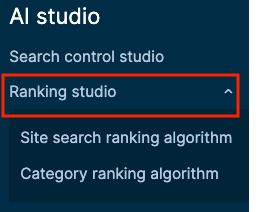
Ranking studio overview
The Ranking studio application has two tabs:
Algorithms
Lists all algorithms available for the selected catalog, with their status and last-modified date.
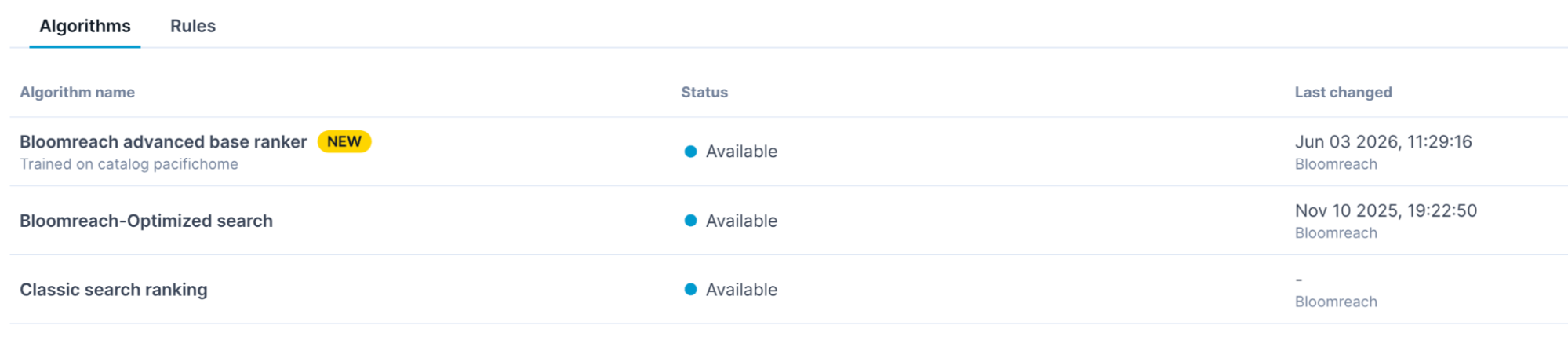
Advanced base ranker
The advanced base ranker (ABR) is a base ranking algorithm for keyword and category search. It learns signal weights from your catalog's behavioral data and applies them across all your catalogs after training completes.
Business use cases
- Improve ranking using merchant-specific shopper behavior signals like clicks, add-to-carts, and purchases.
- Optimize for business outcomes such as revenue per visit (RPV) while preserving relevance.
- Introduce custom business signals into ranking through custom ABR algorithms.
- Use merchandising rules for specific ranking outcomes, while ABR shapes broader ranking behavior across queries or categories.
Classic search ranking
The default base ranking algorithm. Uses a fixed set of signals with fixed weights. Classic Ranking is read-only, you can't edit signal weights.
Bloomreach-Optimized search
An ML-based algorithm trained on global catalog data. Computes the weights of each signal by analyzing the global catalog data.
NoteClassic search ranking and Bloomreach-Optimized search are legacy algorithms and will be discontinued in the future. Bloomreach will keep you updated on the discontinuation timeline.
Algorithm statuses
| Status | What it means |
| In use | Serving traffic for this catalog. |
| Available | Trained and ready to deploy. Not yet serving traffic. |
| Syncing | Algorithm weights sync is in progress. |
| In training | Algorithm training is in progress. |
Rules
Shows the active algorithm rule for all queries and lets you apply algorithms, set up A/B tests, or roll back to a previous algorithm. Use the Catalog dropdown to switch between catalogs.
Customize ranking
Ranking studio provides an application interface for customizing and testing newly created ranking algorithms:
1. Machine learning (ML-powered) algorithm
- Choose an ML algorithm as the source algorithm to clone ranking signals.
- Add the custom signals on top of the cloned signals.
- When you start ML training, the algorithm learns the signal weights with the training framework.
- Upon training completion, view, test, and apply algorithm results to all or select queries (or categories).
2. Catalog-specific ML algorithm
- Create a distinct source ML algorithm that learns specifically from a catalog.
- When you start ML training, the algorithm learns only from the selected product catalog and user traffic data.
- Upon training completion, view, test, and apply algorithm results to all or select queries (or categories).
Business use case: Leverage high-quality custom signals in catalog-specific trained algorithms with minimal effort.
3. Custom algorithm
- Clone the signals from a source ML algorithm trained on a specific catalog, and choose the signal weights.
- Loomi syncs the custom weights.
- View, test, and apply algorithms to all or select queries (or categories).
Business use case: Get fine-grained control of the ranking signal weights. Ideal when you have a dedicated in-house data science team that can provide comprehensive data insights to optimize the signal weights.
All these strategies are covered in the respective guides.
Guides for legacy versus advanced base ranker (ABR) ranking algorithms
If you’re using ABR, follow the guide to Customize search ranking with ABR or Customize category ranking with ABR.
If you’re using legacy algorithms (Classic ranking and Bloomreach-Optimized search) or want to customize category ranking, follow the guide to Customize legacy ranking.
Updated about 2 months ago