

Global rules
This guide explains how to view, configure, and A/B test global algorithm settings in Search control studio.
Prerequisites
- Permissions: Ensure that you have the required permissions.
- Knowledge: Review Search control studio before configuring global rules. That guide provides an overview of the available search options.
Global rules overview
Under the Global rules tab, view the current settings enabled for all your language-specific catalogs and sites. Use the Column selection dropdown to show or hide any of the following columns:
- Influence: The scope of search settings. At the account level, you can see algorithm settings for language-specific catalogs and sites. If you have access to only one site, you can update the settings for that site only. Rules with a different site influence are indicated with a Read-only tag.
- Search options: The current search settings.
- Variants: The rule variants for the A/B test.
- Enable: Read-only enable toggle.
- Last changed: The date, time, and name of the last editor.
Customize global rules
1. View global algorithm settings
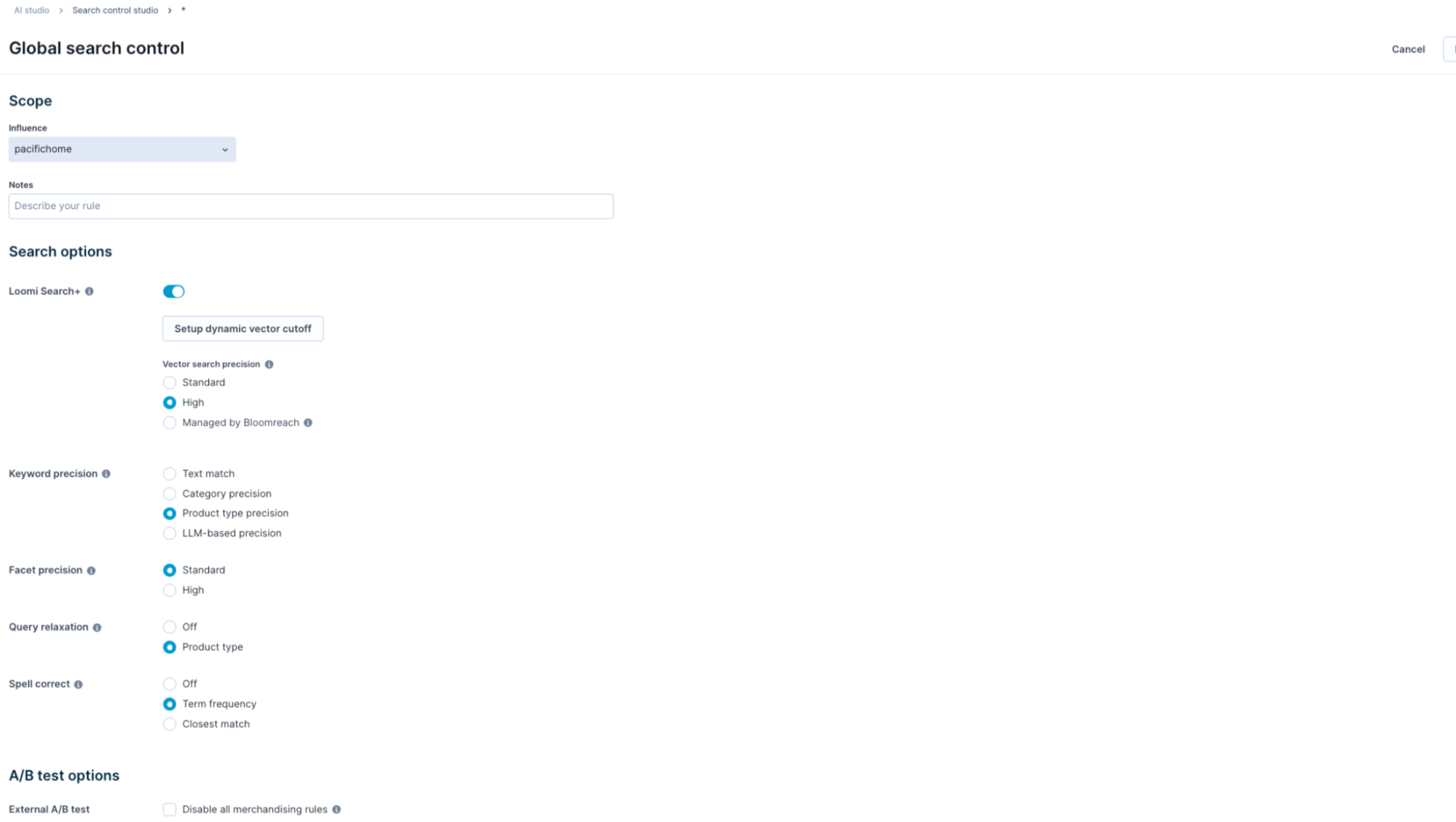
To view and edit global algorithm rules, hover over the global rule and click Edit. This opens a configuration screen with controls for the available search options.

In multi-site accounts, the Associated sites section shows the site scope based on the selected influence:
- For catalog-level rules, all sites powered by that catalog are shown.
- For site-level rules, the specific site in scope is shown.
2. Select and preview algorithm settings
-
Select the desired algorithm setting using the dropdown controls.
-
Add an optional Note to describe your rule.
-
Click Preview to view the results with the new algorithm settings.
-
Enter a query in the search box and press Enter/Return to see results with the updated configuration. The following table explains how facet and facet value changes appear in the preview UI:
| Tag | What it means |
|---|---|
| No change indicator | No change in facet or facet value position. |
| Up indicator | The facet or facet value is ranked higher than before. |
| Down indicator | The facet or facet value is ranked lower than before. |
| New tag | A new facet introduced after changing the algorithm settings. |
-
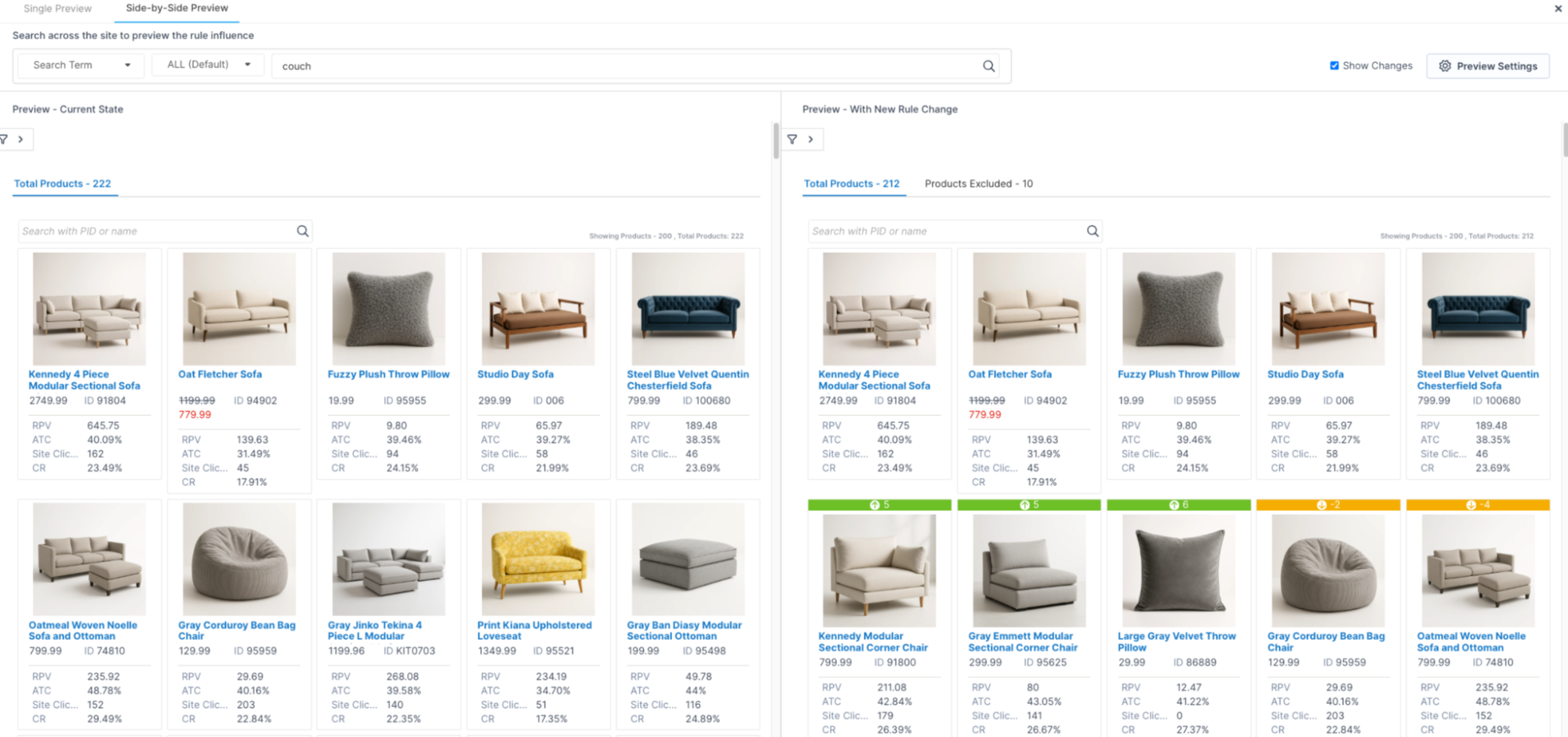
For further exploration, go to the Side-by-side preview tab and select the Show changes checkbox. View the excluded products (noise) and compare results with the current state. This helps you determine if the new algorithm settings work for your use case.
-
To preview facet precision changes, click the filter icon to reveal all facets. From the Total facet dropdown, select Excluded facets to view the facet noise removed from results.
-
If you enter a misspelled query, results display after the system applies spell correction. For example, the query
bateryis corrected tobattery.
3. Apply rule globally
Once you're satisfied with the results, click Save to enable the global rule for all queries.
Conflict resolution
Review the conflict resolution order in the Search control studio guide.
A/B test global algorithm rules
A/B test via dashboard
-
Edit the global rule and make the changes required for the new test variant.
-
Click the down arrow button and click Save new variant.

-
After variant creation, open the Rule variants modal using the variants icon.

-
Toggle ON the variants to include in the test and click Set up new test.
-
The Test setup page opens. Configure the test and click Save & start test.
-
The test is now active. The global rule displays an In testing status.
NoteOptionally, turn off all currently active and future merchandising rules for the selected catalog or site by selecting the checkbox in the External A/B test section. No alerts appear on the ranking rules page if another user tries to create new rules while merchandising rules are disabled.
A/B test via API
-
Copy the external A/B testing URL from the External A/B test section. Use this URL to run and manage the A/B test via your third-party testing platform. Replace
QUERY_PLACEHOLDERwith your query before making the request. -
This is a self-managed A/B test. The parameters are controllable through the front-end API call.

Updated 6 months ago