

Understand grouped results
If you are a Group merchandising customer, use the Product grid insights application to understand grouped recall, ranking, and the ranking of products within groups.
View grouped search results
-
After running a search, check the Group-by checkbox and choose a grouping attribute from the dropdown.

-
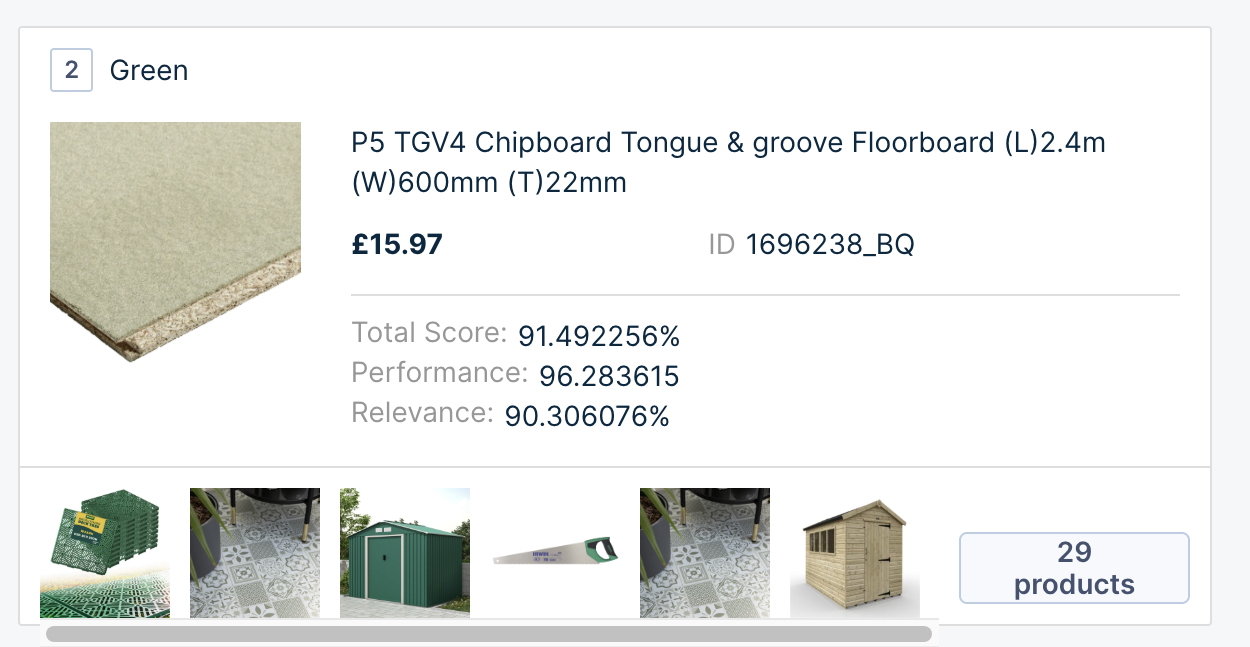
This shows a grouped recall for the query, product ID, category name, or category ID. Each group card displays:
-
Group attribute value. For instance, Texture: Soft.
-
Top product of the group and product data like title, price, and product_id.
-
Total score, performance score, and relevance scores of the best-performing product of the group.
Future improvementOn the Product grid insights page, you may see Synonyms from a previously searched query for a group rule. We will improve this in an upcoming release.
-
Understand ranking of groups
Groups are ranked based on the score of the best-performing product.
Impact of merchandising operations on group ranking
Groups are ranked based on the score of the best-performing product.
Operations applied to groups
- Group operations take the highest precedence. Suppose there is a group A ( with Product1, Product2 ) and group B (with Product3, Product4 ). Considering the top-performing products, If Product1 has a score of 50 and Product3 has a score of 60, group B is ranked first by default.
| Rank | Group | Products with scores |
|---|---|---|
| 1 | Group B[default] | Product3 - 60 Product4 - 12 |
| 2 | Group A | Product1 - 50 Product2 - 10 |
However, if you sequentially lock group A in position 1, it takes the highest precedence.
| Rank | Group | Products with scores |
|---|---|---|
| 1 | Group A[sequentially locked] | Product1 - 50 Product2 - 10 |
| 2 | Group B | Product3 - 60 Product4 - 12 |
- The same applies to Group boost/bury. Group block will impact the recall as well.
- Attribute-based rules: Attribute include or exclude rules impact the recall and group ranking. Attribute boost/ or bury rules also impact the group ranking.
Operations applied to products within the group
These operations only affect the ranking of products within a group. Boost/Bury/Sequential lock on products within a group will not change the group's ranking. Suppose group A is ranked in position 1, and group B is in position 2.
| Rank | Group | Products with scores |
|---|---|---|
| 1 | Group A | Product1 - 50 Product2 - 40 |
| 2 | Group B | Product3 - 45 Product4 - 35 |
If you boost Product4 and the new score is 100, there is no impact on the group ranking.
| Rank | Group | Products with scores |
|---|---|---|
| 1 | Group A | Product1 - 50 Product2 - 40 |
| 2 | Group B | Product4 - 100 [PID boost] Product3 - 45 |
In the case of a product blocklist, if the first product is blocked from the recall, it will impact the group's ranking.
View products in a group
Clicking on a group opens its products page, displaying all products within that group.
Understand how products rank within groups
- Products within the group are ranked based on descending total scores.
- The top-performing product of each group is usually placed first unless there's a merchandising rule to change the order of products in the group.
- The group card displays product-level merchandising operations, such as boost, bury, and so on.
View individual product details
Click on the individual product in the group to see detailed product information.
Updated 7 months ago