

Conversational agent analytics
This article guides you on how to use Conversational agent evaluation dashboards in the Use Case Center.
What are Conversational agent dashboards
Conversational agent dashboards offer a standardized way to evaluate how Conversational agent performs across your store. Instead of piecing together reports manually, you get a pre-built suite of 4 dashboards that help you measure Conversational agent's real impact on revenue, conversion, and customer behavior.
Prerequisites
-
User permissions: Ensure you have the Reports Editor and Dashboard Editor roles.
-
Data mapping: Configure data mapping and confirm that the required events are tracked in your project. Work with your Bloomreach representative to map the following events under Data & Assets > Data manager > Mapping:
-
view_item -
view_category -
purchase -
purchase_item -
cart_update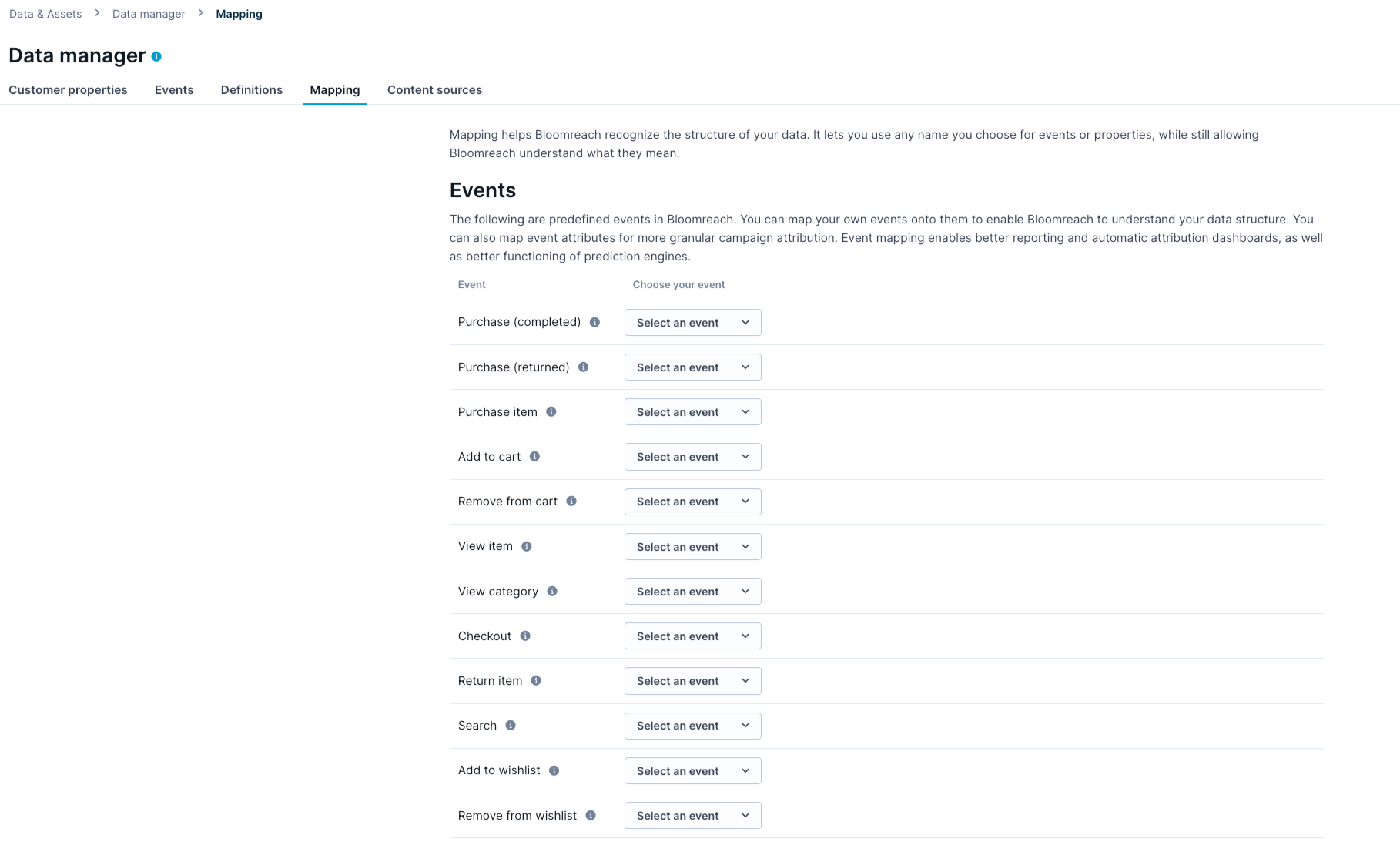
Configure data mapping
-
-
Access: To access evaluation dashboards, request your Bloomreach representative to enable them. Once enabled, the dashboards are visible under Use Case Center > Conversational agent Evaluation Dashboards.
-
Knowledge: Familiarity with concepts including metrics, segmentations, and running aggregates.
Dashboard types
The Conversational agent dashboard suite contains 4 dashboards. For a full list of metrics available across all dashboards, see Conversational agent dashboard metrics.
Global A/B results (session-level)
Business goal
Measure Conversational agent's overall revenue and conversion impact.
Description
NoteTo monitor the long‑term impact of Conversational agent, Bloomreach recommends maintaining a small global‑level holdout (around 5–10%) to continuously assess its performance over time. This holdout consists of traffic that never sees Conversational agent. Use this dashboard to track customer uplift in the Conversational agent variant compared to the Control group.
This is the primary dashboard for measuring Conversational agent's overall impact. It provides a session-level view of your global A/B test, comparing sessions where customers were exposed to Conversational agent against sessions in the control group, giving you direct insights into whether Conversational agent is driving more revenue and conversions.
This dashboard answers questions like:
- Is Conversational agent driving more revenue than the control group?
- How does the conversion rate compare between the Conversational agent and control group variants?
- Is Conversational agent performing differently on mobile versus desktop?
- How has attributed revenue trended over time?
- Is engagement with Conversational agent increasing or declining over time?
Key metrics
Key metrics include A/B test results by device, attributed ATCs, attributed orders, attributed revenue, attributed revenue over time, average order value (AOV), bounce rate, Conversational agent coverage, conversion rate (CR), CR over time, engagement rate over time, PDP views per session, PLP views per session, revenue per visit (RPV), RPV over time.
Global A/B results (customer-level)
Business goal
Understand how Conversational agent affects individual customer outcomes.
Description
This dashboard provides a customer-level view of the same global A/B test rather than a session lens. It counts unique customer profiles, illustrating how Conversational agent affects individual customers across their full journey through Conversational agent’s visibility and interaction, to an attributed purchase.
Use this dashboard to understand customer-level outcomes. This dashboard answers questions like:
-
What proportion of customers who saw Conversational agent went on to purchase?
-
Does Conversational agent perform better for new, returning, or loyal customers?
-
How many customers were exposed to both Conversational agent and the control group variants?
-
How many customers who engaged with Conversational agent return and engage again in a later session?
NoteSessions differ from customers: a session is a single website visit, while a customer profile merges all customer sessions into a single profile, including sessions from different devices and browsers.
Profiles identified as mixed customers are the merged sessions that were exposed to both the Conversational agent and Control group variants.
Key metrics
Key metrics include average order value (AOV), conversion funnel, customer conversion rate, drill-down by device, drill-down by loyalty, mixed variant customers, orders per customer, re-engagement funnel, and revenue per customer.
Use case A/B results (session-level)
Business goal
Evaluate the performance of a specific Conversational agent placement.
Description
This dashboard lets you filter the session-level A/B test results to a specific Conversational agent use case. It uses the same structure as the global session-level dashboard but scopes the analysis to sessions where that use case was active.
Use this dashboard to identify which placements are driving the most impact and which may need adjustment. This dashboard answers questions like:
- Is the PDP use case outperforming the PLP use case?
- Which use case is responsible for the conversion uplift seen globally?
- Should you prioritize one use case placement over another?
- Is engagement with this use case increasing or declining over time?
NoteFor overall (aggregated) impact across all Conversational agent use cases, always use the global session‑level dashboard as your single source of truth for metrics such as revenue uplift, conversion rate, and revenue per visit.
The use case dashboards (for example, PDP, PLP, Search) are not additive. A single session can trigger multiple use cases, so the same order or revenue can appear in more than one use case view. If you add up results across use cases, you will double‑count sessions, orders, and revenue. Use these dashboards to compare and optimize individual use cases, not to calculate the total impact.
Key metrics
Key metrics include A/B test results by device, attributed ATCs, attributed orders, attributed revenue, attributed revenue over time, average order value (AOV), bounce rate, Conversational agent coverage, conversion rate (CR), CR over time, engagement rate over time, PDP views per session, PLP views per session, revenue per visit (RPV), RPV over time.
Global feedback and insights
Business goal
Understand customer satisfaction and interaction patterns.
Description
This dashboard captures qualitative and behavioral signals, that is, how customers feel about Conversational agent and how they interact with it. It tracks satisfaction scores, thumbs up/down reactions, conversation patterns, and commercially relevant signals like which product categories appear most in Conversational agent-attributed purchases.
Use this dashboard when you want to go beyond revenue numbers and understand the customer experience. This dashboard answers questions like:
- Are customers satisfied with Conversational agent's responses?
- Are customers clicking on products Conversational agent recommends, or mostly typing freeform questions?
- Which products and categories get the most attention from customers interacting with Conversational agent?
- Is Conversational agent engaging customers more on product detail pages or product listing pages?
NoteConversational agent collects customer feedback by default in two ways:
- Message reactions: Customers can react with a thumbs-up or thumbs-down on specific messages.
- Interaction rating: When customers close a chat, Conversational agent prompts them to rate the interaction on a scale of 1 to 5, with an option to provide open-ended feedback.
To disable feedback collection, contact your Bloomreach representative.
Key metrics
Key metrics include:
- Satisfaction and feedback: CSAT, number of CSAT submissions, open feedback, thumbs-up/thumbs-down reactions.
- Latency: Conversational agent latency, Conversational agent load latency.
- Interaction and engagement behavior: Interactions over time, exit funnel, engagement rate by PDP, engagement rate by PLP, user response type, user intent breakdown.
- Top-performing content & revenue attribution: Top actions, top conversation starters, top revenue categories, top revenue products, drill-down products, drill-down category.
Custom dashboards
Conversational agent offers 4 default dashboards that deliver a holistic view of its performance. Optionally, Bloomreach encourages you to learn more about analytics and create additional custom evaluation dashboards. Developing custom dashboards allows for:
- Tailoring analytics specifically to your needs and Conversational agent deployment.
- Diving deeper into the findings reported in the default dashboards.
- Performing more advanced analytical exploration.
Updated 17 days ago