

Customize chat widget
This article introduces you to customizing the Conversational agent chat widget.
Shoppers browse products differently on every storefront. Widget customization lets you align Conversational agent's product carousel, product cards, and mini PDP with your brand and provides shoppers with a consistent experience.
Customizations available
-
Add-to-cart: Show an add-to-cart button on product cards, in the carousel, and in the mini PDP, and control what happens when a shopper clicks it.
-
Button visibility per product: Hide the add-to-cart button on specific products, such as items that are out of stock or marked "coming soon."
-
Product carousel and product cards: Replace the built-in carousel or individual product cards with your own custom design. For product cards, trigger Ask follow up, Find similar, and Go to product page actions directly from a custom component, the same way the built-in buttons do.
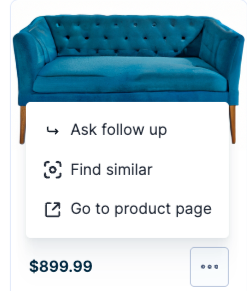
Trigger options for product cards.
- See all results: Add a See all results button below a carousel that sends shoppers to your own results page.
- Compare prompt: Hide the Compare button in the chat widget.
Where widget customizations appear
Use widget customization to solve real storefront problems:
Showcase variants
If a product comes in only one version, let shoppers add it to the cart right away. If a product comes in multiple colors or sizes, let Conversational agent open the mini PDP first, so your shoppers pick the right one before they add to cart.
Manage inventory
Hide add-to-cart on out-of-stock and "coming soon" items, so Conversational agent never invites a shopper to buy something they can't get.
Promote on-brand experiences
- Build a highly custom storefront with a product carousel that matches your unique brand identity.
- Extend your product cards with a favorites icon, promotional callouts, and an alternate image on hover.
Enable widget customization
Contact your Product Engagement Manager to implement the customizations. For a fully custom product carousel, product card, or mini PDP component, your Product Engagement Manager can share the technical implementation guide with your development team.
Requirements
Before you customize product widgets, ensure:
- The Conversational agent chat widget is fully set up and working.
- Your product catalog is connected to Bloomreach.
Updated 2 months ago