

| Time | Status | User Agent | |
|---|---|---|---|
Retrieving recent requests… | |||
Definition
The API enables vendors, plugins, and enterprise clients to manage Imports externally by API. It adds the option to automate data flow by service instead of a manual user process. Utilizing the API can significantly shorten the time to import, which is useful for external plugins.
You may make use of Management API for Imports by:
- Copying import definitions from one project to another.
- Deploying the same import to multiple projects by a script.
Management API for Imports exposes API methods to list, read, create, and delete import definitions. List imports operation retrieves a list of all imports that API has created.
Authorization
In this API call you must use the following authorization access and permissions:
| Available access type | Permissions needed |
|---|---|
| Private access | Imports > Allow to List Imports |
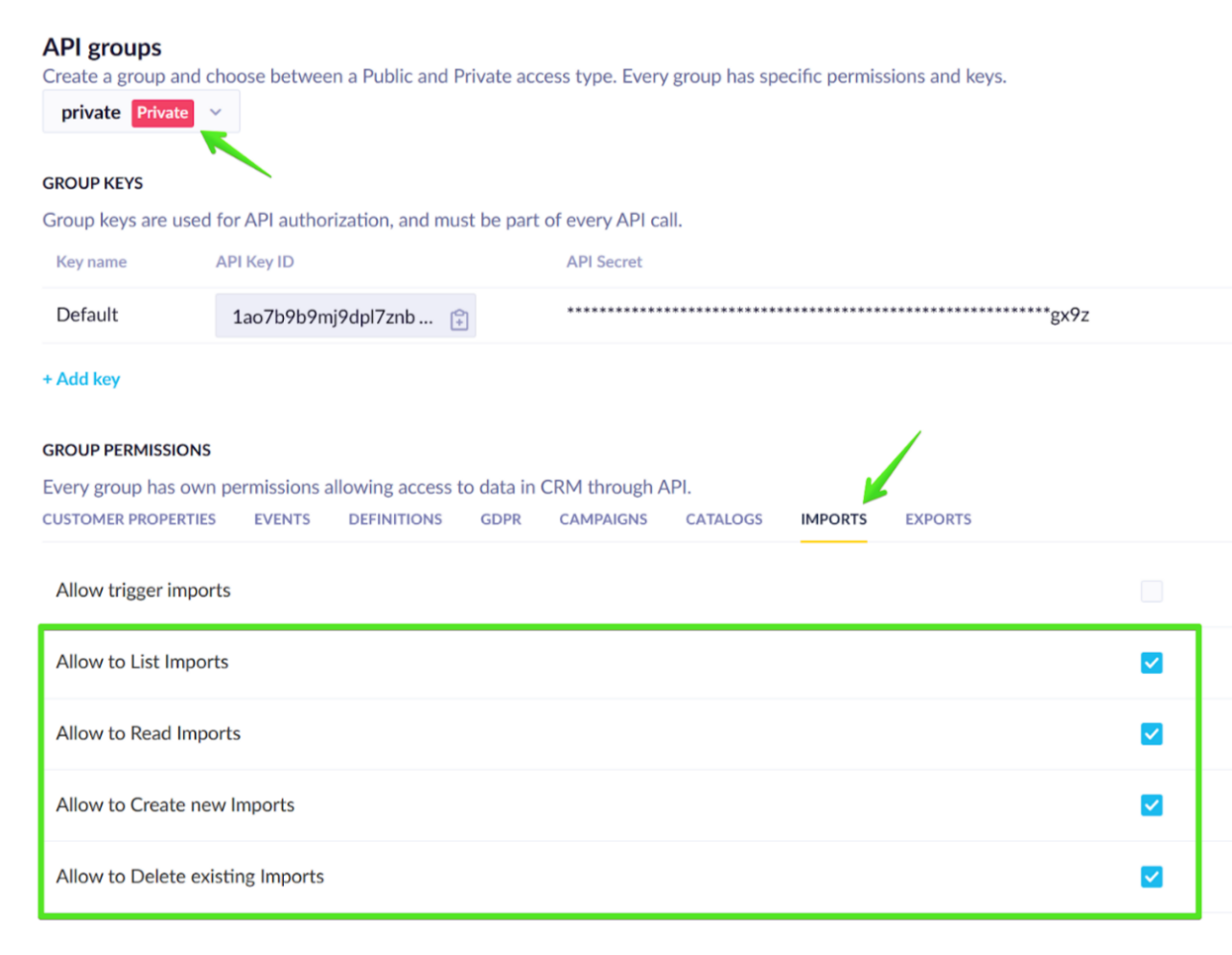
Admin must first create Private access keys and grant permissions. Then the service can call the API and perform the operation.
Read more about:
Request
Path parameters
| Parameter | Type | Description | Required |
|---|---|---|---|
| projectToken | string | The ID of your project. | Required |
Query parameters
| Parameter | Type | Description | Required |
|---|---|---|---|
| limit | integer | >= 1, <= 50Default: 10 | |
| offset | integer | Default: 0 |
Response description
| Parameter | Type | Description | Required |
|---|---|---|---|
| import_id | string | The ID of your import. | Required |
| import_definition | object | The definition of your import. | Optional |
Import_definition object description
| Parameter | Type | Description | Required |
|---|---|---|---|
| name | string | The name of your import. | Required |
| trigger | one of: object | The trigger for import either now, or repeated based on frequency or new files. | Required |
| active | boolean | Default: true | Optional |
| source | one of: object | The source of imported data. | Required |
| destination | one of: object | The destination where data is imported. | Required |
| mapping | object | Data mapping pattern of your import. | Required |
Trigger object description
Trigger can be defined by one of the two object descriptions:
(1) First trigger object description option:
| Parameter | Type | Description | Required |
|---|---|---|---|
| trigger_type | string | Type of the trigger. Allowed values: | Required |
(2) Second trigger object description option:
| Parameter | Type | Description | Required |
|---|---|---|---|
| trigger_type | string | Type of the trigger. | Required |
| frequency | string | The frequency in which imports are triggered. Allowed values: | Required |
| times | array[object] | <= 48 items | Required |
| days | array (oneOf) [Day_of_week] or array (oneOf) [Day_of_month] | The days on which imports are triggered. | Optional |
| minutes | array[integer] | Required | |
| timezone | string | Timezone in which time of trigger is set. | Required |
| from_date | number<float> | From which date imports are triggered. | Optional |
| to_date | number<float> | To which date imports are triggered. | Optional |
Times object description
| Parameter | Type | Description | Required |
|---|---|---|---|
| hour | integer | >= 0, <= 23 | Required |
| minute | integer | >= 0, <= 59 | Required |
Source object description
Source can be defined by one of the two object descriptions:
(1) First source object description option:
| Parameter | Type | Description | Required |
|---|---|---|---|
| source_type | string | Allowed value: url | Required |
| import_url | string | Required | |
| use_socks_proxy | boolean | Default: false | Optional |
| auth | object | Optional |
(2) Second source object description option:
| Parameter | Type | Description | Required |
|---|---|---|---|
| source_type | string | Allowed value: filestorage | Required |
| integration_id | string | The ID of your integration.
| Required |
| parent_path | string | Optional | |
| path | string | >= 1 characters | Required |
| file_selection | string | Allowed values: all, last_mod, last_alpha, not_imported | Required |
Auth object description
| Parameter | Type | Description | Required |
|---|---|---|---|
| username | string | Required | |
| password | string<password> | Required |
Destination object description
Destination can be defined by one of the three object descriptions:
(1) First destination object description option:
| Parameter | Type | Description | Required |
|---|---|---|---|
| event_destination | object | A specific event type into which you import data. | Required |
(2) Second destination object description option:
| Parameter | Type | Description | Required |
|---|---|---|---|
| customer_destination | object | The customer table where you import data. | Required |
(3) Third destination object parameter option:
| Parameter | Type | Description | Required |
|---|---|---|---|
| catalog_destination | object | The catalog into which you import data. | Required |
Event_destination object description
| Parameter | Type | Description | Required |
|---|---|---|---|
| event_type | string | >= 1 characters | Optional |
| event_triggers | boolean | Default: false | Optional |
Catalog_destination object description
| Parameter | Type | Description | Required |
|---|---|---|---|
| catalog_name | string | Name of the catalog into which you import data. | Required |
| catalog_attributes | one of: object | Optional |
Catalog_attributes object description
Catalog_attributes can be defined by one of the two object descriptions:
(1) First catalog_attributes object description option:
| Parameter | Type | Description | Required |
|---|---|---|---|
| catalog_type | string | Allowed values: generic, product, variants | Required |
(2) Second catalog_attributes object description option:
| Parameter | Type | Description | Required |
|---|---|---|---|
| catalog_type | string | Allowed values: generic, product, variants | Required |
| associated_product_catalog_id | string | The ID of your product catalog. | Optional |
Mapping object description
| Parameter | Type | Description | Required |
|---|---|---|---|
| tz_info | string | The timezone to use for time/datetime/timestamp columns. Default: | Optional |
| column_mapping | object | Required |
Column_mapping object description
| Parameter | Type | Description | Required |
|---|---|---|---|
| id_mappings | array[object] | The ID of your mappings. | Required |
| property_mappings | array[object] | Required | |
| timestamp_column | string | Optional |
Id_mappings object description
| Parameter | Type | Description | Required |
|---|---|---|---|
| from_column | string | Required | |
| to_id | string | Required |
Property_mappings object description
| Parameter | Type | Description | Required |
|---|---|---|---|
| from_column | string | Optional | |
| to_column | string | Required | |
| target_type | string | Default: string | Optional |
| searchable | boolean | Optional | |
| indexed | string | Optional |
Limitations
- Update API method isn't implemented.
- You can't create an import for Vouchers.
- You can't create import of other types (for example, from Input/Uploaded file, from Database by query, from the application).
- Managing import definitions created by Users is done in the app (not via API).
- API rate limits: The Joint number of requests for operations 'List', 'Read', and 'Delete' cannot exceed 100 requests per minute.