

Channel API access and feesThe Channel API is available to partners and clients who want to build connectors to Communications Platform as a Service (CPaaS) vendors or Mail Transfer Agents (MTAs, also known as ESPs) such as Mailgun, Sinch, Infobip, and Omnivery.
Channel API access isn't enabled by default and is subject to additional fees. To get access, contact your Account Manager.
The Channel API lets you connect your messaging infrastructure to Bloomreach by building a connector for your channel. Bloomreach handles campaign orchestration and customer data; your platform handles delivery and status reporting.
How it works
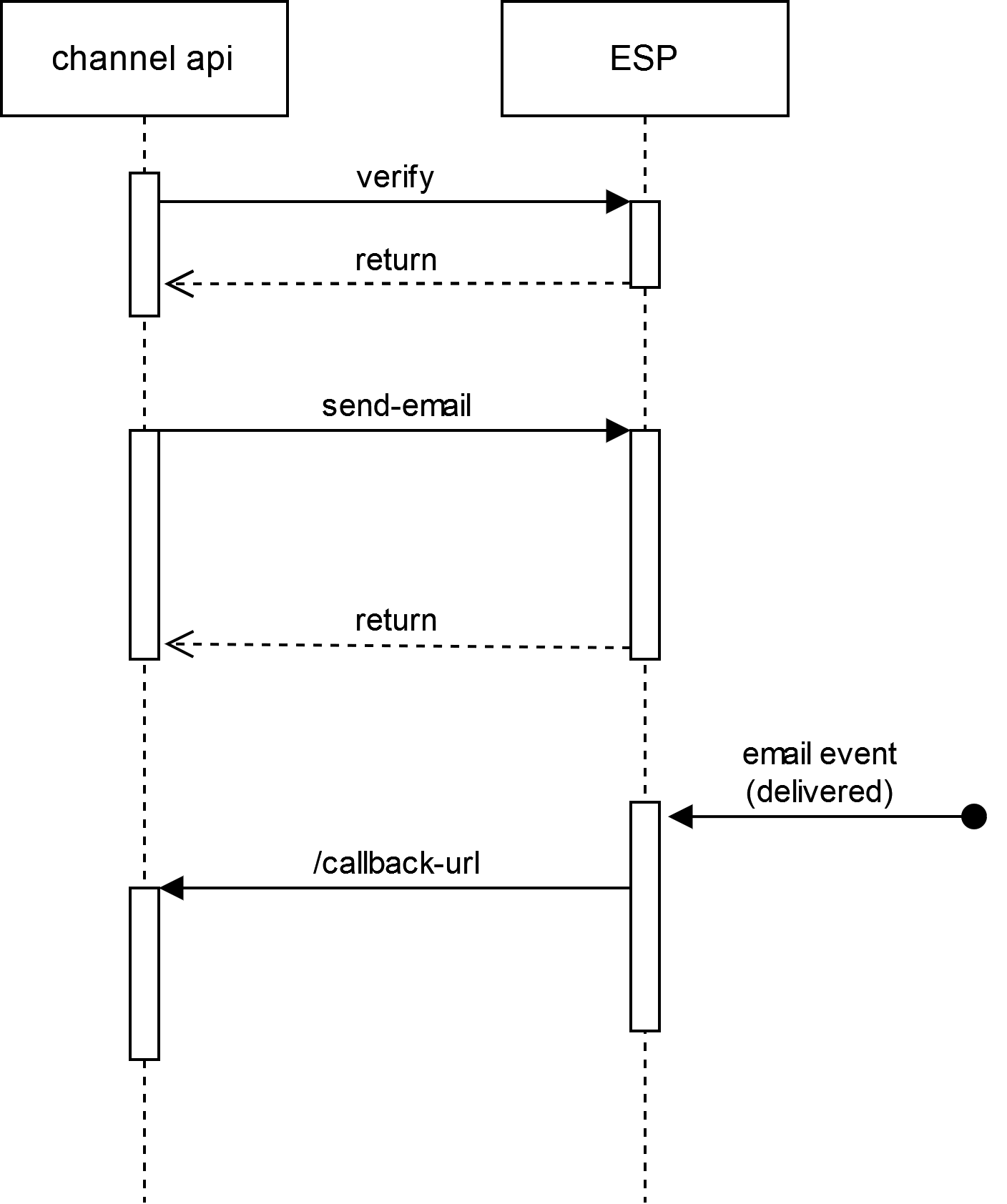
When Bloomreach triggers a campaign, it sends the message payload to your channel via the Channel API. Your platform delivers the message and returns delivery status through a callback endpoint. Bloomreach logs the result against the customer profile.
The sequence diagram below shows the full flow from campaign trigger to delivery confirmation.
- Bloomreach triggers a send request to your channel endpoint.
- Your platform receives the request and delivers the message.
- Your platform sends a callback to Bloomreach with the delivery status.
- Bloomreach logs the result against the customer profile.
Sequence diagram
Before you start
- Channel API access must be enabled by Bloomreach. Contact your Account Manager to request access and confirm applicable fees.
- The endpoints available to you depend on your channel type. Review the table below to understand what applies to your integration.
Available endpoints by channel
| Channel | Available endpoints |
|---|---|
| Verify credentials, manage webhooks, send email, handle delivery callbacks | |
| SMS | Verify credentials, send SMS, handle outbound and inbound callbacks |
| MMS | Verify credentials, send MMS, handle outbound and inbound callbacks |