

Release 1.319
TL;DR: Connect Bynder or Contentful to insert approved brand assets into campaigns without re-uploading files. WhatsApp sender profiles now support Business-Scoped User IDs (BSUIDs) alongside phone numbers. This release also includes Android and iOS SDK updates.
Release dates: 30.9. - 5.10.2026
External assets in campaigns
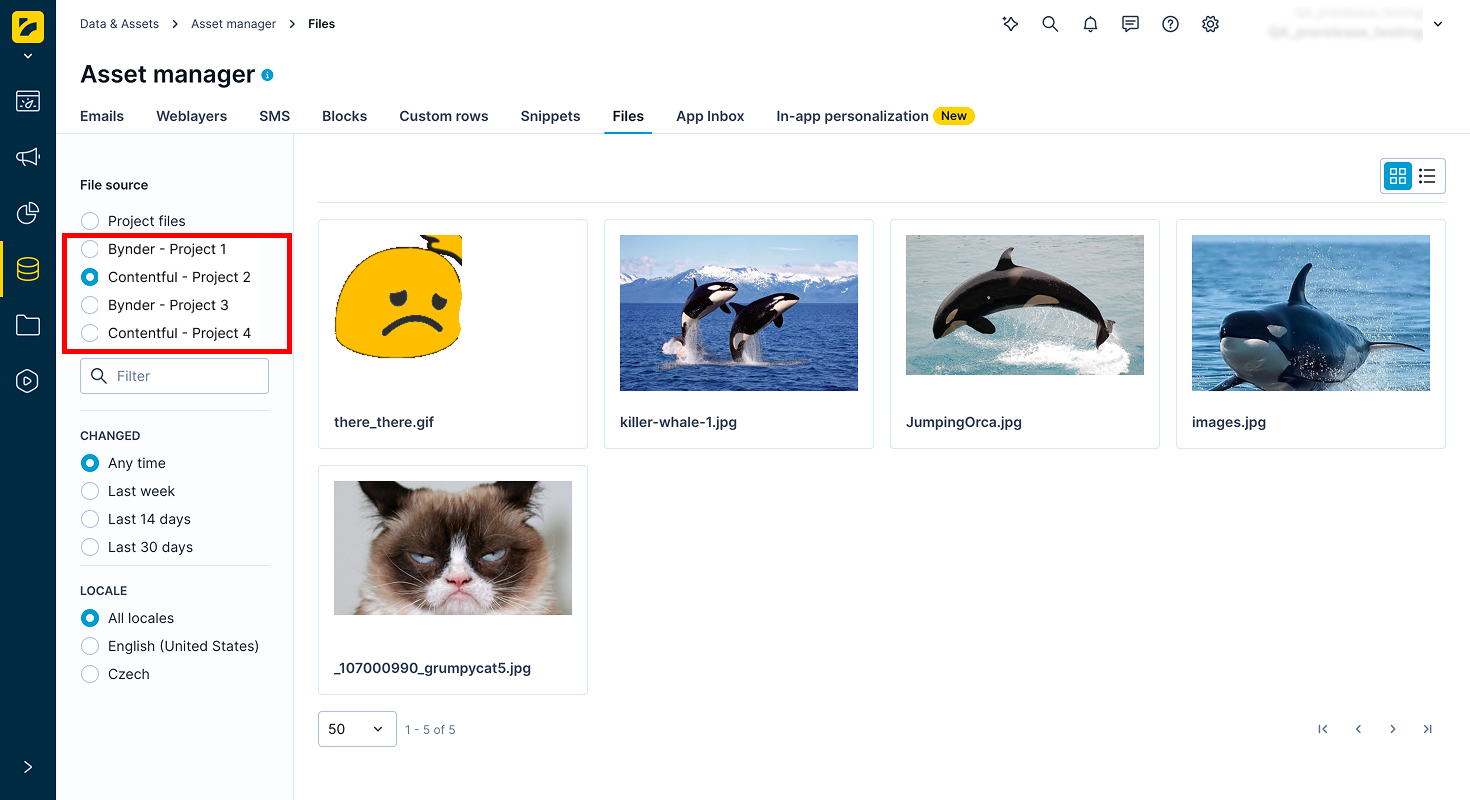
Bring your brand assets into campaigns directly from Bynder or Contentful. No more re-uploading files or hunting down URLs. Connect Bynder or Contentful as an integration, then browse and insert its assets directly from Asset Manager or the campaign image picker.
This gives marketers a faster path from approved brand asset to live campaign, without leaving Marketing.
What's new
- Insert approved assets in seconds: Browse connected Bynder or Contentful assets from the campaign image picker and insert an asset with its URL already filled in.
- One source of truth: Your external assets stay in the main system, so there's no duplicate file to keep in sync.
- Bynder and Contentful available now: Connect either provider in a few steps.
Learn more
For more information, see External assets.
WhatsApp sender profiles and BSUID support
WhatsApp is rolling out usernames, and Meta now assigns a Business-Scoped User ID (BSUID) to every customer who messages a business account. Bloomreach now supports BSUID alongside phone number, so you can keep reaching WhatsApp customers through this transition without losing continuity.
What's new
-
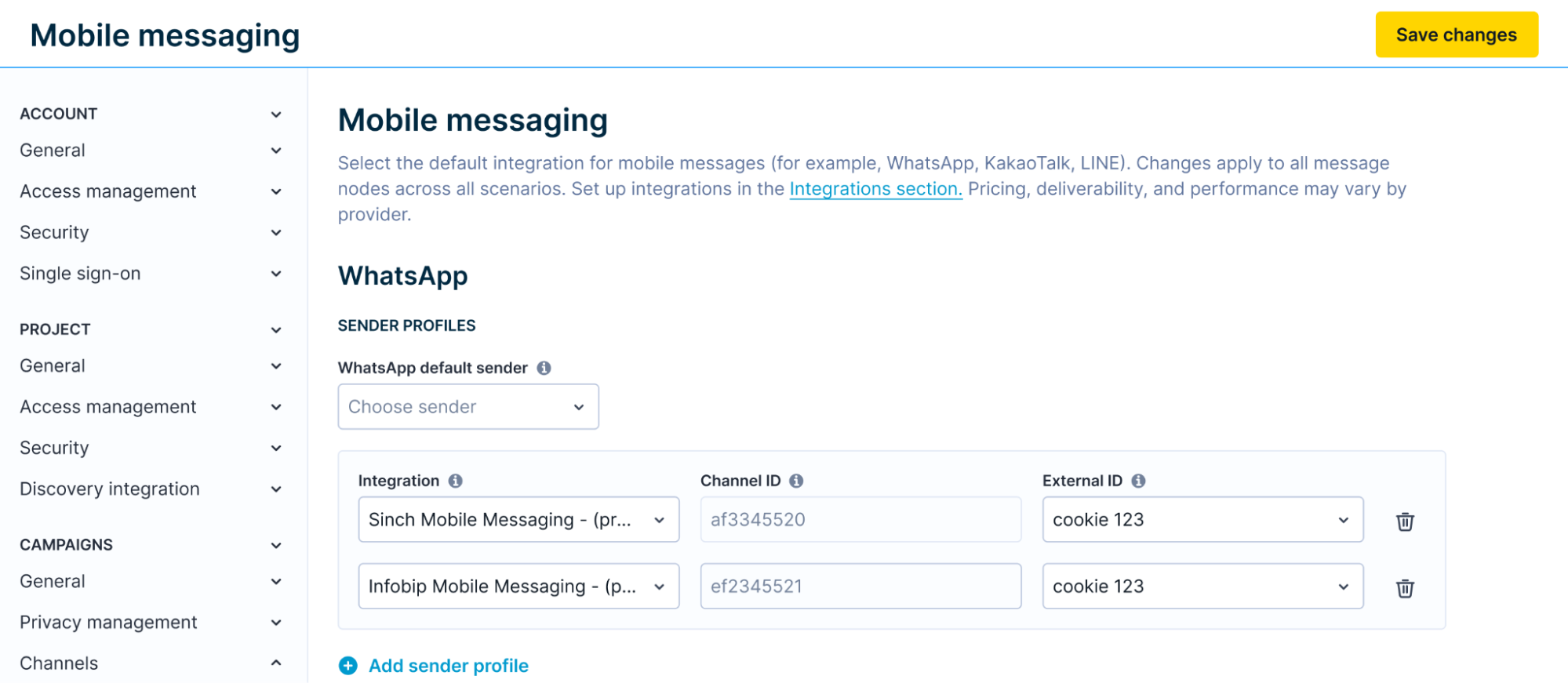
New sender profiles for WhatsApp: Connect an integration, get an auto-filled channel ID, and assign an external ID field to store each customer's BSUID.
-
Continuity for existing customers: Bloomreach keeps sending to phone number first when it's available, and falls back to BSUID automatically, so no manual work is needed for customers you already message.
-
More precise consent control: The new Create a new customer profile setting lets you choose new-profile creation per keyword category, replacing the previous single Map new subscriber ID setting for WhatsApp.
Feature impact
Migration
Your current senders need an external ID to keep working under the new model. See Migrate existing senders.
Learn more
See WhatsApp onboarding to set up your sender profiles.
Peak season readiness
As the year's busiest trading season approaches, learn how Bloomreach ensures reliable services and timely support for your business.
Mobile SDK updates
Android SDK
Runtime control of in-app content blocks with our latest Android SDK 5.4.0 release:
- In-app content blocks control: Adds
Exponea.inAppContentBlocksControllerfor runtime prefetch, availability checks with deadlines, and targeted invalidation of in-app content blocks.
iOS SDK
Runtime control of in-app content blocks, universal link support, and reliability fixes with our latest iOS SDK 5.0.0 release:
- In-app content blocks control: Adds
Exponea.shared.inAppContentBlocksControllerfor runtime in-app content block control with prefetch, invalidate (eager/lazy), and availability APIs. - Universal links: Adopts the UIScene lifecycle for universal links with
ExponeaSceneDelegate,handleUniversalLink, andUrlOpenerscene-delivery fixes. - Minimum iOS version: Raises the minimum iOS deployment target to 15.0 for Xcode 27 compatibility.
- Stale content after invalidation: Fixes stale in-app content block content being served after
invalidatePlaceholders()when placeholders were originally fetched as part of a larger batch. - Concurrent fetch handling: Fixes
invalidate()resolving with stale content when a concurrent fetch completed after the invalidation was applied. - In-app messages on app load: Fixes in-app messages configured to display on app load being silently skipped when session processing runs before the SDK marks the app as foreground.
- In-app message height: Fixes incorrect in-app message height when the message image loads after the initial layout.
- Animated images: Fixes a crash and non-animating rendering for animated GIF/WebP images in legacy in-app messages.