

🚀 Release 2026-71
Release date: Sep 30, 2026
TL;DR: See what shoppers do right before and right after a query or category with paths. Discovery is now Search. Loomi for Shopify experience pagination and sorting customization.
Performance dashboard improvements
Analyze previous and next paths for queries and categories
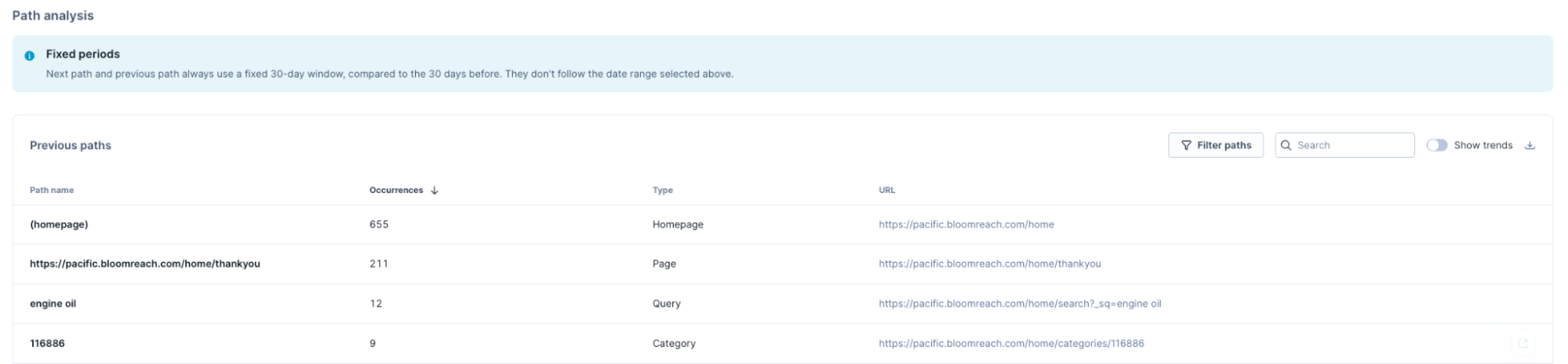
When you open individual queries or categories, the site search and category details pages now show Previous paths and Next paths.
What's new
-
Track shopper behavior: See the actions shoppers take right before and right after they search for a specific query or view a category.
-
Stay on top of trends: View actions for a query or category for the last 30 days. Toggle on Show trends to see trends and compare metrics with the preceding 30 days.

Business use cases
-
Identify which categories or queries commonly lead shoppers into specific products, to spot cross-sell patterns. For example, if Previous paths shows shoppers often arriving at the product "Running shoes" from the category "Sneakers," that's a cross-sell pairing worth merchandising together.
-
Spot where shoppers go after a search or category page that isn't converting, so you can prioritize fixing the pages.
-
Filter paths by UTM parameters to see how shoppers from a campaign move through your site.
Learn more
See Analyze previous and next paths.
Apply multiple conditions in category custom scopes
Category custom scopes now support up to 5 conditions, combined with the OR operator, the same as queries and products. Combine conditions to group exactly the categories you want to track.
Discovery is now Search
Bloomreach Discovery is now called Search across the product UI. No action required. This doesn't change the service, its functionality, or your agreement terms — it's the same product under its new name.
Peak season readiness
As the year's busiest trading season approaches, learn how Bloomreach ensures reliable services and timely support for your business.
Loomi for Shopify experience customization now covers pagination and sorting
What's new
Loomi for Shopify now offers more ways to customize your storefront. Using the Experience customization editor, you can configure pagination controls and the sorting dropdown, in addition to the page layout, product cards, and facets you could already edit. Replace the default HTML with your own EJS, validate, and publish in one session.
Why is this valuable
Pagination and sorting are two of the most visible controls on a results page, and merchants previously had to accept the default markup for both. Extending the editor to these components closes that gap, so a storefront's brand carries through the entire results experience.
Use cases
- Configure pagination controls to load the next page's results below the current ones, extending the page instead of navigating away.
- Rename the sorting dropdown's default "Sort by" label to match the storefront's tone.
- Reorder sort options to lead with a preferred choice, such as best sellers.