

🚀 Release 2026-41
Release date: Jun 1, 2026
TL;DR : Set exceptions to rules. Apply range filters with include and exclude query parameters.
Improvements
Exceptions to rules: exclude rules for specific queries or categories
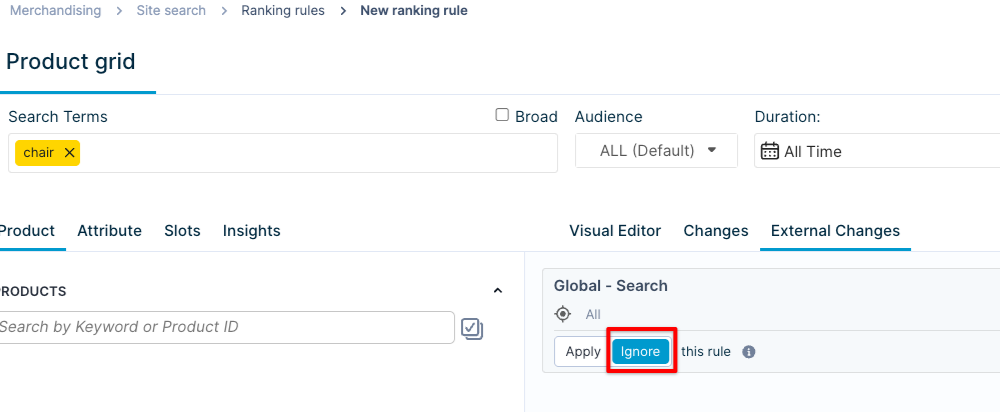
Ignore a site-level global rule or an inherited external rule for a specific query or category without affecting the rest of your merchandising setup.
What’s new
Set exceptions to rules directly in the Product grid editor under the External Changes tab. The rule continues to apply everywhere else.
Why is this valuable
Useful when a broadly effective rule that generally improves results, but may hurt certain queries or categories.
Exceptions give you granular control to handle those cases without changing your global rule setup or maintaining duplicate rules across individual pages.
Use cases
- Set a global rule to boost everywhere by margin, but make an exception for the "New arrivals" category, where you'd like to boost by "newness".
- Ignore a global or inherited rule from the account/site group level to run an A/B test without external influence skewing the results.
Feature support
Supported: Set exceptions to query and category rules at the site level.
Not supported:
- Set exceptions to inherited rules that can apply to global rules.
- Set exceptions via API.
- Set exceptions to Recommendations rules.
Access
Available to both Standard and Premium package customers. Check the documentation.
Product and Category API: apply range filters with include and exclude
The include and exclude query parameters in the Product and Category Search API now support range-based filtering for numeric attributes.
What's new
Range filters — [low TO high], [value TO *], [* TO value] — now work for both reserved numeric attributes and custom numeric attributes.
These range-based operations complement existing functionality, such as equals (include=field:value) and not equals (exclude=field:value), providing expanded filtering capabilities.
Why it's valuable
With numeric range filtering now available directly in the API, build more targeted, dynamic product experiences.
Check the full list of supported operations in documentation.
Bug fixes
- Fixed a bug that caused "Failed to fetch" errors for Dynamic categories.
- Fixed a bug in the Category ranking algorithms where the delete option was incorrectly available for the system-generated "All categories" rules. The delete option is now disabled for these rules. You can still delete their variants.
- Fixed a bug where the Product grid editor's drag-and-drop feature was not functioning correctly.