

🚀 Release 2026-72
Release date: Oct 14, 2026
TL;DR: In the Performance dashboard, a new Impact measurement tab tracks ranking rules, synonyms, and redirect changes and shows how performance shifts. Share links that open exactly what you're working on.
Performance dashboard: Measure impact of merchandising changes
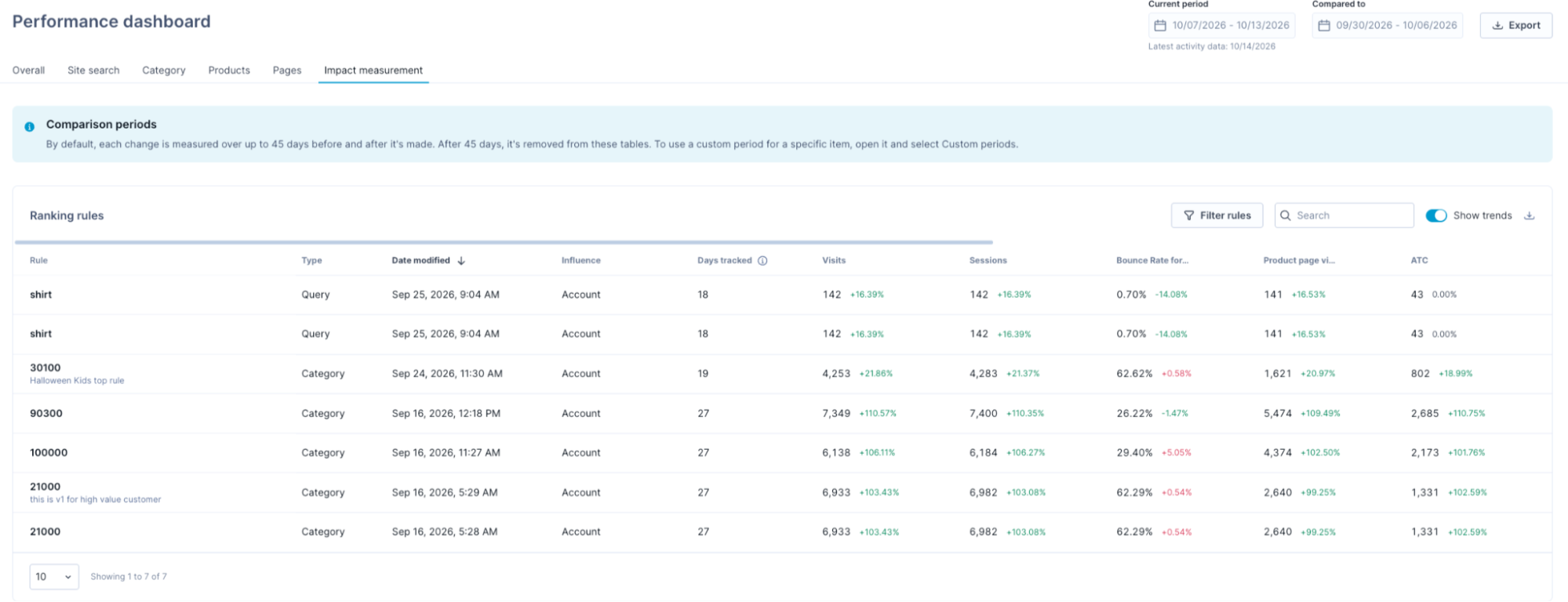
When you create a ranking rule, add a synonym, or set up a redirect, you want to know whether it works. The new Impact measurement tab helps you evaluate each change by comparing performance before and after it. It covers the changes you made in the last 45 days, as a moving window.
What's new
-
Automatic change tracking: Every new or updated ranking rule, synonym, and redirect appears in its own performance table for 45 days. Spend your time optimizing, not logging changes.
-
Custom comparison periods: To assess seasonal trends or promotions, compare a change against any period you choose, such as the previous 3 months.
-
Change drill-down: For pre-post analysis of a ranking rule or synonym, open the change to view metric cards with trends, a day-by-day comparison chart, and the performance of each term. Pinpoint whether a change drives traffic, add-to-carts, conversions, or other key metrics.
Business use cases
- Check if boosting a top category lifted revenue per visit.
- Spot synonyms that boost conversion, and review each direction of a two-way synonym.
- Check whether redirecting no-results queries to a category or sale page brings more shoppers to that page.
Feature impact
The Impact measurement tab is an automated successor to the legacy Activities report that needed manual annotations. Unlike the Activities report, it also tracks redirects. The old report stopped receiving data on Aug 5, 2026, and stays available for historical data until December 2026.
No action is needed. Metrics for a change are tracked automatically and appear in the Impact measurement tab the day after you create or update a rule.
Learn more
See Measure impact of changes.
UI improvement: Share links that open exactly what you're working on
URLs now update dynamically in real time as you navigate through listing pages for Ranking rules, detail pages for Dynamic categories, and Product grid insights. Your search queries, applied filters, sort orders, and pagination selections automatically appear in the address bar.
-
Collaborate faster: Send the link to a teammate, and they see the same filtered results as you do.
-
Return to your work in one click: Bookmark the rules you check regularly and skip setting up your filters each time.