

🚀 Release 2026-21
Release date: Mar 5, 2026
TL;DR : Create more impactful merchandising campaigns with multi-slot assets and broad match for media rules. Minor bug fixes.
Improvements
Multi-slot assets and broad match for media rules
Create larger, more prominent media assets that span multiple grid positions, and apply media rules to query variations with broad match targeting.
What improved
-
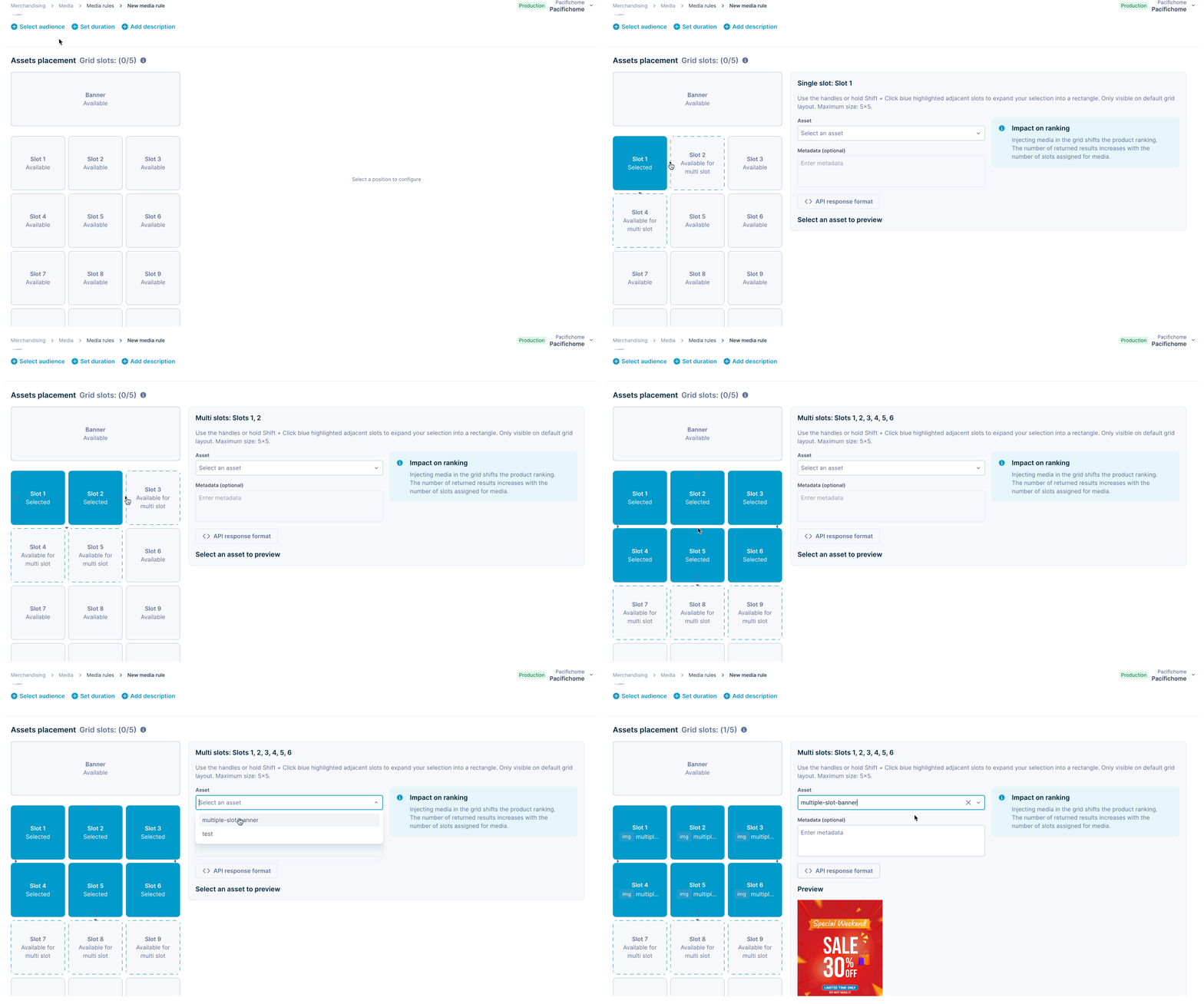
Multi-slot asset placement: Configure assets to span up to 5×5 adjacent grid slots in a media rule. Select your starting position and expand using arrow handles or Shift + Click to create larger content areas within your product grid.
-
Visual slot selection: Available adjacent slots for multi-slot assets are displayed with dotted borders, indicating which positions can be added to your selection.
-
Broad match for media rules: Enable broad match on media rule queries to show assets for query variations and related searches. For example, a rule targeting "running shoes" now applies to queries like "shoes for running" or "runner shoes."
Why it's valuable
- Create visually prominent hero content and featured promotions that capture attention in the product grid.
- Tell compelling brand stories with larger content areas that break the monotony of endless product scrolling.
- Reach more customers with broad match by automatically showing relevant assets across query variations without creating multiple rules.
- Increase campaign efficiency by targeting query families instead of managing individual exact-match rules.
Implementation required for multi-slot assets
Update your integration to handle the new dimension and slots fields in the API response. See the technical integration guide for implementation details.
Bug fixes
- Filtering: Fixed an issue where filtering products by variant-level attributes wasn't working correctly on selecting multiple filter values.
- Variant slicing: Resolved a bug where the Boost operation was incorrectly overriding the Sequential lock operation when previewing Variant slicing rules.