

This guide walks you through creating, rotating, and revoking your Conversational agent API tokens.
Create and manage tokens
Conversational agent API tokens are located in Conversational agent > API. To create a new token, follow the steps in the Frontend integration guide on GitHub.
Your created API tokens appear under Active tokens, along with who created them and when. Select the copy icon next to the token to copy its value to your clipboard. You can have up to 5 active tokens at a time.
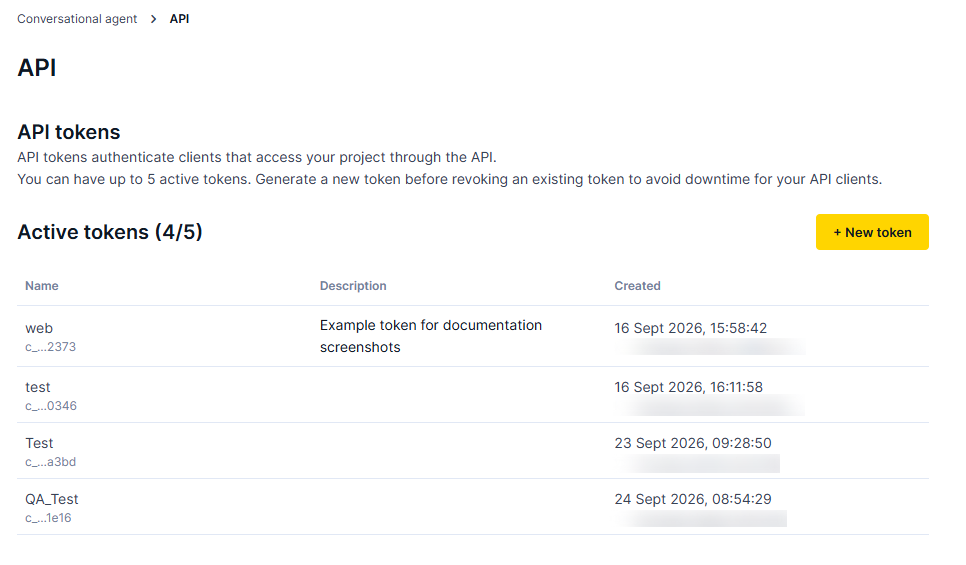
The API page lists your project's active tokens.
Revoke a token
-
Under Active tokens, find the token you want to revoke.
-
Click Revoke token.
-
Click Revoke token again in the modal to confirm.
Once revoked, view the audit trail of the last 10 tokens under Revoked tokens, along with who created and revoked them.
TipTo rotate credentials without downtime, generate a new token and update your integration before revoking the old one — revoking a token immediately invalidates it and cuts off any client still using it.
Access
Contact your Product Engagement Manager to access this feature.